> ## Documentation Index
> Fetch the complete documentation index at: https://docs.aviatrix.com/llms.txt
> Use this file to discover all available pages before exploring further.
# IPv6 Overview
> IPv6 (Internet Protocol version 6) is the next-generation IP addressing protocol designed to overcome IPv4 limitations and provide enhanced scalability, security, and performance for modern networks.
IPv6 (Internet Protocol version 6) is the next-generation IP addressing protocol
designed to overcome IPv4 limitations and provide enhanced scalability,
security, and performance for modern networks. Aviatrix introduces IPv6 support
across its multicloud networking platform to meet enterprise and federal
mandates for dual-stack deployments.
**Preview in Controller 9.0.** IPv6 support on the Aviatrix platform is in Preview in Controller 9.0. The controller-level **Support for IPv6** toggle in **Settings** > **Configuration** > **General** is labeled **Preview** in CoPilot. Use IPv6 in non-production environments and contact Aviatrix support before enabling it on production deployments.
## Benefits of IPv6
* **Address Exhaustion**: The limited address space of IPv4 is nearly depleted.
IPv6 offers a much larger address pool.
* **Compliance and Mandates**: Federal agencies and global enterprises require
IPv6 adoption to meet regulatory and operational goals.
* **Future-Proofing**: IPv6 ensures long-term scalability for cloud and hybrid
environments.
## IPv6 Support in Controller 8.2
Controller 8.2 introduced the foundational IPv6 capabilities for AWS and Azure:
* Dual-stack for AWS and Azure
* FireNet with Palo Alto Networks for AWS
* Network Segmentation
* BGP over IPSec and BGP over LAN (AWS and self-managed networks)
* Edge support for AEP and ESXi platforms
## IPv6 Support in Controller 9.0
Controller 9.0 expands the IPv6 foundation with the following additions. All
Controller 9.0 IPv6 capabilities are in Preview:
* GCP transit and spoke gateway IPv6
* Government Cloud (AWS GovCloud and Azure Government)
* Equinix Edge IPv6 (LAN interface for Edge Spoke; WAN interface for Edge
Transit)
* Global IPv6 route summarization
* Unique Local Address (ULA) `fd00::/8` automatic management (RFC 4193)
* Bidirectional Forwarding Detection (BFD) for IPv6 BGP
* BGP over LAN for Azure (parity with AWS in Controller 8.2)
* BGP over GRE for IPv6 site-to-cloud connections
* Fortinet and Checkpoint FireNet IPv6 support
* IKEv2 enforced for IPv6 BGP over IPSec
* IPv6 diagnostic tooling enhancements
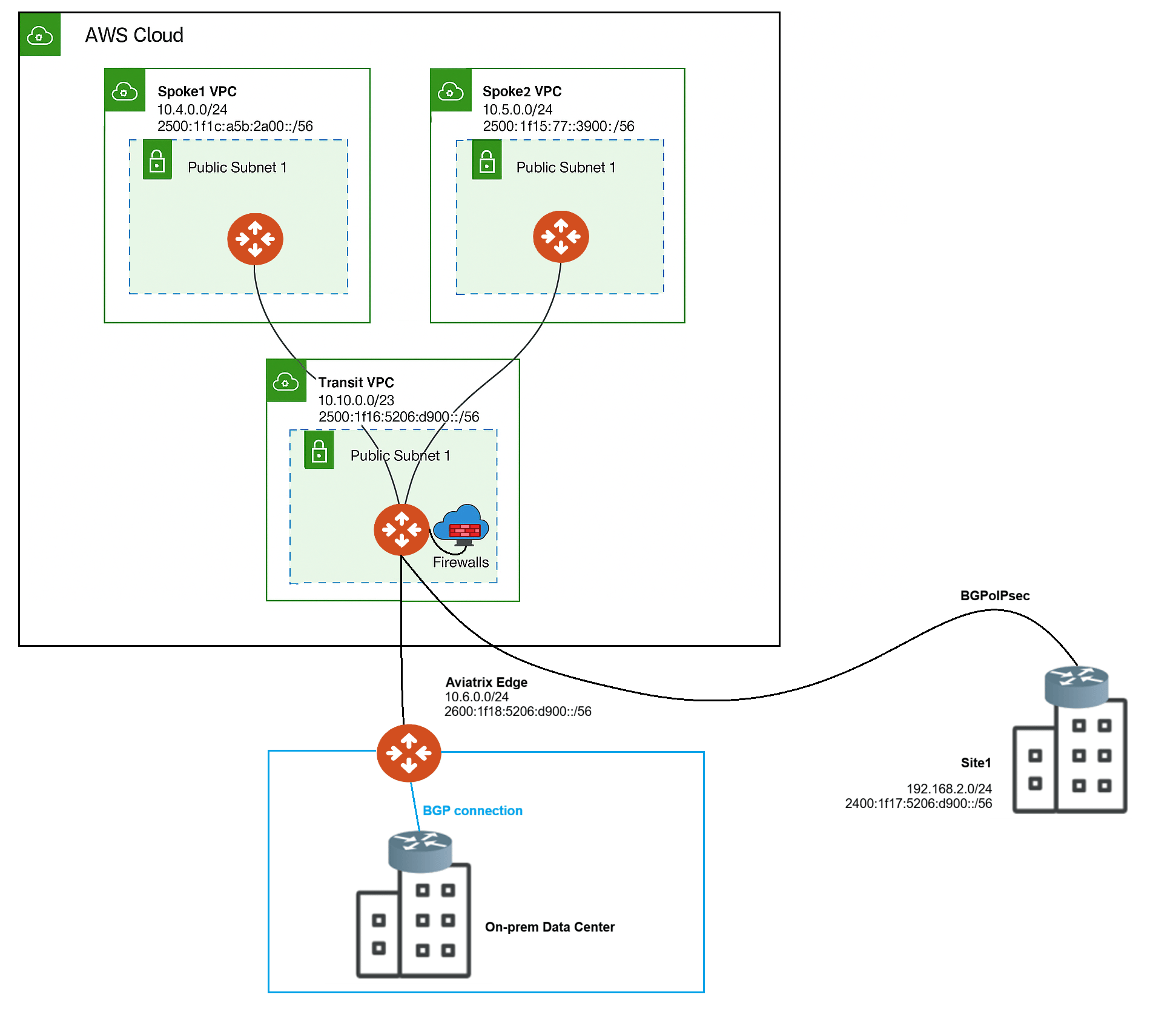
The following figure shows an example of IPv6-enabled nodes that communicate
over dual-stack connections:
 ## Key IPv6 Features in Aviatrix Platform
* **Dual-Stack Support**: Enable both IPv4 and IPv6 on VPC/VNet, Transit, and
Spoke Gateways on AWS, Azure, and GCP (GCP IPv6 Gateways in Controller 9.0).
* **Site2Cloud Connectivity**: IPv6 support for BGP over IPsec (BGPoIPSec) and
BGP over LAN (BGPoLAN) to secure S2C connections.
* **Edge Enablement**: IPv6 connectivity for Aviatrix Edge gateways to support
on-premises to cloud traffic.
* **Global IPv6 Route Summarization**: Controller-wide setting that advertises
summarized IPv6 routes instead of individual host prefixes, reducing route
table size.
* **Unique Local Address (ULA) Support**: Automatic management of fd00::/8
summary routes (RFC 4193) when IPv6 is enabled on a Gateway.
* **FireNet Integration**: IPv6 traffic inspection for east-west and north-south
flows in centralized firewall architectures.
* **Terraform Automation**: Management of IPv6 configurations through Terraform.
## IPv6 Operational Considerations
The following sections describe the operational considerations for IPv6 in the
Aviatrix platform.
### Global Configuration
Before making IPv6-related changes on the Aviatrix platform, turn On **Support
for IPv6** in CoPilot. The toggle is labeled **Preview** in Controller 9.0.
To turn On the **Support for IPv6** toggle:
1. In CoPilot, go to **Settings** > **Configuration** > **General**.
2. Turn On the **Support for IPv6** toggle (labeled **Preview**).
3. Click **Save**.
The IPv6-related options on the CoPilot are disabled by default.
### Enable IPv6 on Gateways
Before enabling IPv6 on gateways, ensure the VPC/VNet of the Gateway supports
IPv6.
#### Enable IPv6 on New Gateways
To enable IPv6 on new gateways:
1. Turn On the **Support for IPv6** toggle in CoPilot to enable global IPv6
settings.
2. Create a new VPC/VNet that supports IPv6.
## Key IPv6 Features in Aviatrix Platform
* **Dual-Stack Support**: Enable both IPv4 and IPv6 on VPC/VNet, Transit, and
Spoke Gateways on AWS, Azure, and GCP (GCP IPv6 Gateways in Controller 9.0).
* **Site2Cloud Connectivity**: IPv6 support for BGP over IPsec (BGPoIPSec) and
BGP over LAN (BGPoLAN) to secure S2C connections.
* **Edge Enablement**: IPv6 connectivity for Aviatrix Edge gateways to support
on-premises to cloud traffic.
* **Global IPv6 Route Summarization**: Controller-wide setting that advertises
summarized IPv6 routes instead of individual host prefixes, reducing route
table size.
* **Unique Local Address (ULA) Support**: Automatic management of fd00::/8
summary routes (RFC 4193) when IPv6 is enabled on a Gateway.
* **FireNet Integration**: IPv6 traffic inspection for east-west and north-south
flows in centralized firewall architectures.
* **Terraform Automation**: Management of IPv6 configurations through Terraform.
## IPv6 Operational Considerations
The following sections describe the operational considerations for IPv6 in the
Aviatrix platform.
### Global Configuration
Before making IPv6-related changes on the Aviatrix platform, turn On **Support
for IPv6** in CoPilot. The toggle is labeled **Preview** in Controller 9.0.
To turn On the **Support for IPv6** toggle:
1. In CoPilot, go to **Settings** > **Configuration** > **General**.
2. Turn On the **Support for IPv6** toggle (labeled **Preview**).
3. Click **Save**.
The IPv6-related options on the CoPilot are disabled by default.
### Enable IPv6 on Gateways
Before enabling IPv6 on gateways, ensure the VPC/VNet of the Gateway supports
IPv6.
#### Enable IPv6 on New Gateways
To enable IPv6 on new gateways:
1. Turn On the **Support for IPv6** toggle in CoPilot to enable global IPv6
settings.
2. Create a new VPC/VNet that supports IPv6.
If the VPC/VNet already
supports IPv6, skip this step.
3. Create a new Gateway on the new VPC/VNet.
4. Ensure to turn On the **Support for IPv6** toggle while creating the Gateway.
Ensure the Controller and CoPilot VPC/VNet are IPv4-only.
Refer to the following pages to enable IPv6 on new gateways:
* [Global Configuration](#global-configuration)
* Create a VPC/VNet
* Create a Transit Gateway
* Create a Spoke Gateway
#### Enable IPv6 on Existing Gateways
To enable IPv6 on existing gateways:
1. Turn On the **Support for IPv6** toggle in CoPilot to enable global IPv6
settings.
2. If the VPC/VNet of the Gateway does not support IPv6:
1. Create a new VPC/VNet that supports IPv6.
2. Create a new Gateway on the new IPv6 VPC/VNet.
Refer to
[Enable IPv6 on New Gateways](#enable-ipv6-on-new-gateways) for more
details.
3. If the VPC/VNet of the Gateway supports IPv6, edit the Gateway and turn On
the **Support for IPv6** toggle.
Refer to the following pages to enable IPv6 on existing gateways:
* [Global Configuration](#global-configuration)
* Edit a Transit Gateway
* Edit a Spoke Gateway
### Routing, Diagnostics, and Visibility
IPv6-related information is available in the route tables, diagnostic tools,
Topology, and Dashboard sections. See the following pages for more details:
* Gateway Routes
* VPC/VNet Route Tables
* Gaining Visibility into Your Network Topology
* Troubleshooting - Diagnostic Results
## Limitations
* IPv6-only mode is not supported; dual-stack deployments are required.
* Contact Aviatrix support before enabling Edge as a Transit (EaT) with IPv6.
* For **BGP over IPsec** connections with IPv6 enabled, the Controller enforces
**IKEv2**.
IKEv1 is not supported for IPv6 BGPoIPSec.
## Related topics
* Enabling GCP Global VPC Routing
* Gateway Routes
* VPC/VNet Route Tables
* Gaining Visibility into Your Network Topology
* Troubleshooting - Diagnostic Results