> ## Documentation Index
> Fetch the complete documentation index at: https://docs.aviatrix.com/llms.txt
> Use this file to discover all available pages before exploring further.
# Auto Right-Sizing
> You can use the Auto Right-Sizing feature to apply appropriate sizing to Transit and Spoke gateway instances (AWS and Azure). This can reduce cloud provider costs, improve performance and mitigate packet loss.
You can use the Auto Right-Sizing feature to apply appropriate sizing to Transit
and Spoke gateway instances (AWS and Azure). This can reduce cloud provider
costs, improve performance and mitigate packet loss.
 Auto Right-Sizing is only supported for AWS and Azure.
The Auto Right-Sizing feature is disabled by default. See
[Auto Right Sizing Enable](https://legacy.docs.aviatrix.com/documentation/latest/network/auto-right-sizing-enable.html?expand=true)
for instructions on enabling the feature.
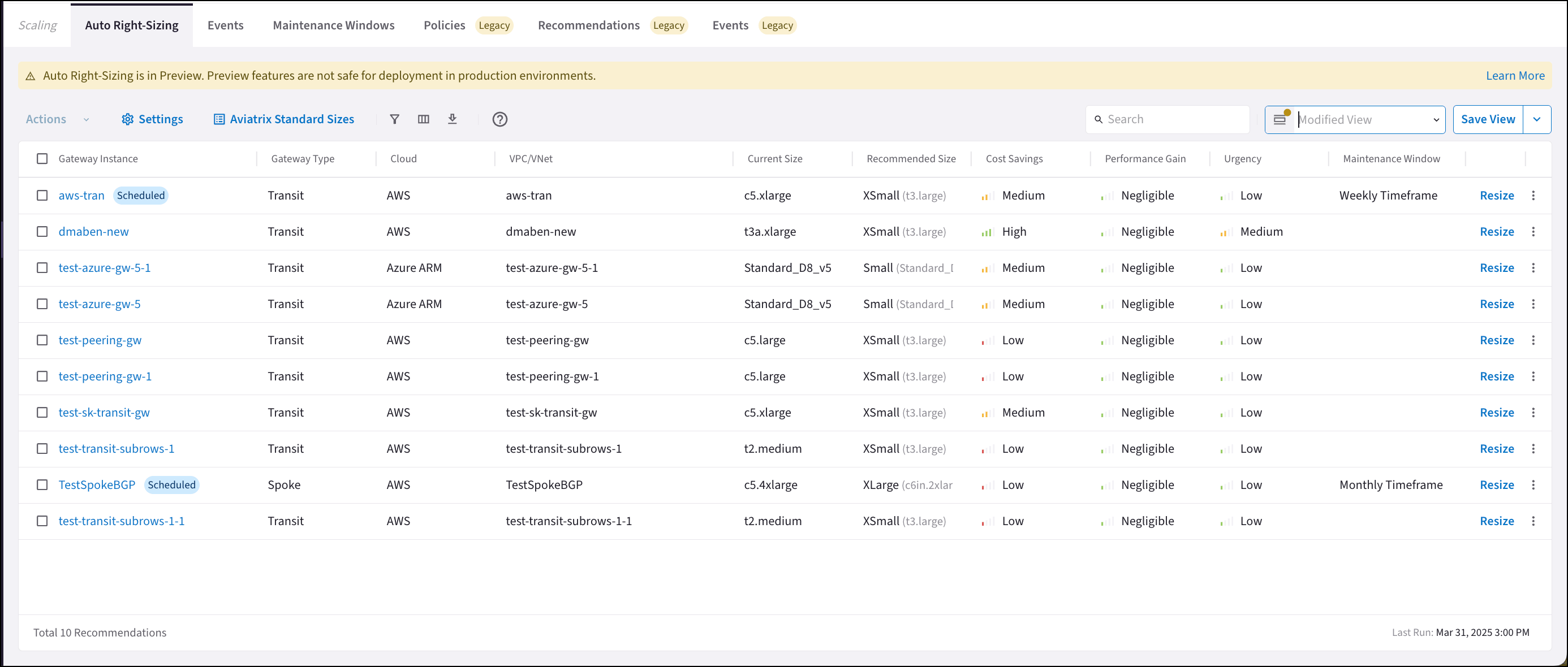
The Auto Right-Sizing tab shows:
* Gateway instances for which auto right-sizing is recommended. This list is
replaced every monitoring period.
* The urgency of each recommendation.
* The potential performance gain of the gateway instance once the recommendation
is implemented.
* The potential cost savings once the recommendation is implemented. For more
information, see
[Auto Right-Sizing Optimization](https://legacy.docs.aviatrix.com/documentation/latest/network/ars-optimization.html).
The Current Size column may display gateway instance sizes that do not map to{" "}
Aviatrix standard sizes
. In that case, a related Aviatrix standard size is not displayed in brackets.
The gateway instance sizing recommendations are based on Aviatrix standard
gateway sizes. See Mapping
Aviatrix Standard Gateway Sizes to VM Instance Sizes for details on which
gateway instance sizes correspond to Aviatrix standard recommendations such as
XSmall, Small, Large, and XLarge for Spoke and Transit gateways.
If you configured the Gateway Scaling feature prior to CoPilot 4.15, the Policies, Recommendations, and Events tabs for that feature will show 'Legacy'. You can continue using the Gateway Scaling feature if you want to add new gateway instances when scaling up.
If you did not use the Gateway Scaling feature prior to CoPilot 4.15, the Legacy
tabs are not displayed.
Aviatrix recommends migrating to the Auto Right-Sizing feature for your gateway
scaling needs.
At this time Auto Right-Sizing only suggests modifying existing gateway sizes,
not adding or removing gateway instances.
See the{" "}
Aviatrix Gateway Sizing Best Practices Guide{" "}
for information to assist you with pre-deployment planning of your gateway
sizing.
## Considerations Before Implementing Auto Right-Sizing Recommendations
* Configure the monitoring frequency in Auto
Right-Sizing Settings.
* Select VPC/VNets to exclude from monitoring in Auto
Right-Sizing Settings before performing resize actions.
* At any time, you can manually resize your gateways from Cloud Fabric >
Gateways.
* Do not resize gateways in the same VPC/VNet to be different sizes;
periodically check if recommendations for HA gateway instances suggest vastly
different sizes. If that occurs, you should check the
[health of your gateway](https://legacy.docs.aviatrix.com/documentation/latest/monitoring/managed-resources-dashboard.html)
and if
[routing](https://legacy.docs.aviatrix.com/documentation/latest/monitoring/resource-performance.html)
is working correctly.
* Do not downsize any HPE gateway instances to Small.
* Do not downsize any Distributed Cloud Firewall gateway instances to
unsupported sizes.
* Do not resize if your CSP is out of resources in the suggested region.
## Implementing Recommendations
Remember that not all gateways need resizing; you can ignore or dismiss any auto
right-sizing recommendations.
Aviatrix recommends performing auto right-sizing during gateway maintenance
periods. Any user can act on the provided recommendations.
The network will reach 'steady state' over time, as you implement the provided
recommendations.
Recommendations that have been implemented are removed from the Auto
Right-Sizing tab during this update, and moved to the Cloud Fabric > Scaling >
Events tab. Recommendations to preserve the current gateway instance size are
not included. Each gateway instance is limited to one recommendation per
monitoring period.
If there are no active recommendations, a message to this effect is displayed on
the Auto Right-Sizing tab, along with when the next monitoring period scan will
begin.
## Viewing Auto Right-Sizing Recommendation Details
Clicking a gateway instance on the Auto Right-Sizing tab shows its details.
Auto Right-Sizing is only supported for AWS and Azure.
The Auto Right-Sizing feature is disabled by default. See
[Auto Right Sizing Enable](https://legacy.docs.aviatrix.com/documentation/latest/network/auto-right-sizing-enable.html?expand=true)
for instructions on enabling the feature.
The Auto Right-Sizing tab shows:
* Gateway instances for which auto right-sizing is recommended. This list is
replaced every monitoring period.
* The urgency of each recommendation.
* The potential performance gain of the gateway instance once the recommendation
is implemented.
* The potential cost savings once the recommendation is implemented. For more
information, see
[Auto Right-Sizing Optimization](https://legacy.docs.aviatrix.com/documentation/latest/network/ars-optimization.html).
The Current Size column may display gateway instance sizes that do not map to{" "}
Aviatrix standard sizes
. In that case, a related Aviatrix standard size is not displayed in brackets.
The gateway instance sizing recommendations are based on Aviatrix standard
gateway sizes. See Mapping
Aviatrix Standard Gateway Sizes to VM Instance Sizes for details on which
gateway instance sizes correspond to Aviatrix standard recommendations such as
XSmall, Small, Large, and XLarge for Spoke and Transit gateways.
If you configured the Gateway Scaling feature prior to CoPilot 4.15, the Policies, Recommendations, and Events tabs for that feature will show 'Legacy'. You can continue using the Gateway Scaling feature if you want to add new gateway instances when scaling up.
If you did not use the Gateway Scaling feature prior to CoPilot 4.15, the Legacy
tabs are not displayed.
Aviatrix recommends migrating to the Auto Right-Sizing feature for your gateway
scaling needs.
At this time Auto Right-Sizing only suggests modifying existing gateway sizes,
not adding or removing gateway instances.
See the{" "}
Aviatrix Gateway Sizing Best Practices Guide{" "}
for information to assist you with pre-deployment planning of your gateway
sizing.
## Considerations Before Implementing Auto Right-Sizing Recommendations
* Configure the monitoring frequency in Auto
Right-Sizing Settings.
* Select VPC/VNets to exclude from monitoring in Auto
Right-Sizing Settings before performing resize actions.
* At any time, you can manually resize your gateways from Cloud Fabric >
Gateways.
* Do not resize gateways in the same VPC/VNet to be different sizes;
periodically check if recommendations for HA gateway instances suggest vastly
different sizes. If that occurs, you should check the
[health of your gateway](https://legacy.docs.aviatrix.com/documentation/latest/monitoring/managed-resources-dashboard.html)
and if
[routing](https://legacy.docs.aviatrix.com/documentation/latest/monitoring/resource-performance.html)
is working correctly.
* Do not downsize any HPE gateway instances to Small.
* Do not downsize any Distributed Cloud Firewall gateway instances to
unsupported sizes.
* Do not resize if your CSP is out of resources in the suggested region.
## Implementing Recommendations
Remember that not all gateways need resizing; you can ignore or dismiss any auto
right-sizing recommendations.
Aviatrix recommends performing auto right-sizing during gateway maintenance
periods. Any user can act on the provided recommendations.
The network will reach 'steady state' over time, as you implement the provided
recommendations.
Recommendations that have been implemented are removed from the Auto
Right-Sizing tab during this update, and moved to the Cloud Fabric > Scaling >
Events tab. Recommendations to preserve the current gateway instance size are
not included. Each gateway instance is limited to one recommendation per
monitoring period.
If there are no active recommendations, a message to this effect is displayed on
the Auto Right-Sizing tab, along with when the next monitoring period scan will
begin.
## Viewing Auto Right-Sizing Recommendation Details
Clicking a gateway instance on the Auto Right-Sizing tab shows its details.
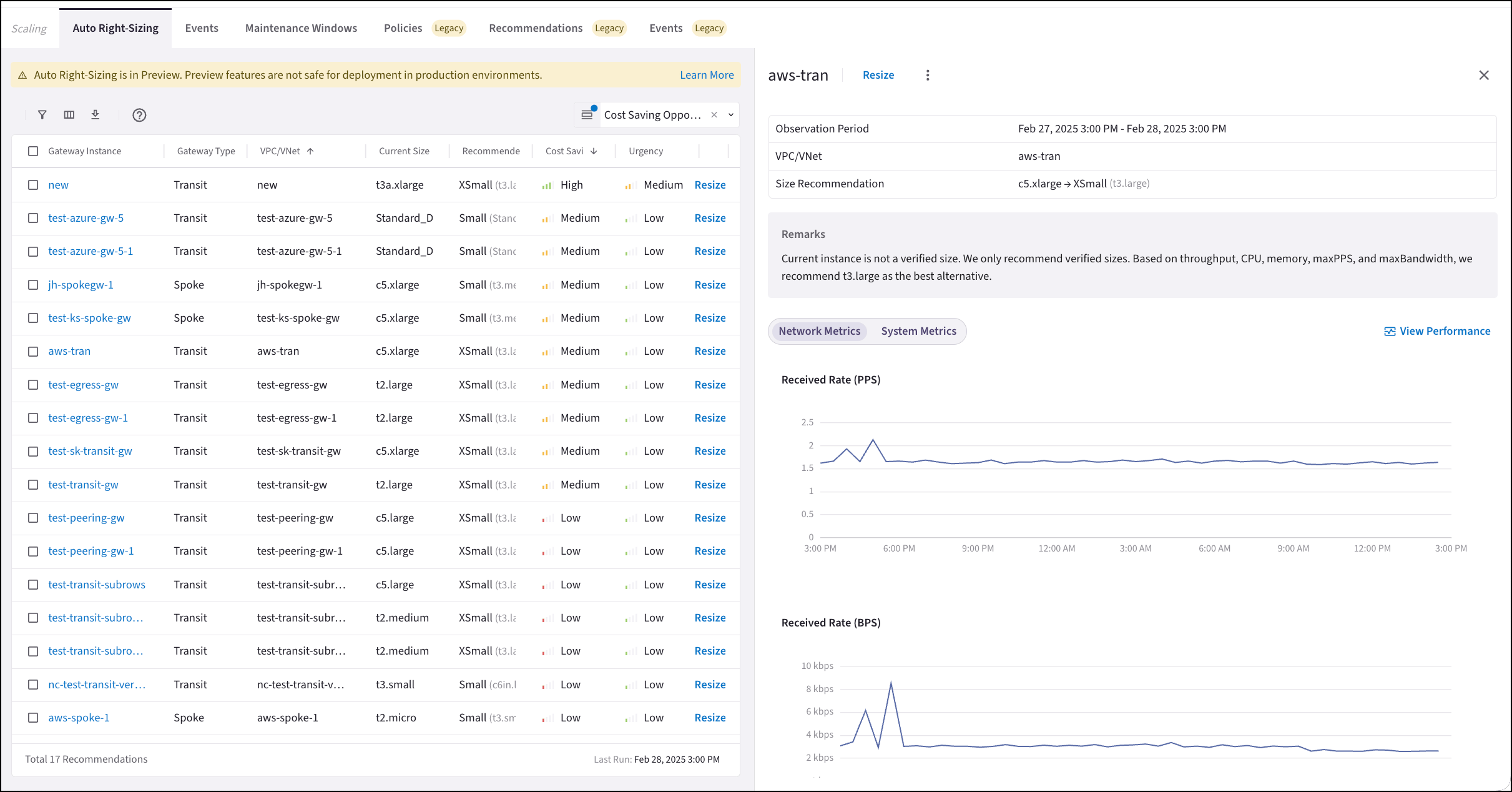 From here you can:
* [Resize](https://legacy.docs.aviatrix.com/documentation/latest/network/auto-right-sizing-resizing.html)
the gateway instance (immediately, or schedule during a maintenance window).
* View the remarks about the current gateway instance. These remarks provide an
explanation of why resizing is recommended.
* View the network and system
metrics for the gateway instance.
* View gateway instance performance. Click View
Performance to go to the Monitor > Performance tab.
* Dismiss the recommendation.
* Ignore recommendations from the selected VPC/VNet.
Detailed information about auto right-sizing functionality.
## Next Steps
* Configure the monitoring period and what VPC/VNets to exclude from
monitoring
* [Resize gateway instances based on provided recommendations](https://legacy.docs.aviatrix.com/documentation/latest/network/auto-right-sizing-resizing.html?expand=true)
* [View the events generated by resizing actions](https://legacy.docs.aviatrix.com/documentation/latest/network/ars-events-tab.html?expand=true)
## Related Topics
* Mapping Aviatrix Standard Gateway Sizes to VM Instance Sizes
* [Auto Right Sizing Ignoring](https://legacy.docs.aviatrix.com/documentation/latest/network/auto-right-sizing-ignoring.html?expand=true)
* [Auto Right Sizing Dismissing](https://legacy.docs.aviatrix.com/documentation/latest/network/auto-right-sizing-dismissing.html?expand=true)
* [Auto Right Sizing Actions](https://legacy.docs.aviatrix.com/documentation/latest/network/auto-right-sizing-actions.html?expand=true)
* [Auto Right-Sizing Optimization](https://legacy.docs.aviatrix.com/documentation/latest/network/ars-optimization.html)
* Auto Right-Sizing Maintenance Window
* [Ars Events Tab](https://legacy.docs.aviatrix.com/documentation/latest/network/ars-events-tab.html?expand=true)
From here you can:
* [Resize](https://legacy.docs.aviatrix.com/documentation/latest/network/auto-right-sizing-resizing.html)
the gateway instance (immediately, or schedule during a maintenance window).
* View the remarks about the current gateway instance. These remarks provide an
explanation of why resizing is recommended.
* View the network and system
metrics for the gateway instance.
* View gateway instance performance. Click View
Performance to go to the Monitor > Performance tab.
* Dismiss the recommendation.
* Ignore recommendations from the selected VPC/VNet.
Detailed information about auto right-sizing functionality.
## Next Steps
* Configure the monitoring period and what VPC/VNets to exclude from
monitoring
* [Resize gateway instances based on provided recommendations](https://legacy.docs.aviatrix.com/documentation/latest/network/auto-right-sizing-resizing.html?expand=true)
* [View the events generated by resizing actions](https://legacy.docs.aviatrix.com/documentation/latest/network/ars-events-tab.html?expand=true)
## Related Topics
* Mapping Aviatrix Standard Gateway Sizes to VM Instance Sizes
* [Auto Right Sizing Ignoring](https://legacy.docs.aviatrix.com/documentation/latest/network/auto-right-sizing-ignoring.html?expand=true)
* [Auto Right Sizing Dismissing](https://legacy.docs.aviatrix.com/documentation/latest/network/auto-right-sizing-dismissing.html?expand=true)
* [Auto Right Sizing Actions](https://legacy.docs.aviatrix.com/documentation/latest/network/auto-right-sizing-actions.html?expand=true)
* [Auto Right-Sizing Optimization](https://legacy.docs.aviatrix.com/documentation/latest/network/ars-optimization.html)
* Auto Right-Sizing Maintenance Window
* [Ars Events Tab](https://legacy.docs.aviatrix.com/documentation/latest/network/ars-events-tab.html?expand=true)