> ## Documentation Index
> Fetch the complete documentation index at: https://docs.aviatrix.com/llms.txt
> Use this file to discover all available pages before exploring further.
# FireNet Design Patterns
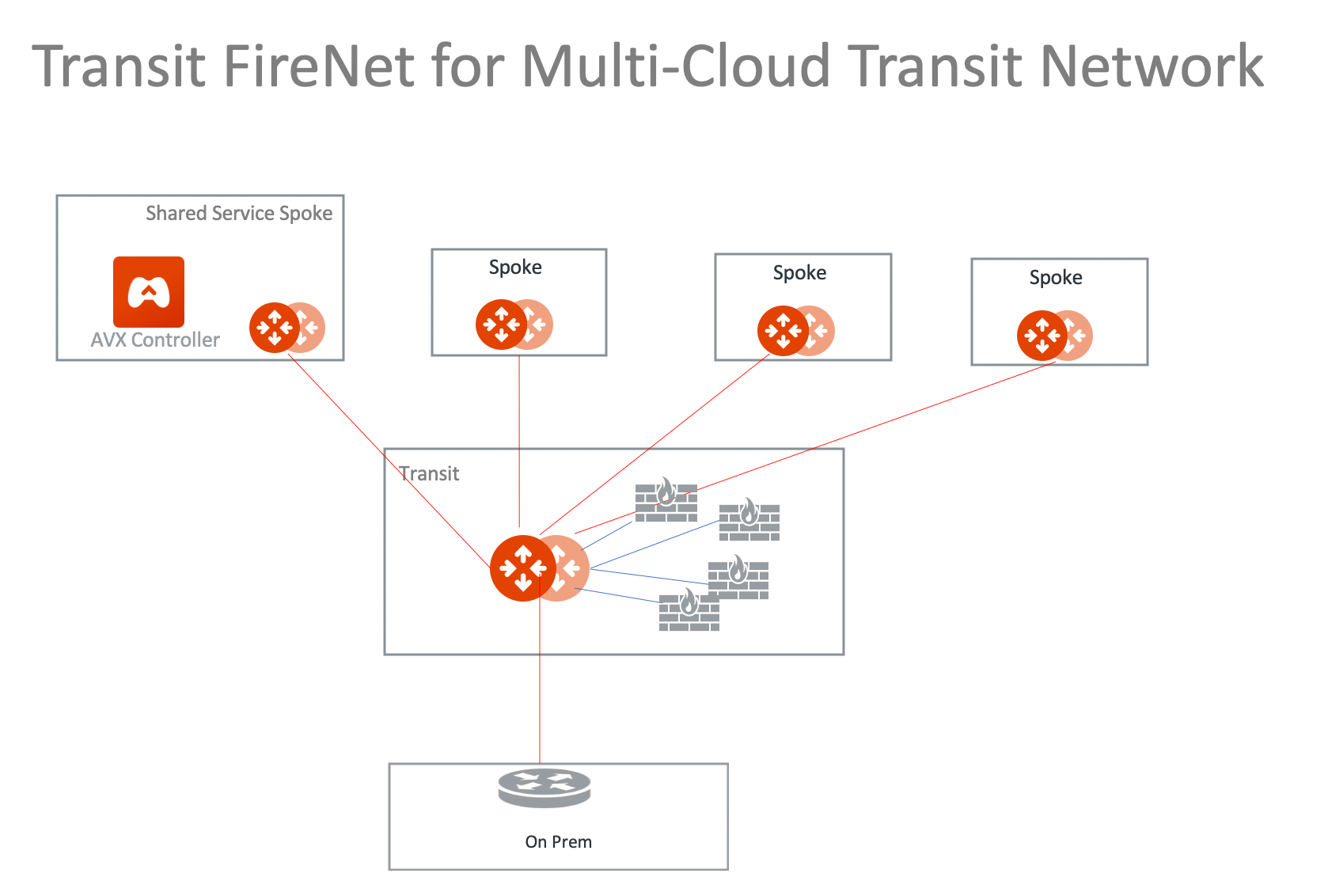
> FireNet supports High Performance Encryption Mode.
## Hybrid to On-prem
 ## Hybrid with High Performance Encryption Mode
FireNet supports High Performance Encryption Mode.
## Hybrid with High Performance Encryption Mode
FireNet supports High Performance Encryption Mode.
 ## FireNet in Multi-Regions
 ## Dual Transit FireNet Network
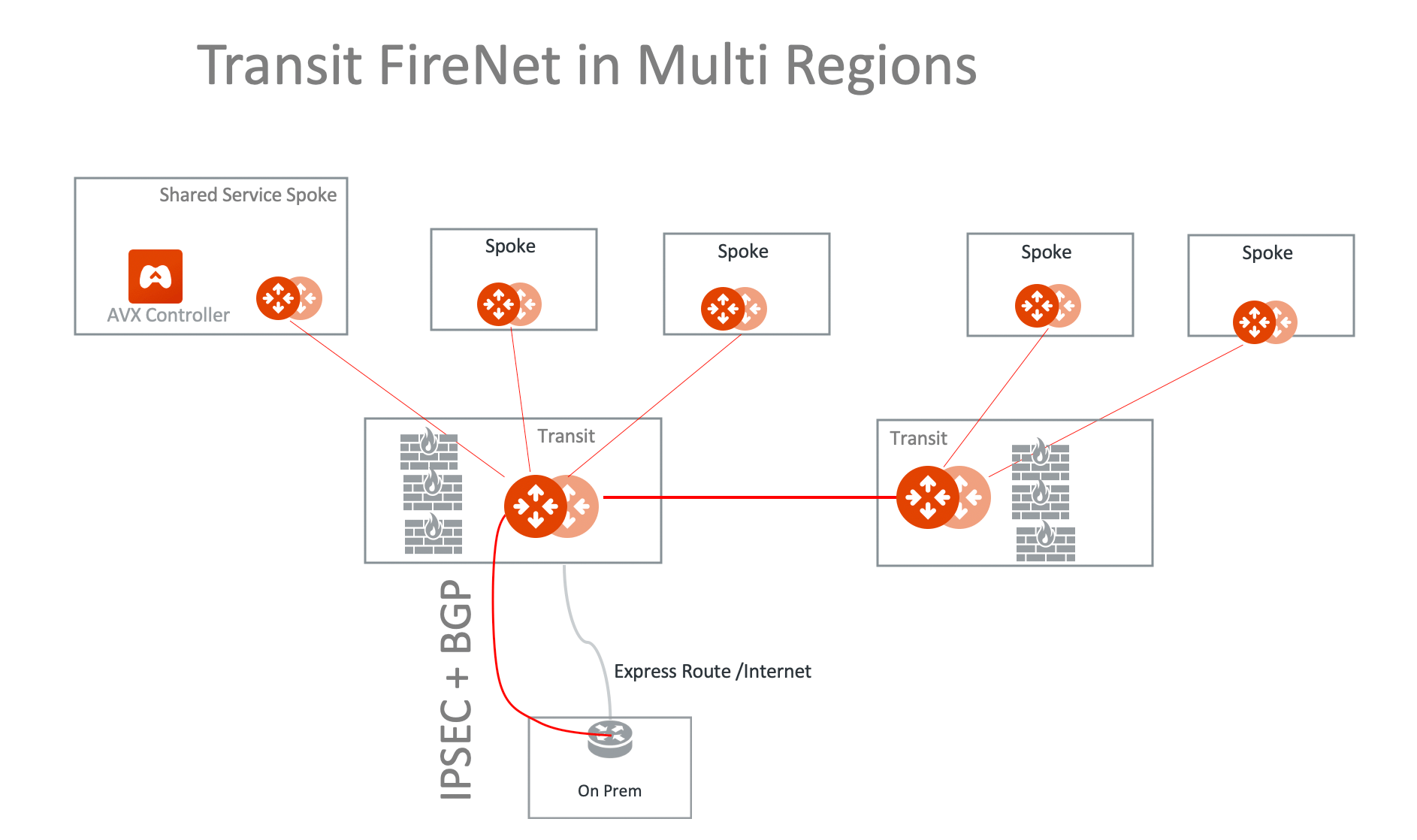
You can deploy two Firewall Networks, one dedicated for East-West traffic
inspection and another for egress inspection.
You must follow this configuration sequence:
1. Disable the Traffic Inspection of the FireNet Gateway intended for egress
control.
2. Enable Egress Control for FireNet Gateway intended for egress control.
3. Build connection policies.
## Dual Transit FireNet Network
You can deploy two Firewall Networks, one dedicated for East-West traffic
inspection and another for egress inspection.
You must follow this configuration sequence:
1. Disable the Traffic Inspection of the FireNet Gateway intended for egress
control.
2. Enable Egress Control for FireNet Gateway intended for egress control.
3. Build connection policies.
 ## Distributed Egress in a Multi-Region Deployment
If you need to have a distributed egress for each region, make sure you filter
out the default route 0.0.0.0/0 when you build the Aviatrix Transit Gateway
peering, as shown in the diagram below.
## Distributed Egress in a Multi-Region Deployment
If you need to have a distributed egress for each region, make sure you filter
out the default route 0.0.0.0/0 when you build the Aviatrix Transit Gateway
peering, as shown in the diagram below.
 ## Ingress Protection via Aviatrix Transit FireNet
This Ingress Protection design pattern is to have the traffic forward to
firewall instances directly in Aviatrix Transit FireNet VPC/VNet as shown in the
diagram below. In this design pattern, each firewall instance must configure (1)
SNAT on its LAN interface that connects to the Aviatrix FireNet Gateway and (2)
DNAT to the IP of application server/load balancer. The drawback of this design
is that the source IP address is not preserved when traffic reaches the
application.
## Ingress Protection via Aviatrix Transit FireNet
This Ingress Protection design pattern is to have the traffic forward to
firewall instances directly in Aviatrix Transit FireNet VPC/VNet as shown in the
diagram below. In this design pattern, each firewall instance must configure (1)
SNAT on its LAN interface that connects to the Aviatrix FireNet Gateway and (2)
DNAT to the IP of application server/load balancer. The drawback of this design
is that the source IP address is not preserved when traffic reaches the
application.
 For an example configuration workflow, see
[Ingress Protection via Aviatrix Transit FireNet with FortiGate](https://legacy.docs.aviatrix.com/documentation/latest/security/fortigate-ingress-protection-firenet.html).
# Hybrid to On-prem
# Hybrid with High Performance Encryption Mode
FireNet supports High Performance Encryption Mode.
# FireNet in Multi-Regions
## Dual Transit FireNet Network
You can deploy two Firewall Networks, one dedicated for East-West traffic
inspection and another for egress inspection.
You must follow this configuration sequence:
1. Disable the Traffic Inspection of the FireNet Gateway intended for egress
control.
2. Enable Egress Control for FireNet Gateway intended for egress control.
3. Build connection policies.
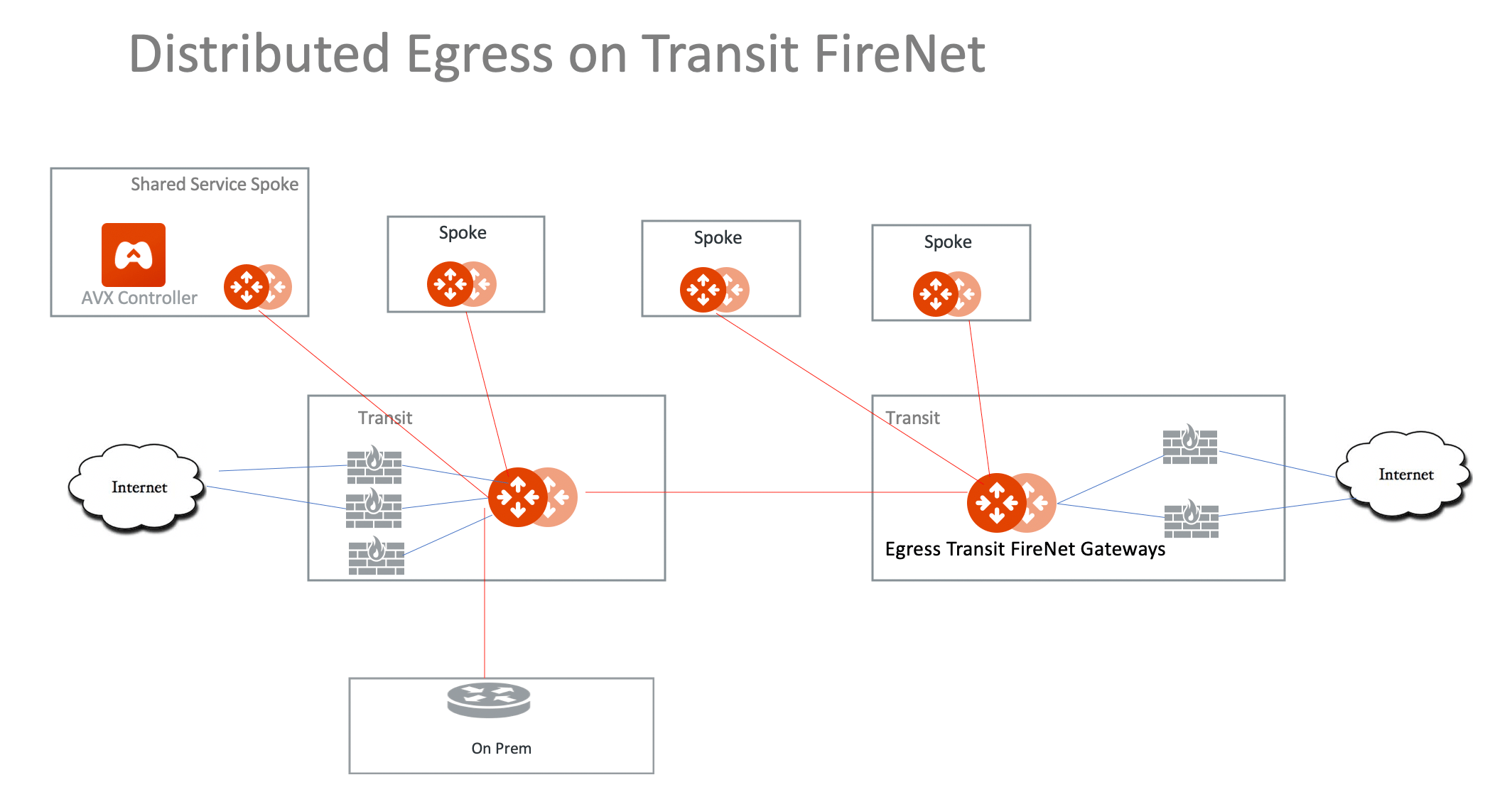
## Distributed Egress in a Multi-Region Deployment
If you need to have a distributed egress for each region, make sure you filter
out the default route 0.0.0.0/0 when you build the Aviatrix Transit Gateway
peering, as shown in the diagram below.
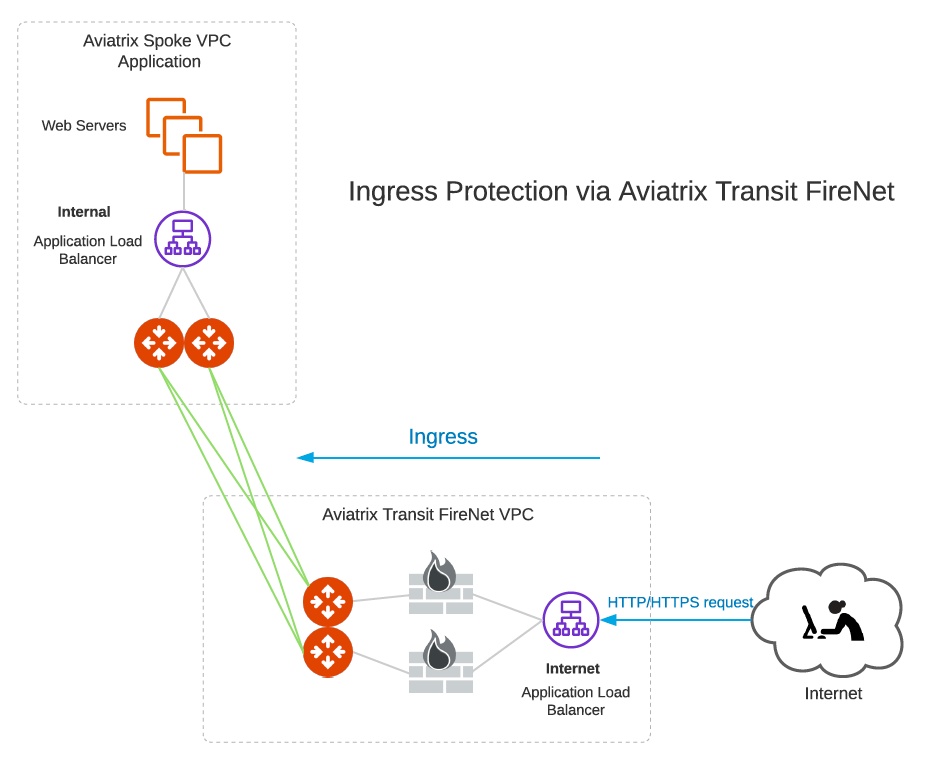
## Ingress Protection via Aviatrix Transit FireNet
This Ingress Protection design pattern is to have the traffic forward to
firewall instances directly in Aviatrix Transit FireNet VPC/VNet as shown in the
diagram below. In this design pattern, each firewall instance must configure (1)
SNAT on its LAN interface that connects to the Aviatrix FireNet Gateway and (2)
DNAT to the IP of application server/load balancer. The drawback of this design
is that the source IP address is not preserved when traffic reaches the
application.
For an example configuration workflow, see
[Ingress Protection via Aviatrix Transit FireNet with FortiGate](https://docs.aviatrix.com/documentation/latest/security/fortigate-ingress-protection-firenet.html).
For an example configuration workflow, see
[Ingress Protection via Aviatrix Transit FireNet with FortiGate](https://legacy.docs.aviatrix.com/documentation/latest/security/fortigate-ingress-protection-firenet.html).
# Hybrid to On-prem
# Hybrid with High Performance Encryption Mode
FireNet supports High Performance Encryption Mode.
# FireNet in Multi-Regions
## Dual Transit FireNet Network
You can deploy two Firewall Networks, one dedicated for East-West traffic
inspection and another for egress inspection.
You must follow this configuration sequence:
1. Disable the Traffic Inspection of the FireNet Gateway intended for egress
control.
2. Enable Egress Control for FireNet Gateway intended for egress control.
3. Build connection policies.
## Distributed Egress in a Multi-Region Deployment
If you need to have a distributed egress for each region, make sure you filter
out the default route 0.0.0.0/0 when you build the Aviatrix Transit Gateway
peering, as shown in the diagram below.
## Ingress Protection via Aviatrix Transit FireNet
This Ingress Protection design pattern is to have the traffic forward to
firewall instances directly in Aviatrix Transit FireNet VPC/VNet as shown in the
diagram below. In this design pattern, each firewall instance must configure (1)
SNAT on its LAN interface that connects to the Aviatrix FireNet Gateway and (2)
DNAT to the IP of application server/load balancer. The drawback of this design
is that the source IP address is not preserved when traffic reaches the
application.
For an example configuration workflow, see
[Ingress Protection via Aviatrix Transit FireNet with FortiGate](https://docs.aviatrix.com/documentation/latest/security/fortigate-ingress-protection-firenet.html).