> ## Documentation Index
> Fetch the complete documentation index at: https://docs.aviatrix.com/llms.txt
> Use this file to discover all available pages before exploring further.
# Overview of Transit Gateway to External Devices
> This document focuses on Aviatrix Transit Gateway connection to an external device.
This document focuses on Aviatrix Transit Gateway connection to an external
device.
## What are the use cases for connecting to an external router?
* **Overcoming the AWS VGW 100 route limit** AWS has route entry limits of 100
per each routing table. Combining the number of VPC CIDRs and the list of
on-prem CIDRs, this route limit is fast approaching or already a problem.
Typically, an Aviatrix Transit Gateway connects to VGW over IPsec and runs a
BGP session with VGW. VGW then connects to on-prem devices. By connecting
directly to an external device, the VGW is bypassed.
* **Overcome AWS VGW performance reset** VGW adjusts instance size based on
network bandwidth consumption, leading to unexpected outage.
* **Azure Transit Network** This feature allows an Aviatrix Transit GW to
connect to on-prem over Azure Express Route or Internet.
* **High Performance with on-prem** By using GRE tunneling protocol, Aviatrix
Multicloud Transit Gateway
builds multiple GRE tunnels to on-prem routers
to achieve 10Gbps throughput.
* **Integrate with SD-WAN gateways deployed in the cloud** BGP over LAN as part
of the External Device option provides an efficient mechanism to connect to
SD-WAN cloud gateways by interoperating with them over LAN in the same
VPC/VNet while exchanging routes dynamically via BGP.
* **All Other Cloud Providers** Use this feature to connect to network of cloud
providers such as Alibaba Cloud, Tencent Cloud, VMware Cloud, IBM Cloud and
others.
Aviatrix Transit Network solution solves these problems when connecting
datacenters to a growing number of VPC/VNets.
* **AWS Transit Gateway** AWS released Transit Gateway (TGW), I need to migrate
my current CSR-based Transit VPC solution.
* **No Route Propagation** AWS Transit Gateway (TGW) does not propagate on-prem
learned routes to Spoke VPC route table, it requires manual programming.
* **Transit Solution for Azure** We have multiple Azure VNETs now, we need to
form a transit network and connect them to on-prem and to AWS Transit network.
* **Change Control** Each time a new VPC is stood up, a change control process
has to take place to modify the edge router for Direct Connect or IPsec over
Internet. This is not agile and the risk of errors in configuration is not
acceptable.
* **BGP** The CSR-based Global Transit solution runs VGW in each spoke VPC/VNet
which runs a BGP session to Transit hub. This is operationally challenging to
manage and troubleshoot. The BGP in VGW is a black box and invisible to the
outside.
* **Not Secure** All spoke VPC/VNets in the CSR-based Global Transit solution
have connectivity to each other through BGP route propagation. There is no
network segmentation. The blast radius is my entire cloud network and
datacenters. This is not acceptable by the security team.
* **Extra Charge** In the CSR-based solution, traffic from one spoke VPC/VNet to
another spoke VPC/VNet traverses through one transit and sometimes two transit
hubs, resulting in 2x or 3x egress charge.
* **Too Complex** The CloudOps is a team of 6 engineers managing 34 AWS
services, the skill set and resources it takes to manage the CSR-based Transit
network is beyond what we want to handle.
* **10Gbps Transit** My current Transit network performance is capped at
1.25Gbps, our network requires much higher bandwidth.
## How does it work?
The Aviatrix Transit Gateway runs a BGP session to an external router to
dynamically exchange routes. It also establishes an IPsec tunnel, GRE tunnel, or
direct Ethernet to the router for packet forwarding. For IPsec tunneling, static
routing option is also supported.
The mechanism works for AWS Direct Connect, Azure ExpressRoute, or the Internet.
### Over Private Network in AWS
When the underlying infrastructure is AWS Direct Connect, the diagram is shown
as below.
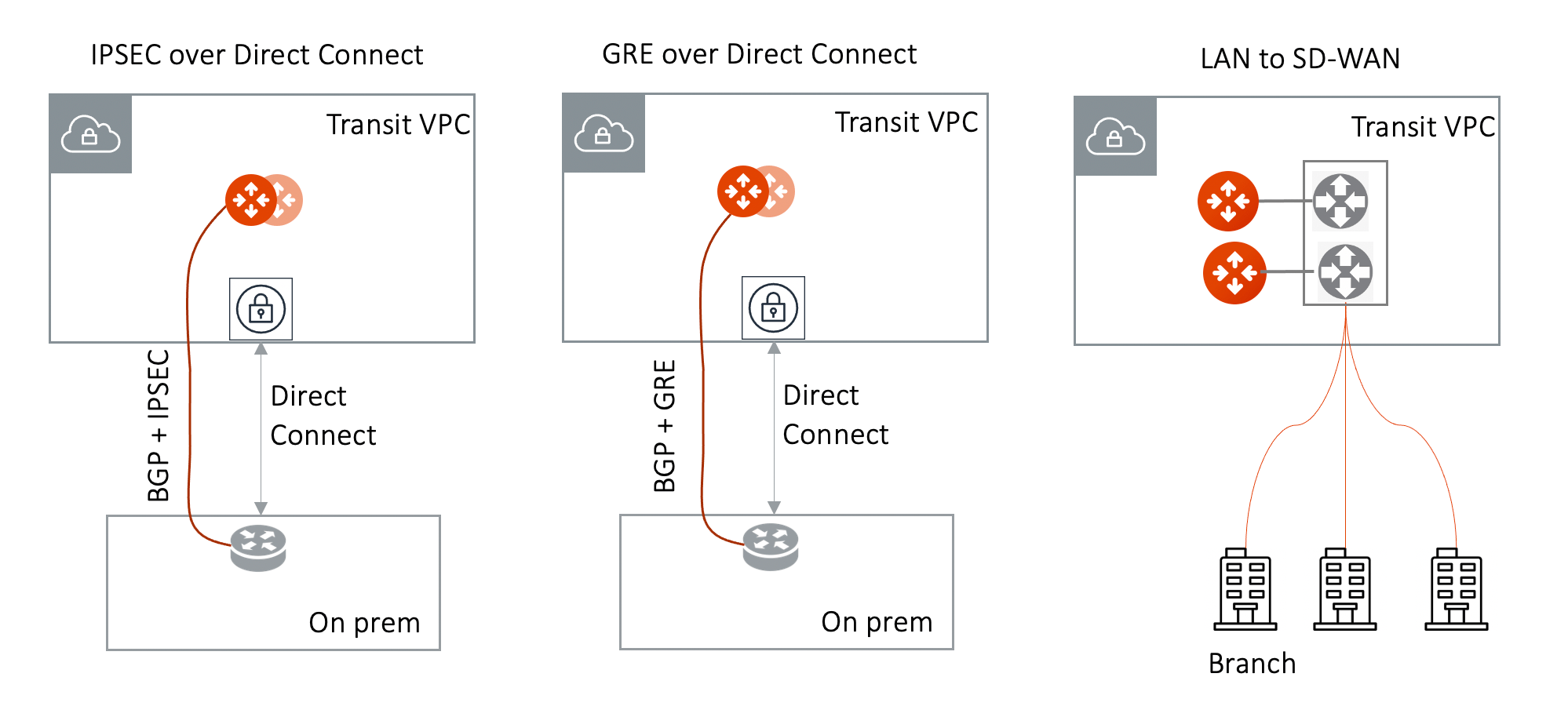 Make sure:
* The VGW is attached to the Transit VPC for IPsec over Direct Connect and GRE
over Direct Connect.
* The external device advertises its IP address to VGW.
* The external device advertises the on-prem network CIDR list to Aviatrix
Transit GW.
### Over a Private Network in Azure
When the underlying infrastructure is Azure Express Route, the external Device
options are IPsec or LAN, as shown below.
Make sure:
* The VGW is attached to the Transit VPC for IPsec over Direct Connect and GRE
over Direct Connect.
* The external device advertises its IP address to VGW.
* The external device advertises the on-prem network CIDR list to Aviatrix
Transit GW.
### Over a Private Network in Azure
When the underlying infrastructure is Azure Express Route, the external Device
options are IPsec or LAN, as shown below.
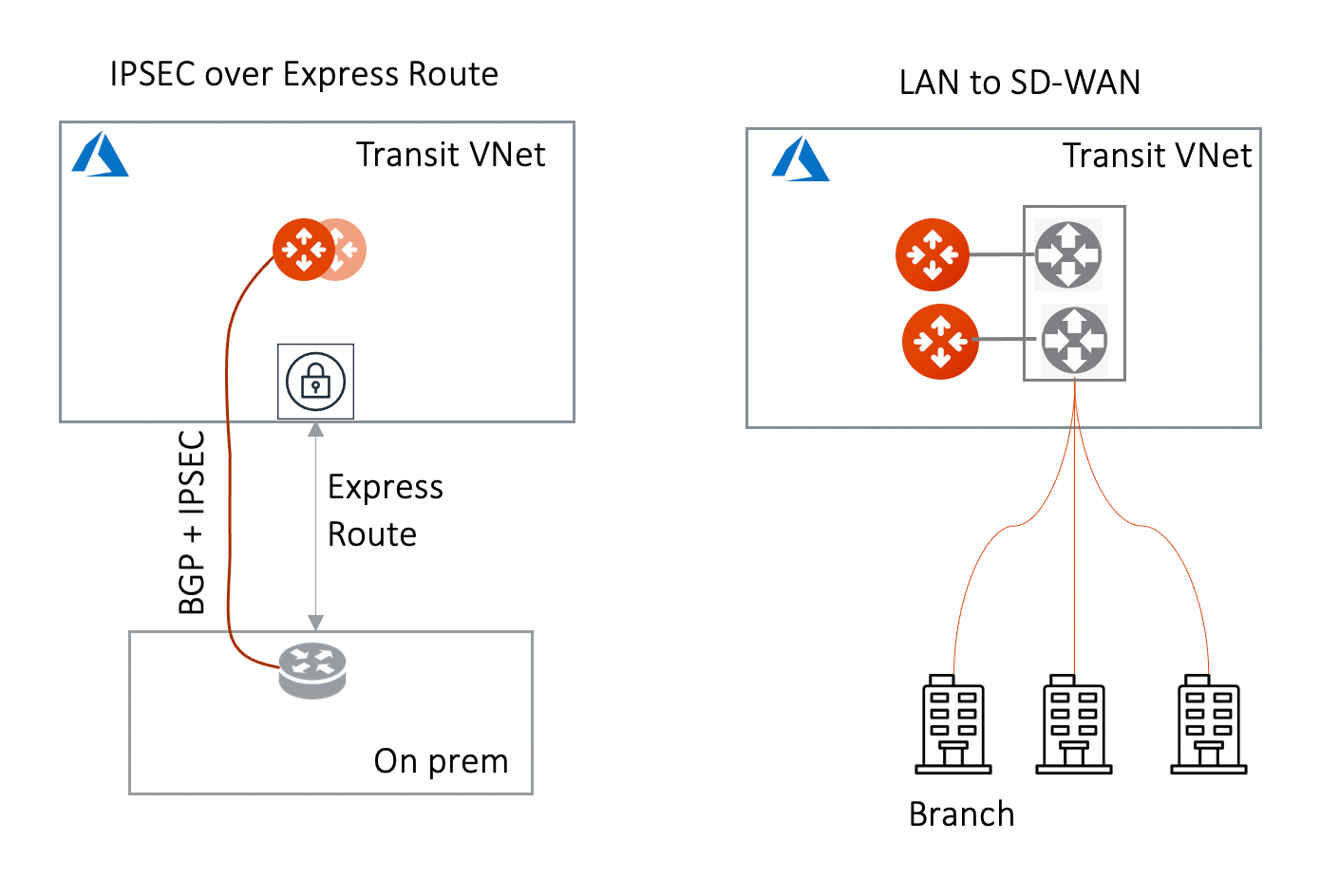 GRE is not supported on Azure.
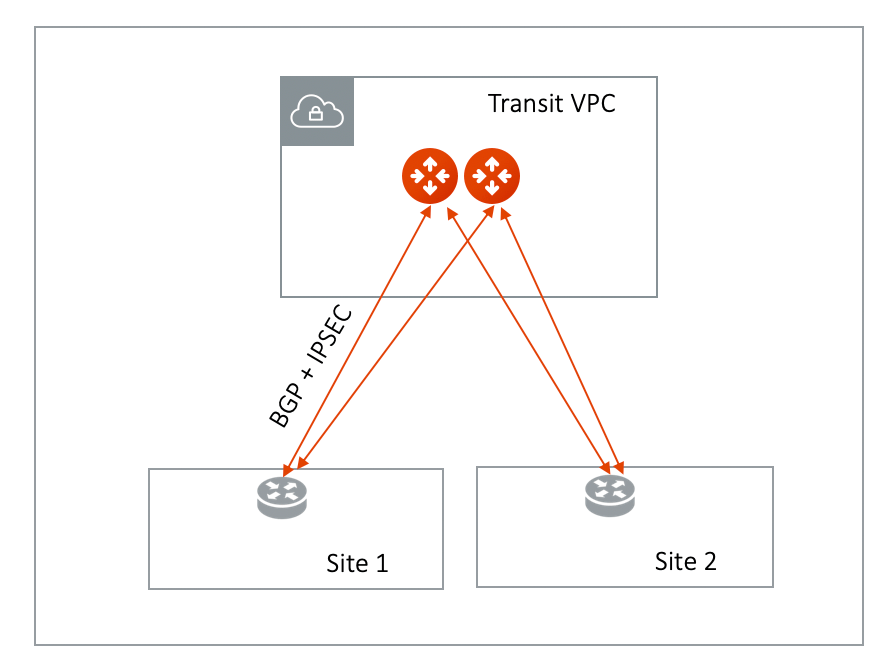
### Over the Internet
When connecting over the Internet, the diagram is shown as below.
GRE is not supported on Azure.
### Over the Internet
When connecting over the Internet, the diagram is shown as below.
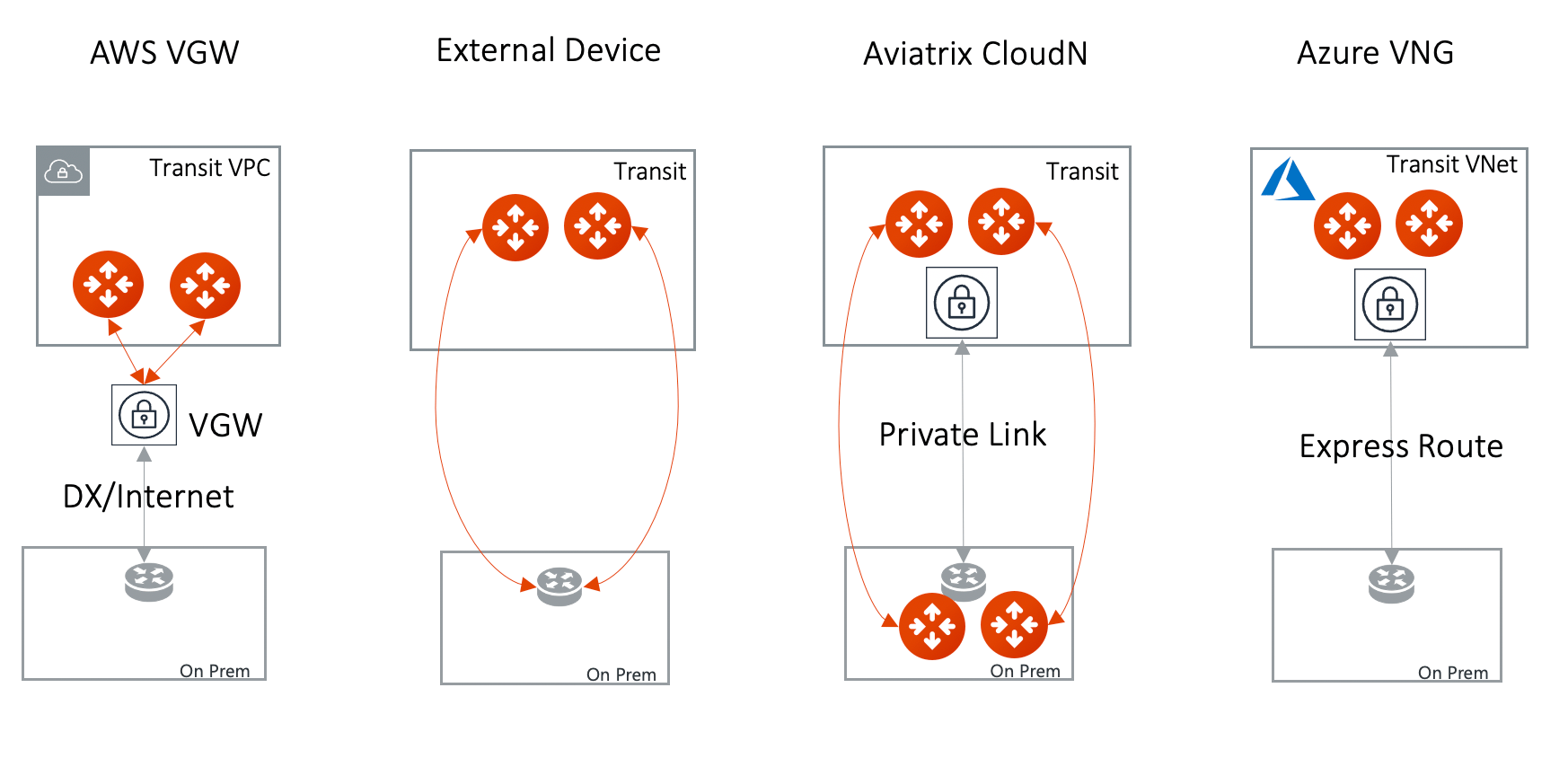
 ## How do I connect to an external device?
There are three options to connect a Transit Gateway to an on-prem network.
Choose one option that meets your network requirements.
1. AWS VGW (This is the default setting)
2. External Device (over Direct Connect or over Internet)
3. Azure VNG
Currently, only one connection is supported on a specific Transit Gateway/VPC,
regardless of which of the three options above is chosen.
## How do I connect to an external device?
There are three options to connect a Transit Gateway to an on-prem network.
Choose one option that meets your network requirements.
1. AWS VGW (This is the default setting)
2. External Device (over Direct Connect or over Internet)
3. Azure VNG
Currently, only one connection is supported on a specific Transit Gateway/VPC,
regardless of which of the three options above is chosen.
 | Transit Gateway | Connect Type | Performance | HA | Route Limit | Deployment notes |
| --------------- | ------------ | ------------ | -------------- | ----------- | ----------------------------------------------------------------------------------------------------------------------------------------------------------------------------------------- |
| AWS VGW | | 1.25Gbps | Active/Active | 100 | VGW should be detached. Use the [instruction here](https://aws.amazon.com/premiumsupport/knowledge-center/create-vpn-direct-connect/) to build encryption between VGW and on-prem router. |
| External Device | | Up to 10Gbps | Active/Standby | Unlimited | VGW should be attached. Aviatrix Transit Gateway establishes BGP + IPSEC with on-prem router. |
| Azure VNG | | 10Gbps | Active/Active | Unlimited | VNG should be attached. |
To connect AWS VGW, see
Transit Gateway Integration with AWS VGW Workflow
.
To connect to Azure VNG, see
Transit Gateway Integration with Azure VNG Workflow
.
To connect to an external device, see
Transit Gateway to External Devices Workflow
.
Connect transit gateways to external devices.
| Transit Gateway | Connect Type | Performance | HA | Route Limit | Deployment notes |
| --------------- | ------------ | ------------ | -------------- | ----------- | ----------------------------------------------------------------------------------------------------------------------------------------------------------------------------------------- |
| AWS VGW | | 1.25Gbps | Active/Active | 100 | VGW should be detached. Use the [instruction here](https://aws.amazon.com/premiumsupport/knowledge-center/create-vpn-direct-connect/) to build encryption between VGW and on-prem router. |
| External Device | | Up to 10Gbps | Active/Standby | Unlimited | VGW should be attached. Aviatrix Transit Gateway establishes BGP + IPSEC with on-prem router. |
| Azure VNG | | 10Gbps | Active/Active | Unlimited | VNG should be attached. |
To connect AWS VGW, see
Transit Gateway Integration with AWS VGW Workflow
.
To connect to Azure VNG, see
Transit Gateway Integration with Azure VNG Workflow
.
To connect to an external device, see
Transit Gateway to External Devices Workflow
.
Connect transit gateways to external devices.