> ## Documentation Index
> Fetch the complete documentation index at: https://docs.aviatrix.com/llms.txt
> Use this file to discover all available pages before exploring further.
# TGW Design Patterns
> Many design patterns exist to deploy your network with the AWS Transit Gateway Orchestrator. Here are some examples.
Many design patterns exist to deploy your network with the AWS Transit Gateway
Orchestrator. Here are some examples.
While the design pattern diagrams use a single symbol to represent the
Aviatrix Gateways, all designs can be implemented with multi-AZ high
availability.
## Dev & Prod Isolated Design
If you want to build network segmentation between Dev/QA VPCs and Production
VPCs, but require the shared service VPC and on-premise to reach each VPC,
consider the diagram below.
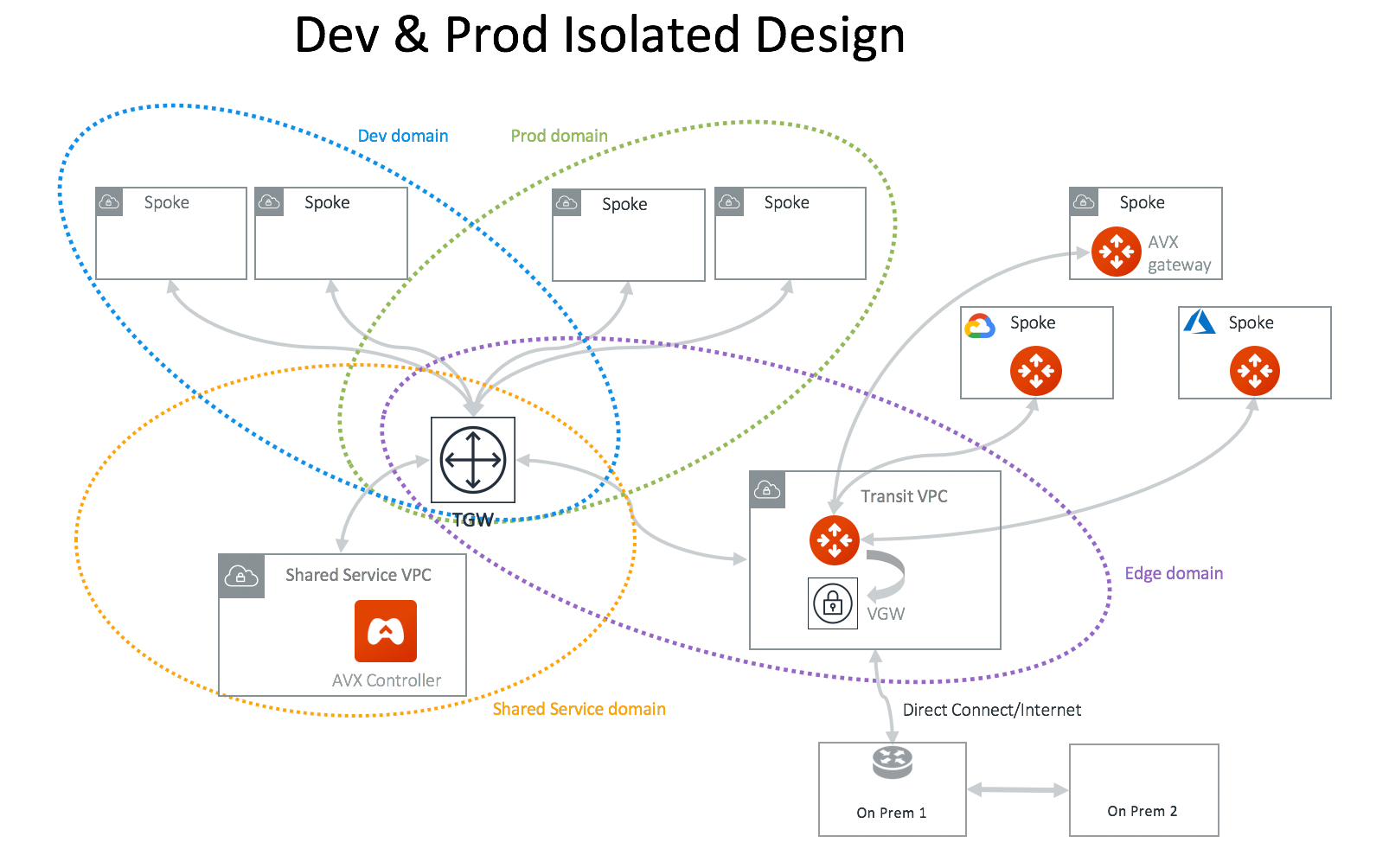 In this network design, you need to create two custom Network Domains,
Dev\_Domain and Prod\_Domain.
At the Plan page Step 2, select *Create Custom Security Domain* and fill in the
information. Make sure you multi-select Shared\_Service\_Domain and
Aviatrix\_Edge\_Domain for Connect to Security Domains. Apply this step for both
Dev\_Domain and Prod\_Domain.
## Dev & Prod Isolated Design with TGW Direct Connect or VPN
Aviatrix integrates native TGW Direct Connect and VPN to connect to on-prem
while allowing you to connect to multiple cloud as Spoke VPCs.
In this network design, you need to create two custom Network Domains,
Dev\_Domain and Prod\_Domain.
At the Plan page Step 2, select *Create Custom Security Domain* and fill in the
information. Make sure you multi-select Shared\_Service\_Domain and
Aviatrix\_Edge\_Domain for Connect to Security Domains. Apply this step for both
Dev\_Domain and Prod\_Domain.
## Dev & Prod Isolated Design with TGW Direct Connect or VPN
Aviatrix integrates native TGW Direct Connect and VPN to connect to on-prem
while allowing you to connect to multiple cloud as Spoke VPCs.
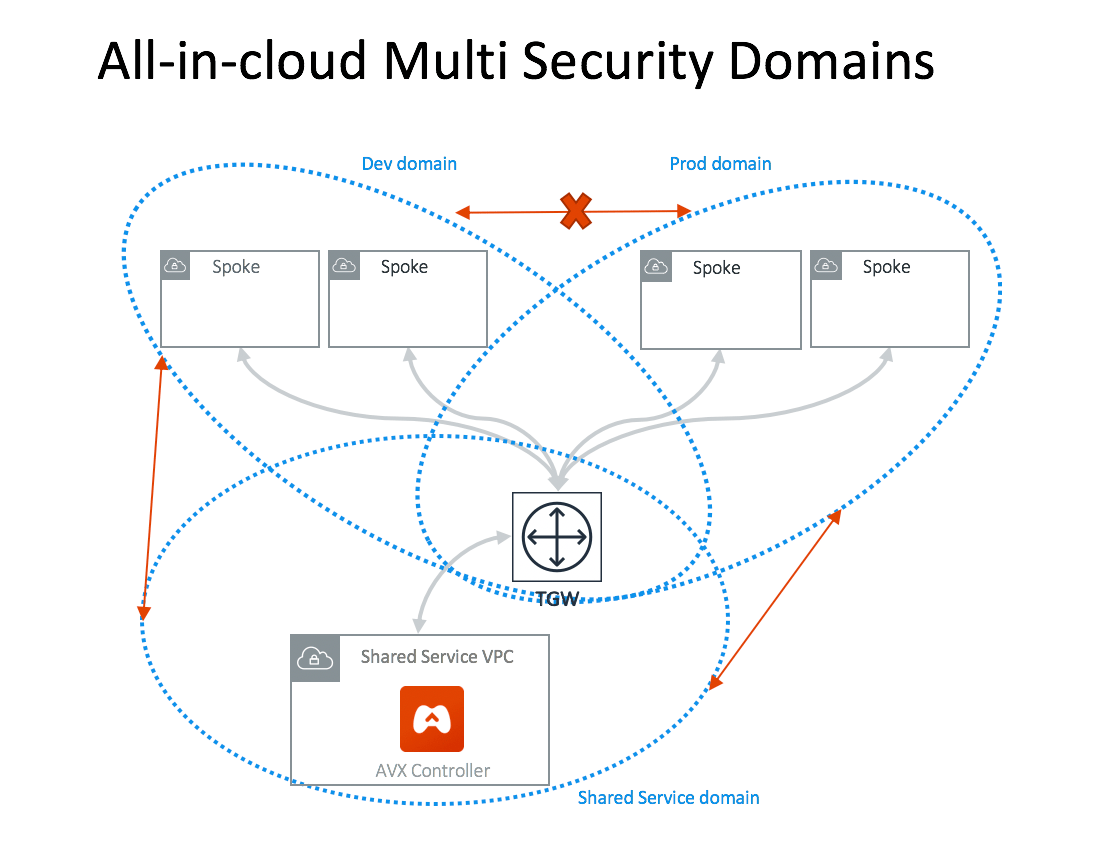
 ## All-in-Cloud with Multi Network Domains
If you are only concerned about VPC-to-VPC segmentation, you can deploy the
Aviatrix Controller for an all-in-cloud segmented network, as shown below.
## All-in-Cloud with Multi Network Domains
If you are only concerned about VPC-to-VPC segmentation, you can deploy the
Aviatrix Controller for an all-in-cloud segmented network, as shown below.
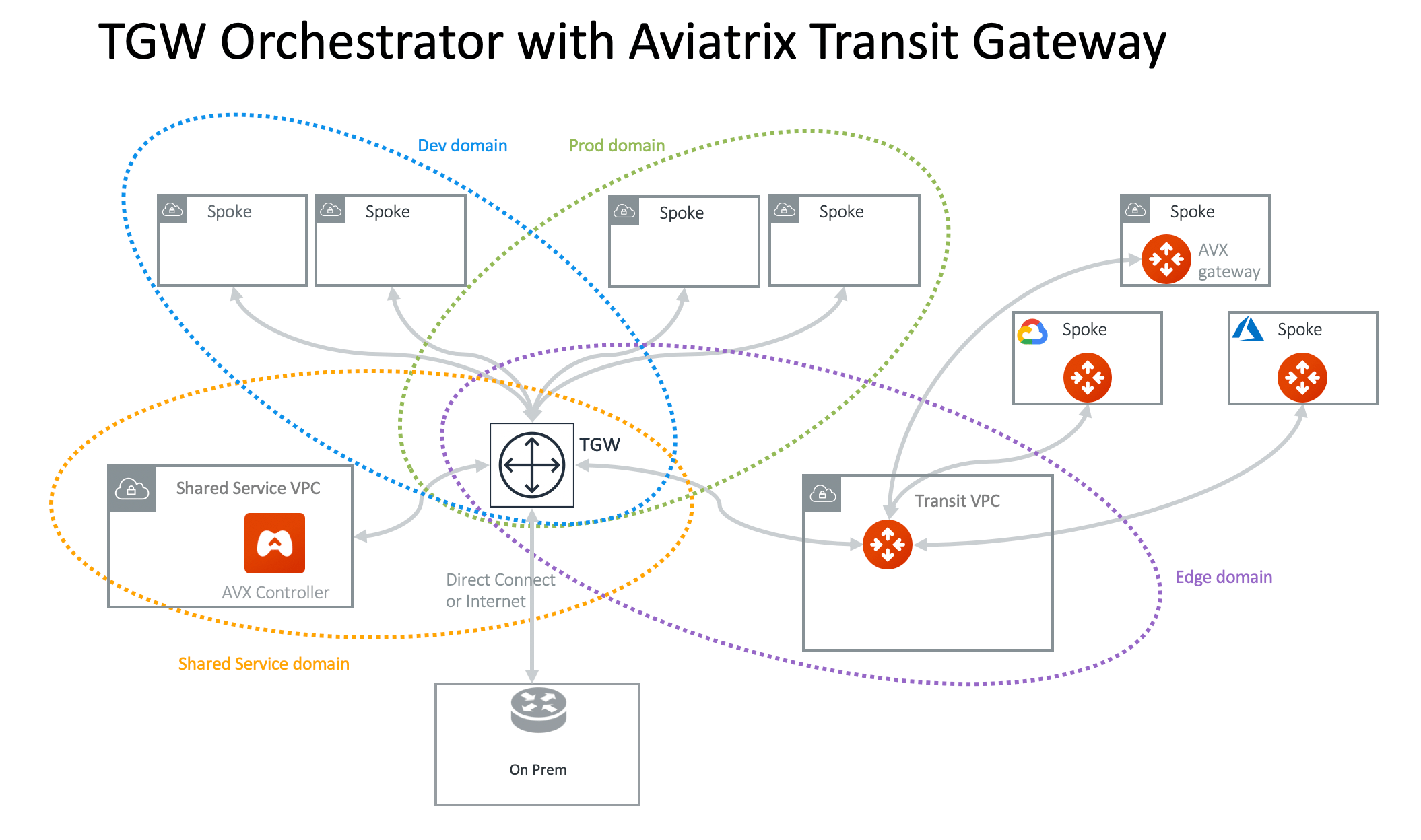
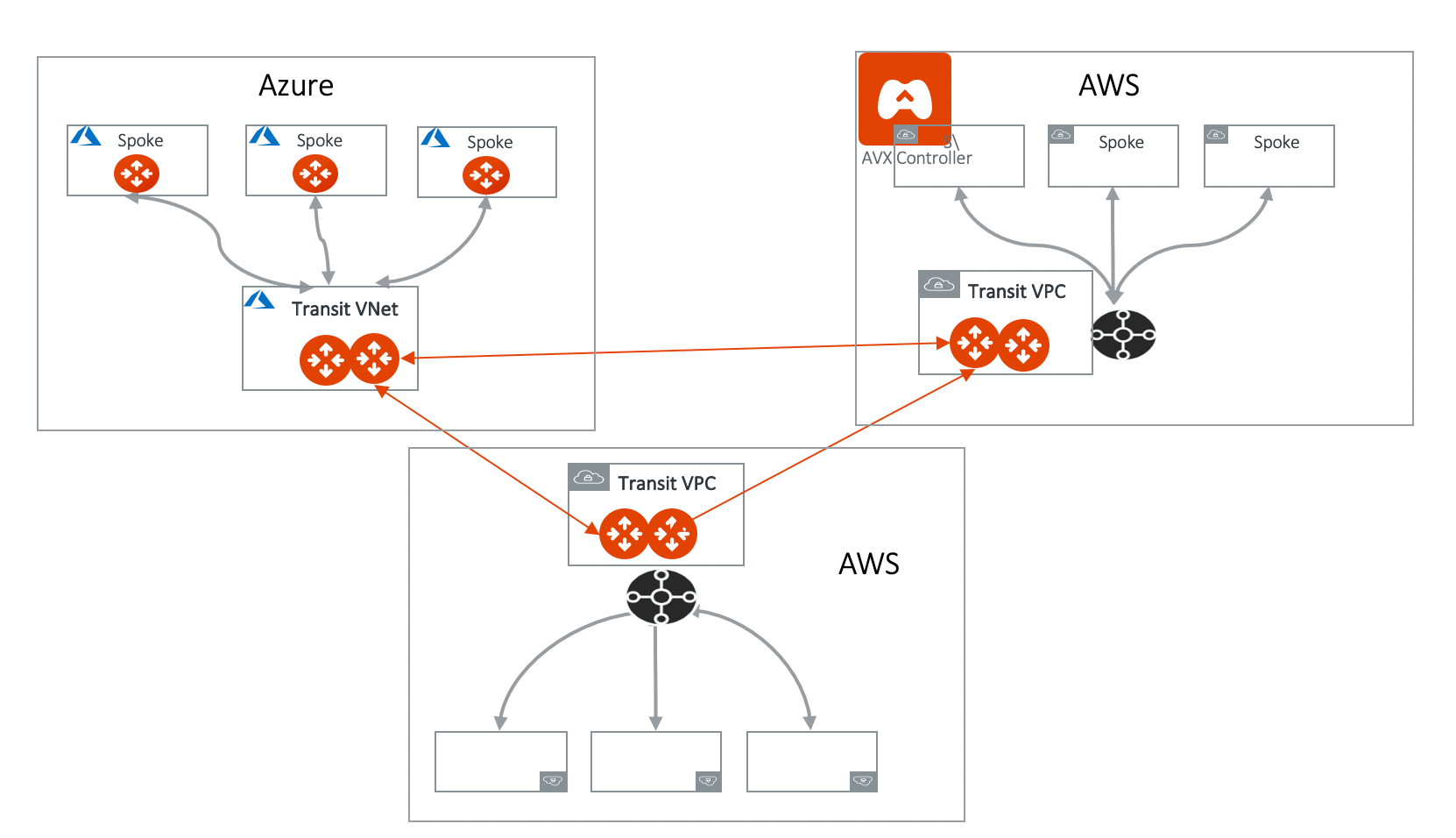
 ## Connecting Transit Gateways in Multi-Regions Multicloud
You can use Aviatrix Transit GWs to connect AWS Transit Gateways in
multi-regions and multicloud deployment, as shown below.
## Connecting Transit Gateways in Multi-Regions Multicloud
You can use Aviatrix Transit GWs to connect AWS Transit Gateways in
multi-regions and multicloud deployment, as shown below.
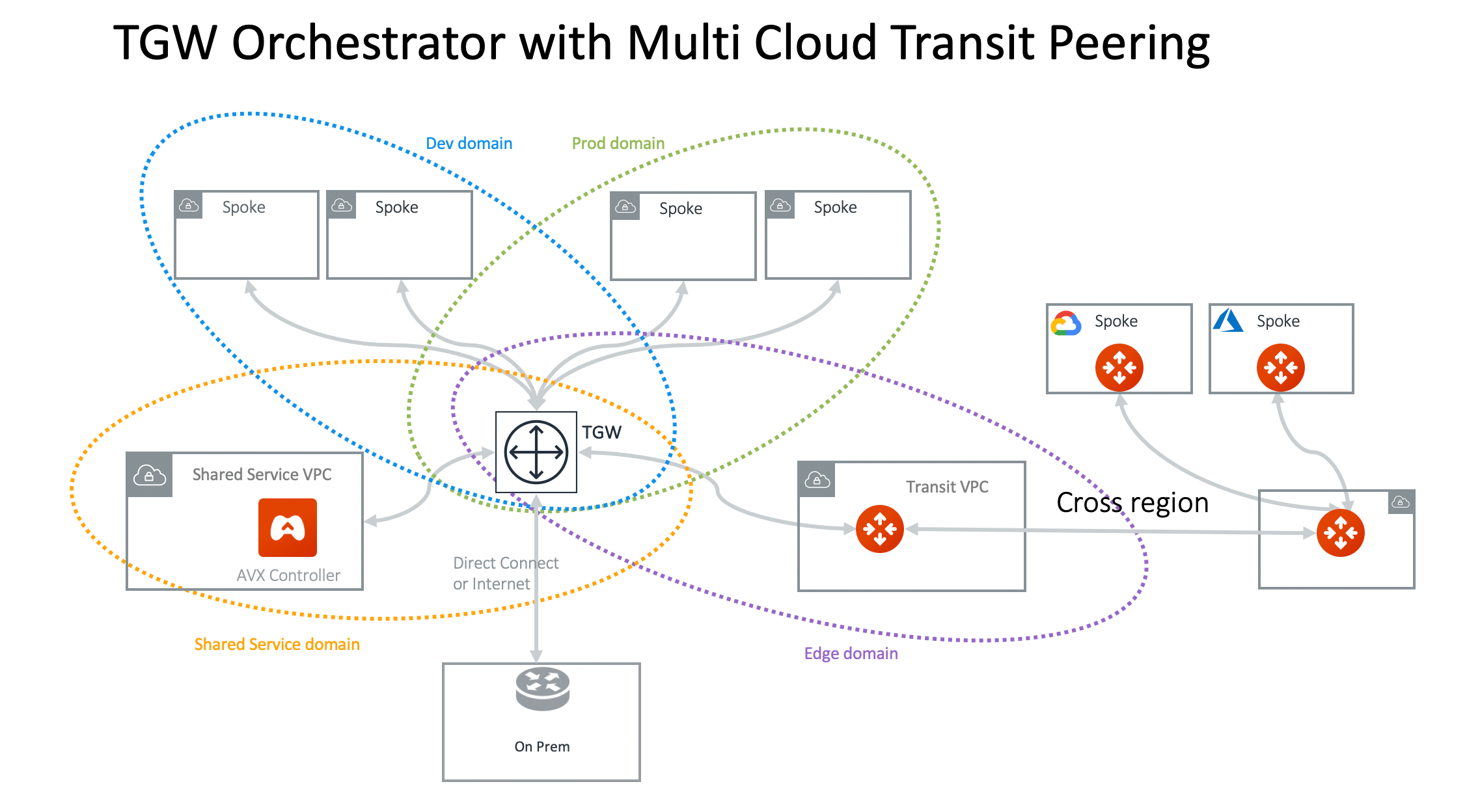
 ## TGW Orchestrator for Cross-Region and Multicloud Spoke
You can extend the TGW to a different region with transit peering and then
spokes in a different cloud.
## TGW Orchestrator for Cross-Region and Multicloud Spoke
You can extend the TGW to a different region with transit peering and then
spokes in a different cloud.
 ## Full-Mesh Network Design
If you like to build a full-mesh network that allows all VPCs and on-prem to
communicate with each other, you do not need to create any custom Network
Domains. Simply use the built-in Default\_Domain and Aviatrix\_Edge\_Domain for the
deployment, as shown below.
## Full-Mesh Network Design
If you like to build a full-mesh network that allows all VPCs and on-prem to
communicate with each other, you do not need to create any custom Network
Domains. Simply use the built-in Default\_Domain and Aviatrix\_Edge\_Domain for the
deployment, as shown below.
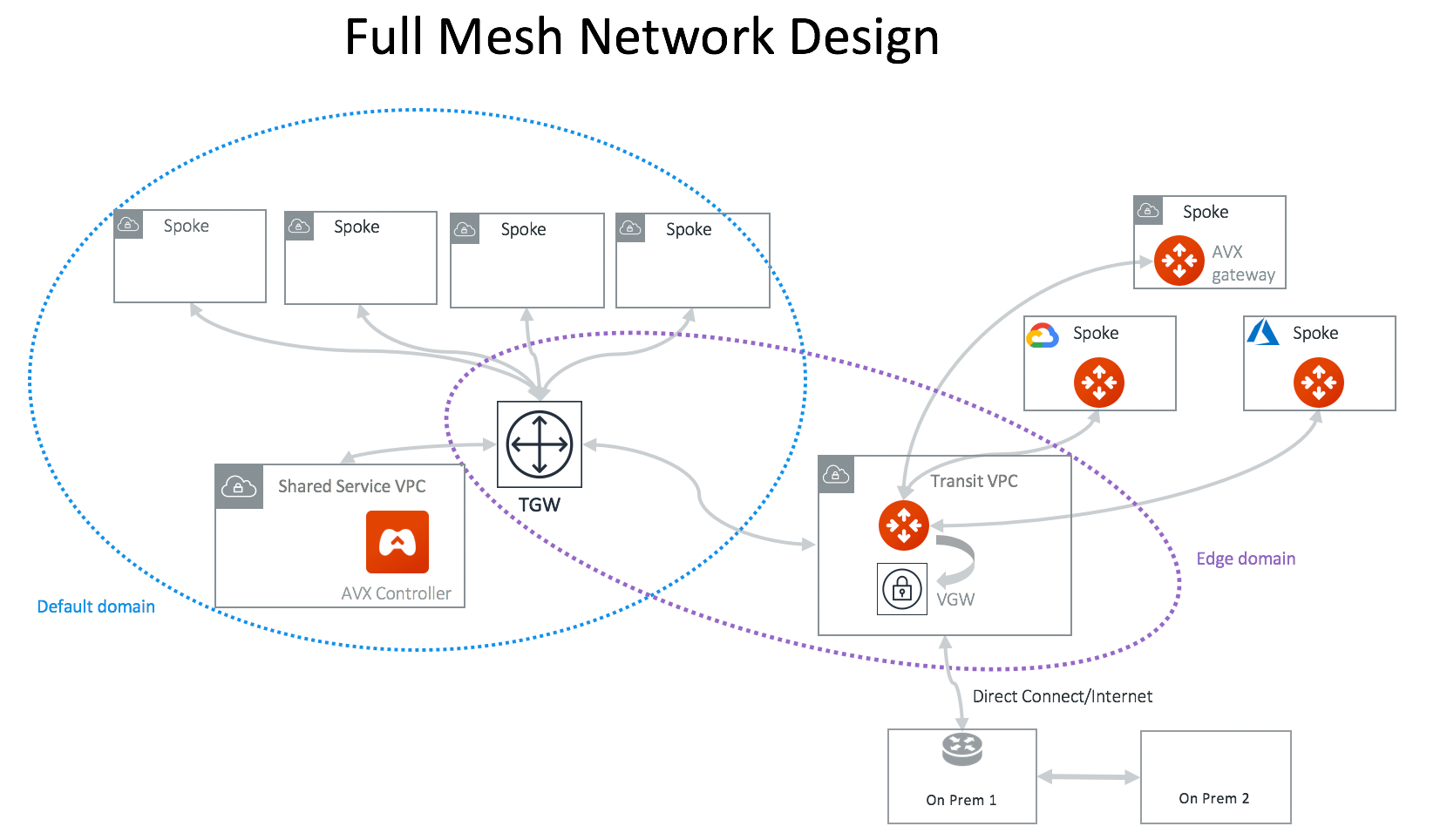 At Plan page Step 2, select *Full mesh network*.
## Fully Isolated Network Design - 1
If you would like to build a fully isolated network where no VPCs can
communicate with each other except to the shared service VPC and on-prem, you
need to create a Network Domain for each VPC and connect each domain to the
Shared\_Service\_Domain.
At Plan page Step 2, select *Full mesh network*.
## Fully Isolated Network Design - 1
If you would like to build a fully isolated network where no VPCs can
communicate with each other except to the shared service VPC and on-prem, you
need to create a Network Domain for each VPC and connect each domain to the
Shared\_Service\_Domain.
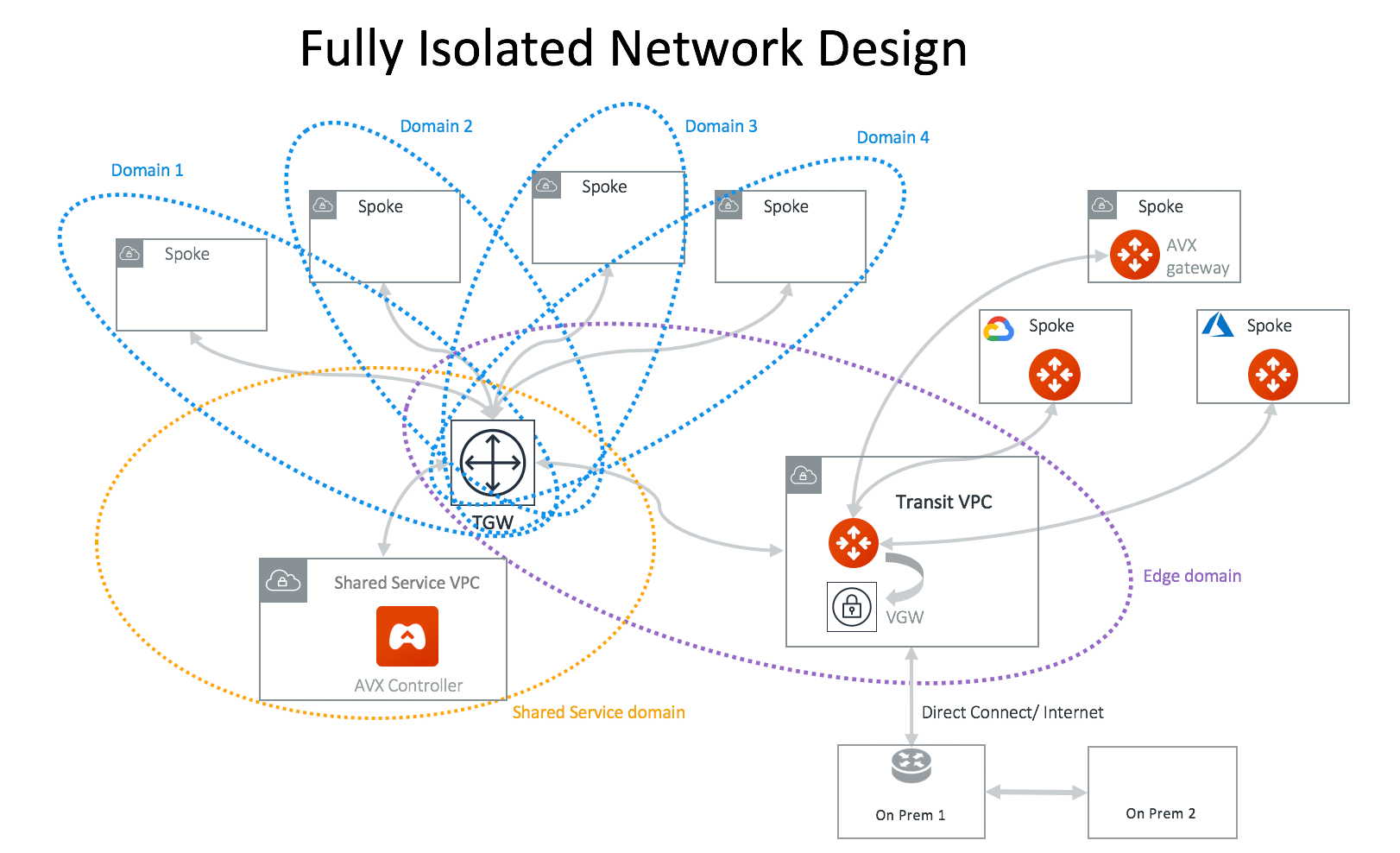 In this network design, you need to create a custom Network Domain for each VPC.
If this design does not scale for you, consider the
Aviatrix Transit Network workflow
where all VPCs are by default isolated to each other.
## Fully Isolated Network Design - 2
An alternative design for a fully isolated deployment is to have a group of VPCs
share one Network Domain but
disabling VPC route propagation
when attaching a VPC, as shown in the diagram below.
In this network design, you need to create a custom Network Domain for each VPC.
If this design does not scale for you, consider the
Aviatrix Transit Network workflow
where all VPCs are by default isolated to each other.
## Fully Isolated Network Design - 2
An alternative design for a fully isolated deployment is to have a group of VPCs
share one Network Domain but
disabling VPC route propagation
when attaching a VPC, as shown in the diagram below.
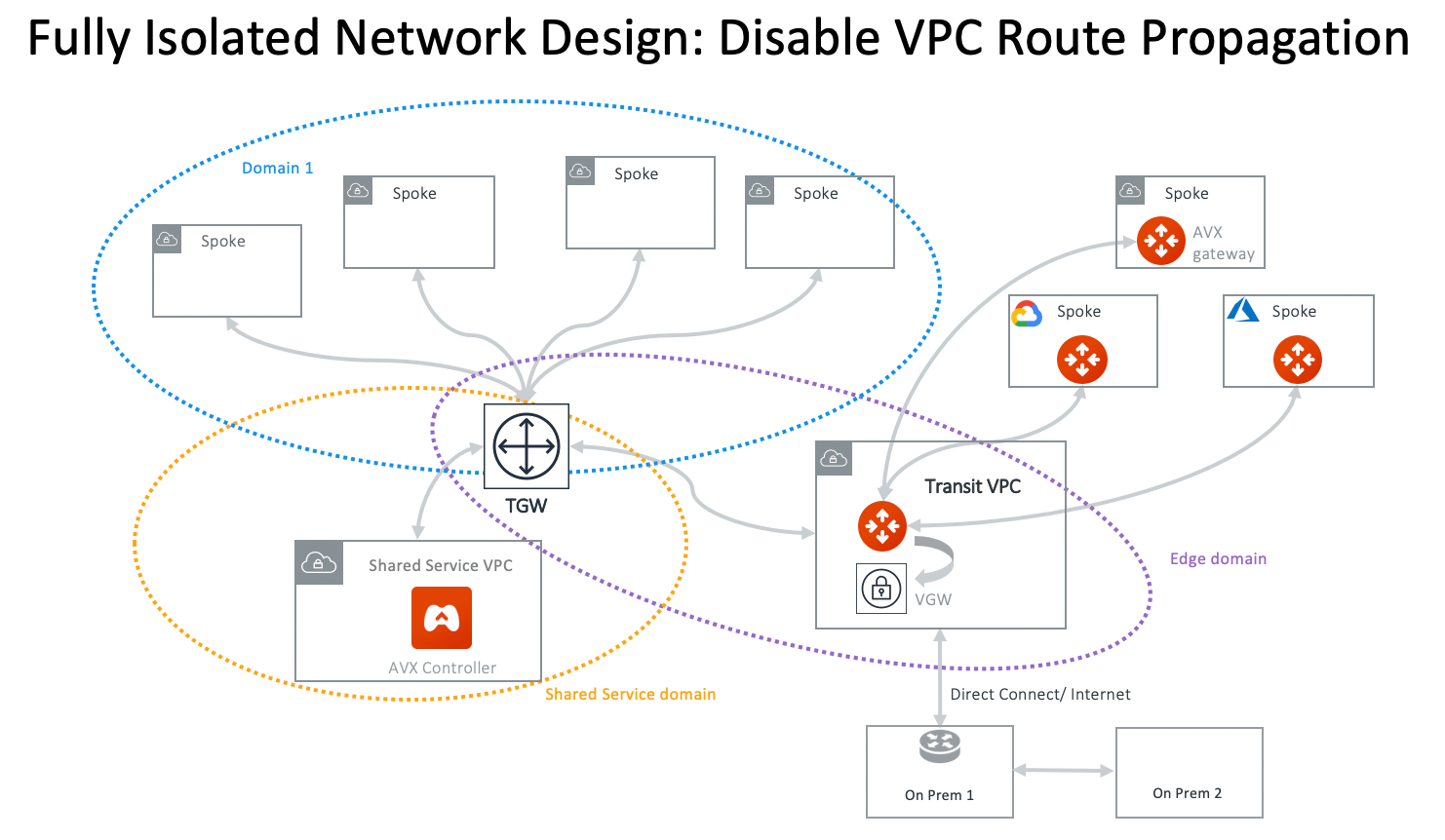 The advantage of this design is to keep the Network Domains to a minimum. You
can specify connection policies for a domain to communicate with another domain,
such as Aviatrix Edge Domain or Aviatrix FireNet Domain, without the VPC in the
domain being able to talk to each other.
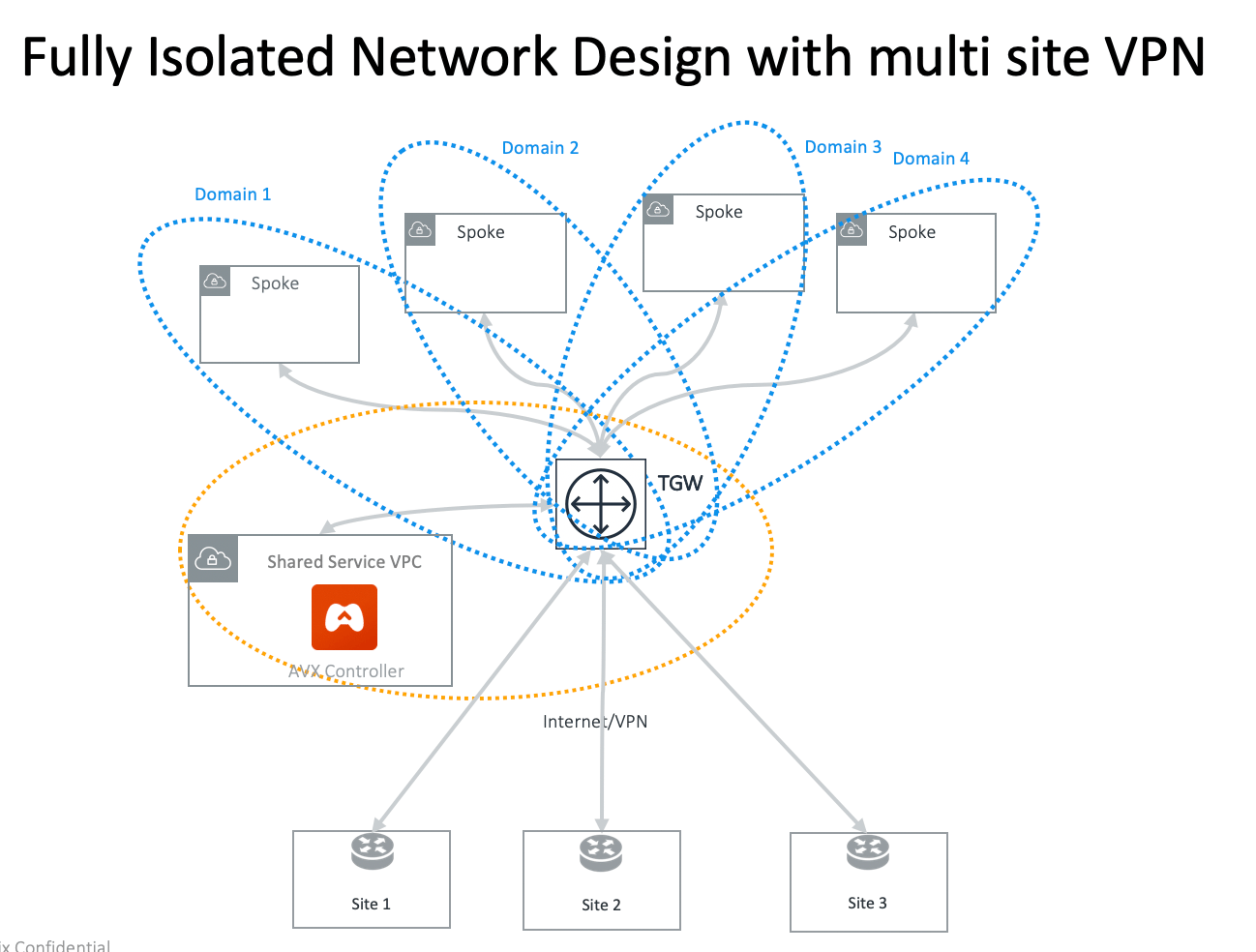
## Fully Isolated Network with Multi-Sites VPN
You can use TGW native VPN capability to connect to multi-sites VPN. Since VPN
connection is in Default Security Domain, you need to build connection policy
for each VPC domain.
The advantage of this design is to keep the Network Domains to a minimum. You
can specify connection policies for a domain to communicate with another domain,
such as Aviatrix Edge Domain or Aviatrix FireNet Domain, without the VPC in the
domain being able to talk to each other.
## Fully Isolated Network with Multi-Sites VPN
You can use TGW native VPN capability to connect to multi-sites VPN. Since VPN
connection is in Default Security Domain, you need to build connection policy
for each VPC domain.
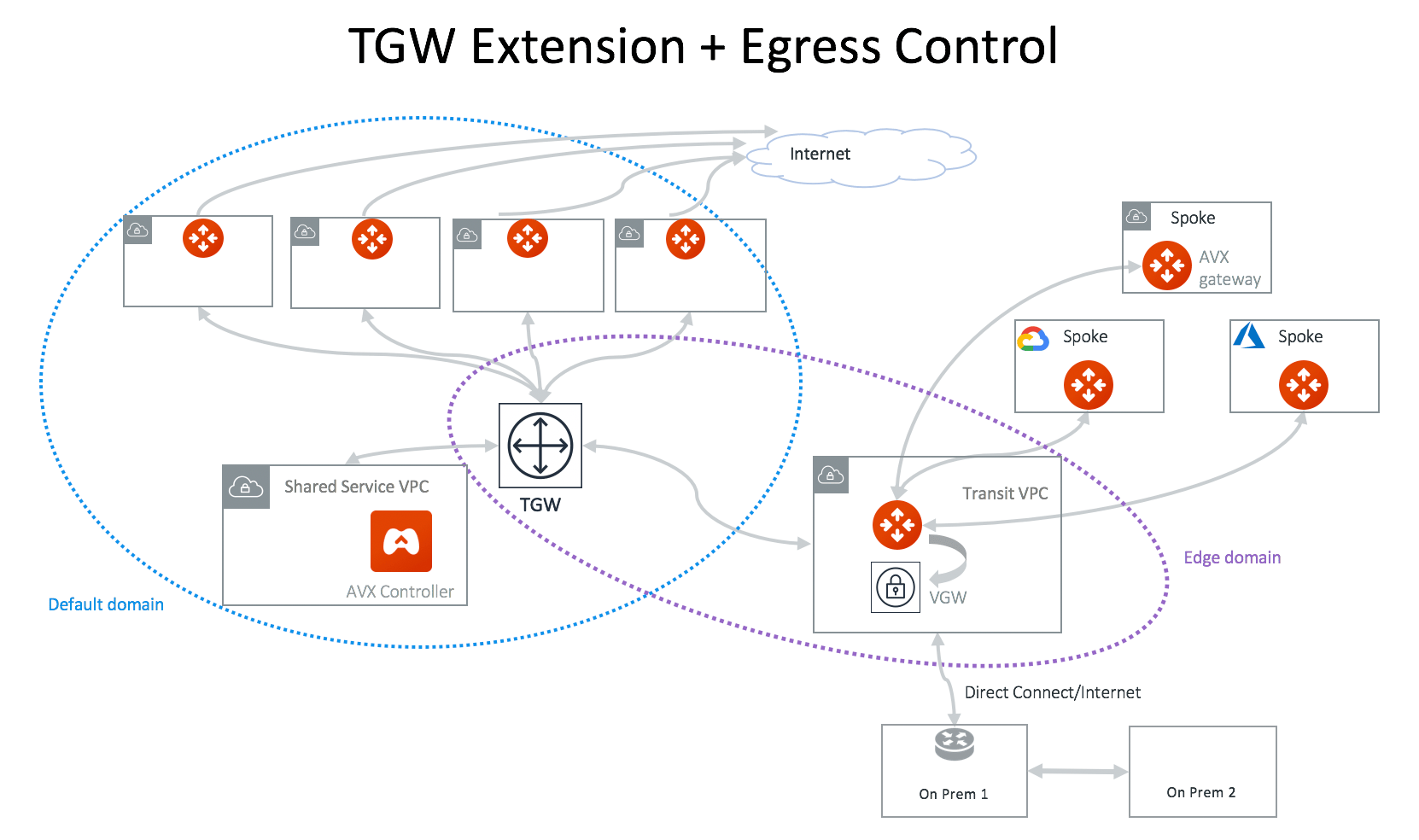
 ## Integrating with Distributed Egress Control Design
For any of the TGW design patterns, you may deploy Aviatrix distributed Egress
FQDN (Legacy) in each VPC. In this example, a full-mesh deployment is expanded
to include Egress FQDN support, as shown below.
## Integrating with Distributed Egress Control Design
For any of the TGW design patterns, you may deploy Aviatrix distributed Egress
FQDN (Legacy) in each VPC. In this example, a full-mesh deployment is expanded
to include Egress FQDN support, as shown below.
 You can configure
Egress Control Filter
, or configure
a DCF-based egress solution (preferred)
.
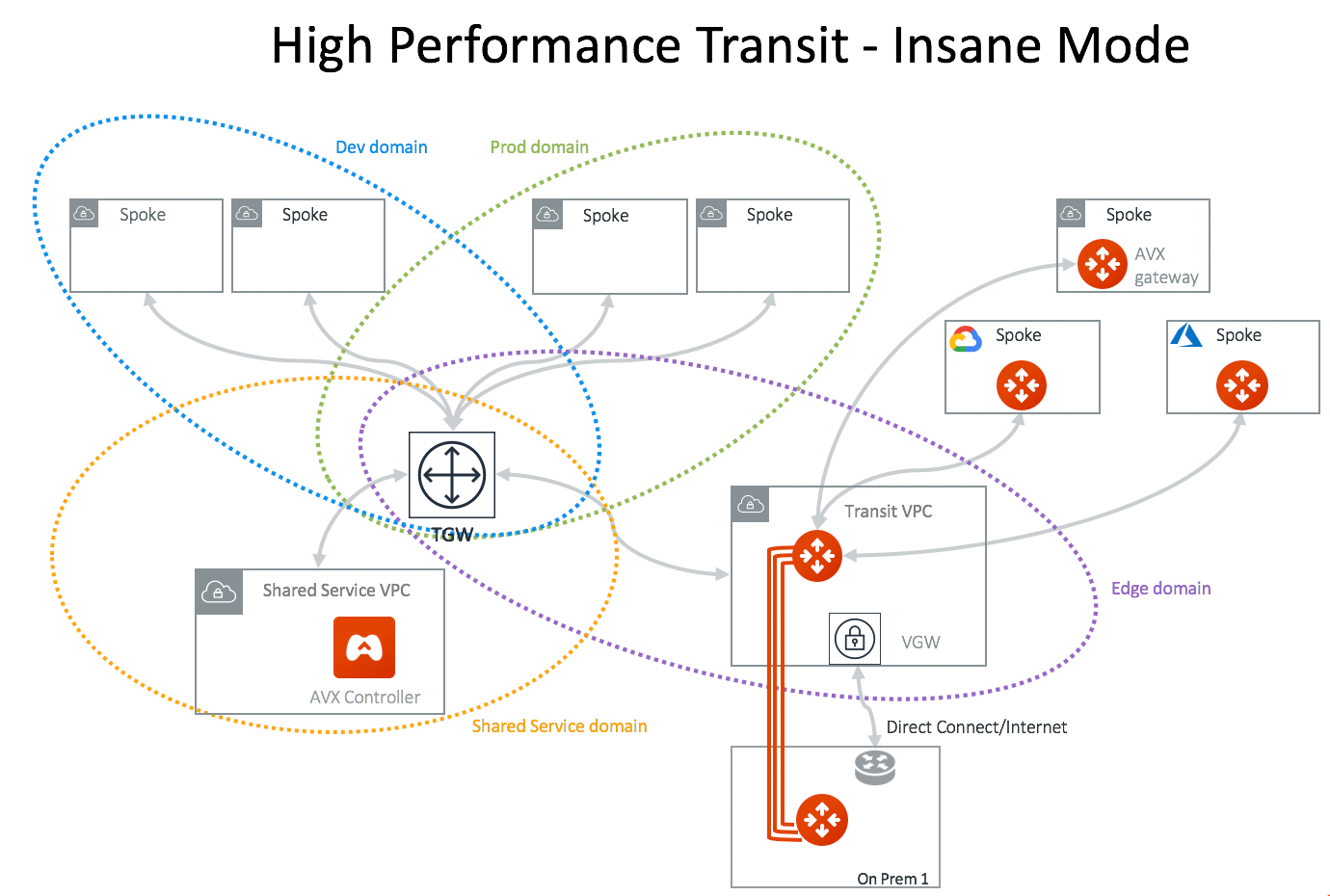
## High Performance Transit - High Performance Encryption (HPE) Mode
Deploy an Aviatrix hardware appliance on-prem to achieve 10Gbps Transit Network
throughput. Added benefit is that traffic over Direct Connect is encrypted.
You can configure
Egress Control Filter
, or configure
a DCF-based egress solution (preferred)
.
## High Performance Transit - High Performance Encryption (HPE) Mode
Deploy an Aviatrix hardware appliance on-prem to achieve 10Gbps Transit Network
throughput. Added benefit is that traffic over Direct Connect is encrypted.
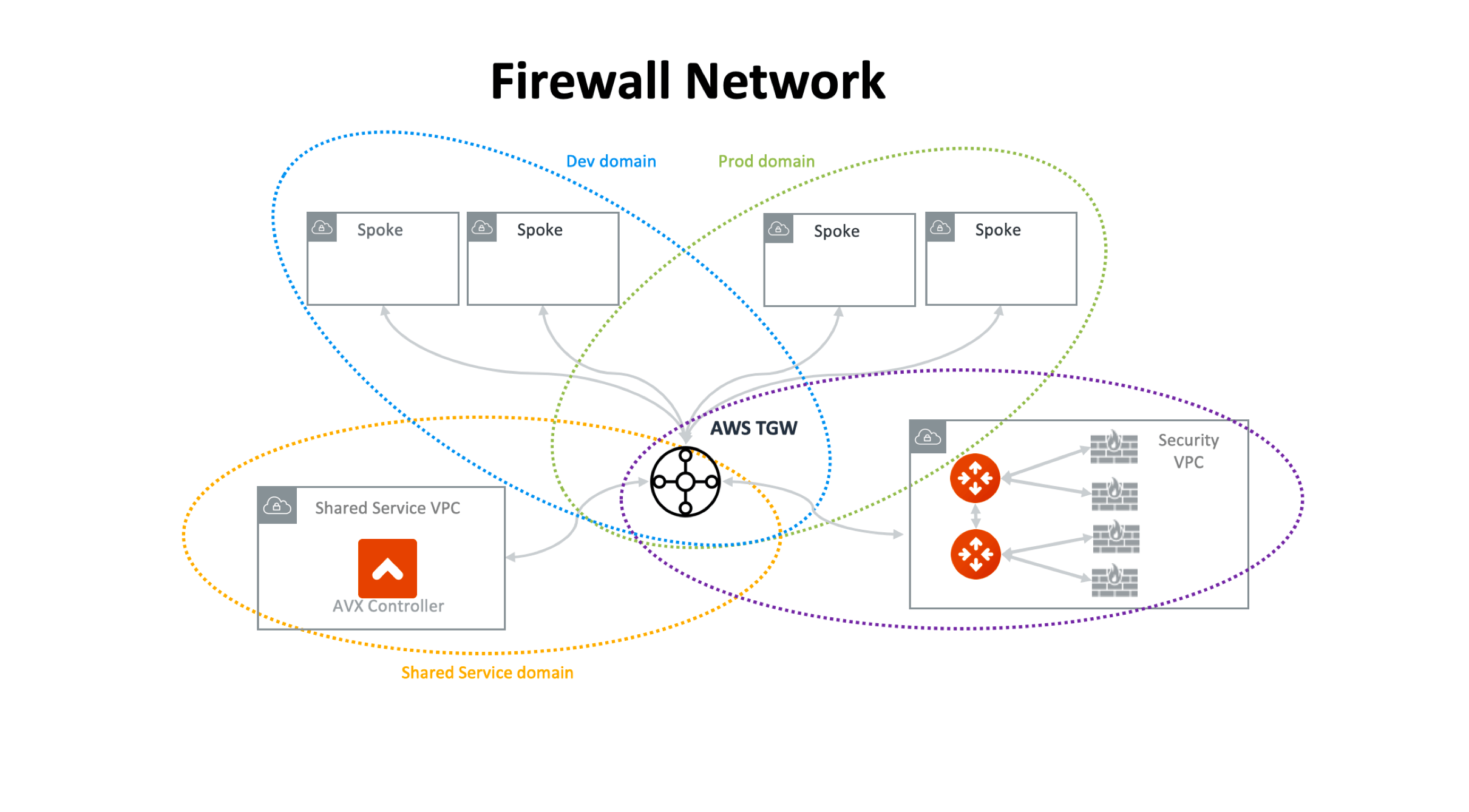
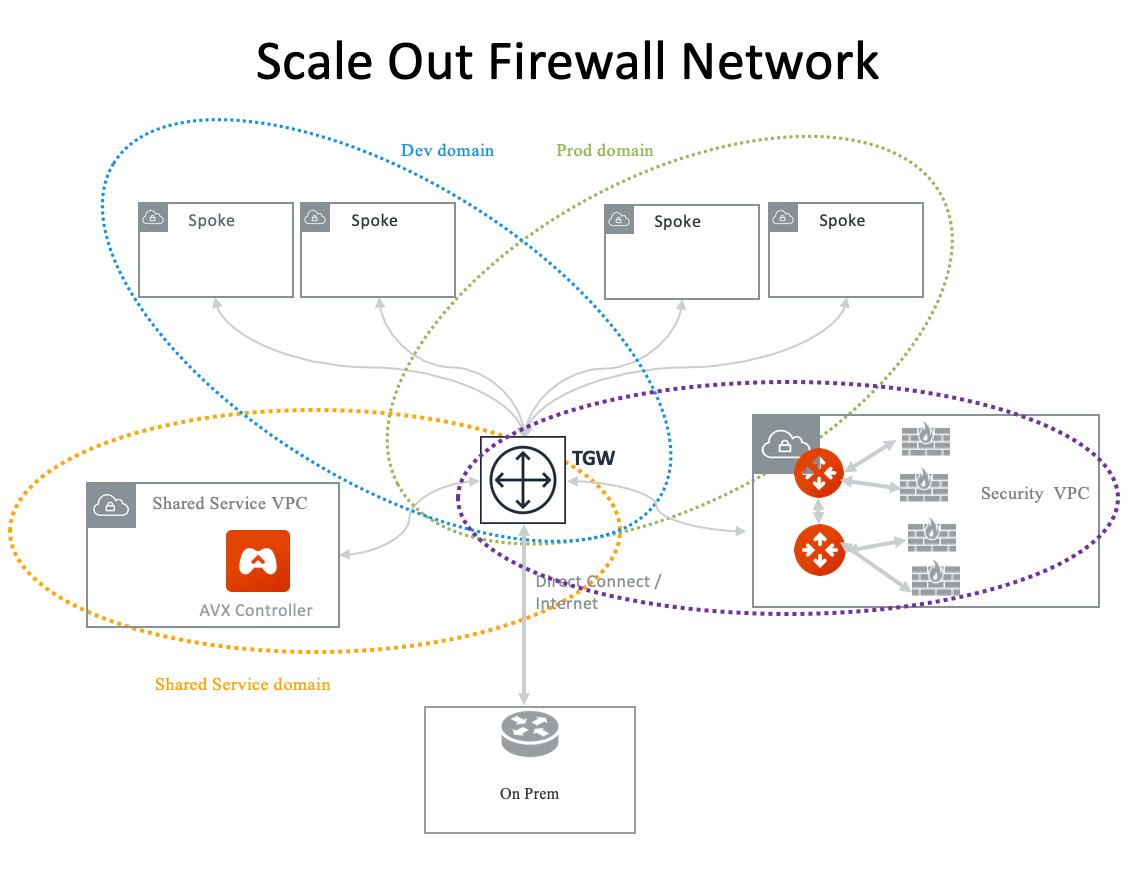
 ## Firewall Network
Simplify and scale your firewall deployment with Aviatrix Firewall Network
solution. For more information, see
Firewall Network Overview
.
## Firewall Network
Simplify and scale your firewall deployment with Aviatrix Firewall Network
solution. For more information, see
Firewall Network Overview
.
 ## TGW Native Hybrid Network
Aviatrix supports TGW VPN and TGW Direct Connect for connecting to remote site
or on-prem network, as shown in the diagram below.
## TGW Native Hybrid Network
Aviatrix supports TGW VPN and TGW Direct Connect for connecting to remote site
or on-prem network, as shown in the diagram below.
 ## Connecting to China Regions
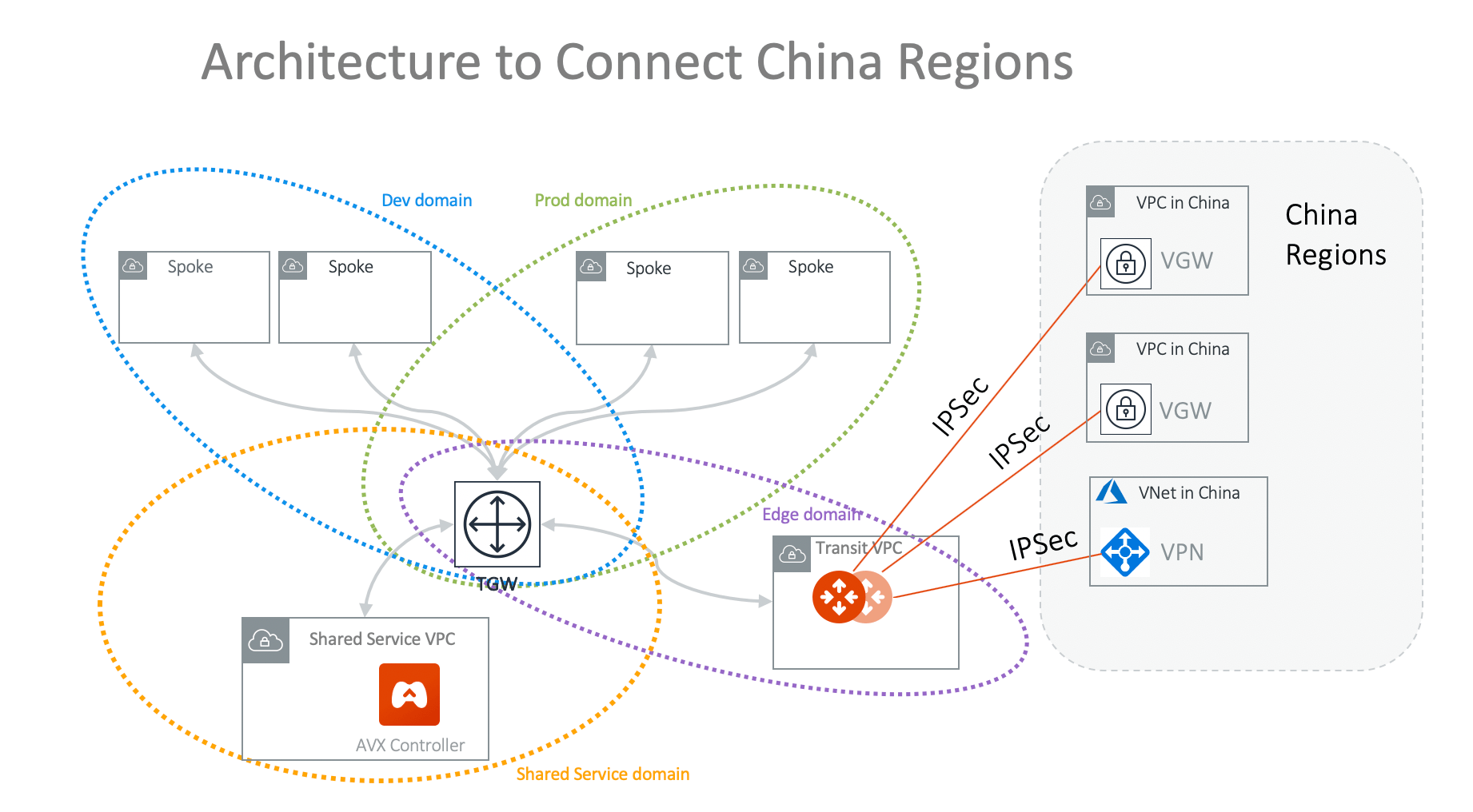
If the majority of deployment is outside China regions, the best way to connect
China region VPC or VNets are to use the cloud native AWS VGW or Azure VPN
gateway and connect them to Aviatrix Transit Gateway by IPsec tunnels, as shown
in the diagram below. This architecture applies to all other cloud providers
that have presence in China regions. On the Aviatrix side, use the option
[External Devices](https://legacy.docs.aviatrix.com/documentation/latest/network/transit-externaldevice-connect.html)
when making the connection.
## Connecting to China Regions
If the majority of deployment is outside China regions, the best way to connect
China region VPC or VNets are to use the cloud native AWS VGW or Azure VPN
gateway and connect them to Aviatrix Transit Gateway by IPsec tunnels, as shown
in the diagram below. This architecture applies to all other cloud providers
that have presence in China regions. On the Aviatrix side, use the option
[External Devices](https://legacy.docs.aviatrix.com/documentation/latest/network/transit-externaldevice-connect.html)
when making the connection.
 ## Connecting to Other Cloud Providers
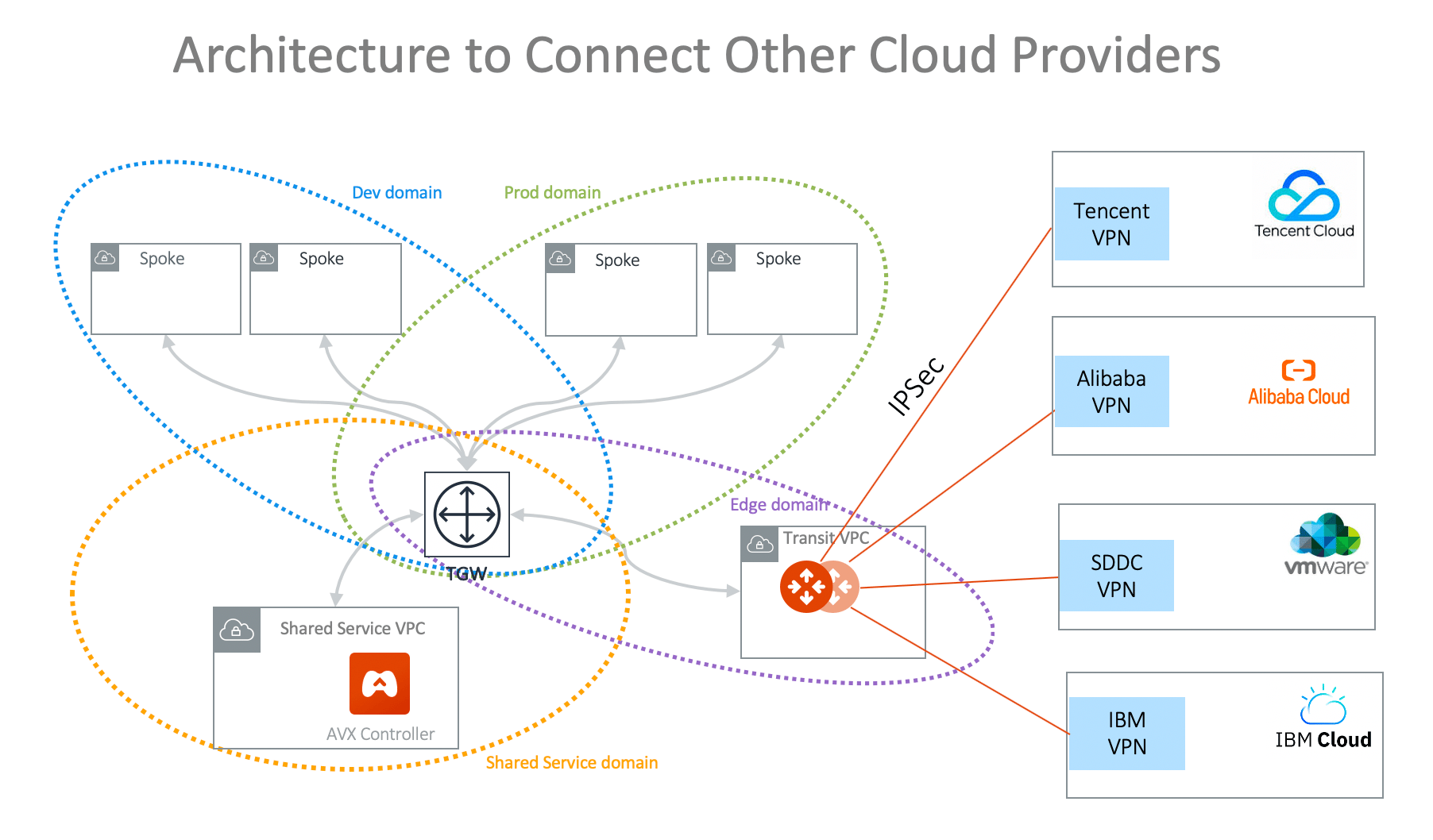
To connect any network of a cloud provider that is not AWS, Azure, GCP, and
Oracle Cloud, use the native VPN gateway of these cloud providers to build VPN
tunnels to the Aviatrix Transit Gateway to connect to the rest of the
deployment, as shown in the diagram below. On the Aviatrix side, use the option
[External Devices](https://legacy.docs.aviatrix.com/documentation/latest/network/transit-externaldevice-connect.html)
when making the connection.
## Connecting to Other Cloud Providers
To connect any network of a cloud provider that is not AWS, Azure, GCP, and
Oracle Cloud, use the native VPN gateway of these cloud providers to build VPN
tunnels to the Aviatrix Transit Gateway to connect to the rest of the
deployment, as shown in the diagram below. On the Aviatrix side, use the option
[External Devices](https://legacy.docs.aviatrix.com/documentation/latest/network/transit-externaldevice-connect.html)
when making the connection.
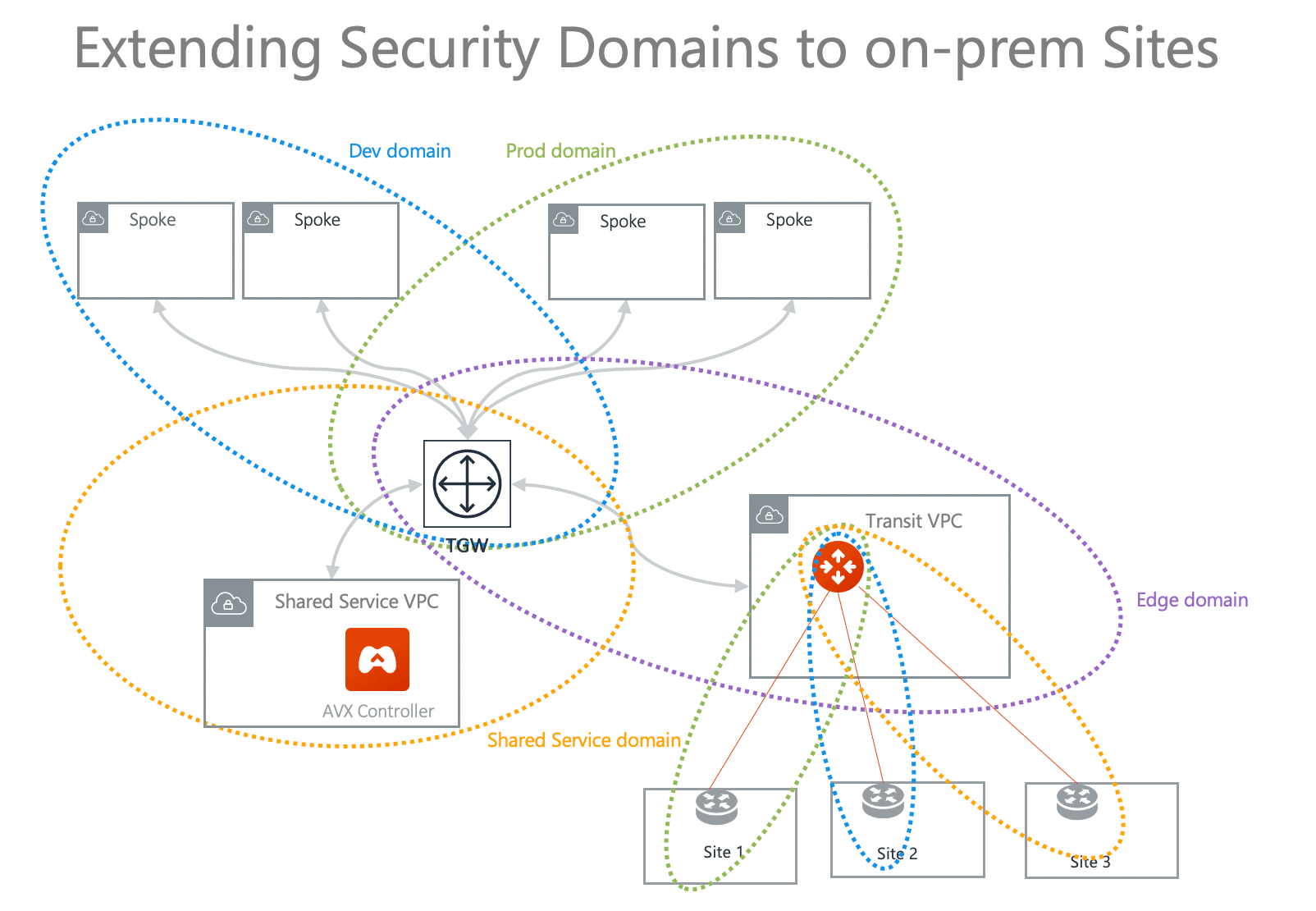
 ## Extending Network Domains to On-Prem Sites
If the Aviatrix Transit Gateway connects to multiple sites over IPsec or GRE
tunnels, the Network Domains can be extended to each site as shown below, where
Blue Domain in the cloud can only communicate with Site 2, Green Domain can only
communicate with Site 1. Routes are only advertised within the domain and data
traffic is segmented by the Network Domains.
## Extending Network Domains to On-Prem Sites
If the Aviatrix Transit Gateway connects to multiple sites over IPsec or GRE
tunnels, the Network Domains can be extended to each site as shown below, where
Blue Domain in the cloud can only communicate with Site 2, Green Domain can only
communicate with Site 1. Routes are only advertised within the domain and data
traffic is segmented by the Network Domains.