> ## Documentation Index
> Fetch the complete documentation index at: https://docs.aviatrix.com/llms.txt
> Use this file to discover all available pages before exploring further.
# Aviatrix Multicloud Transit Architecture for Azure
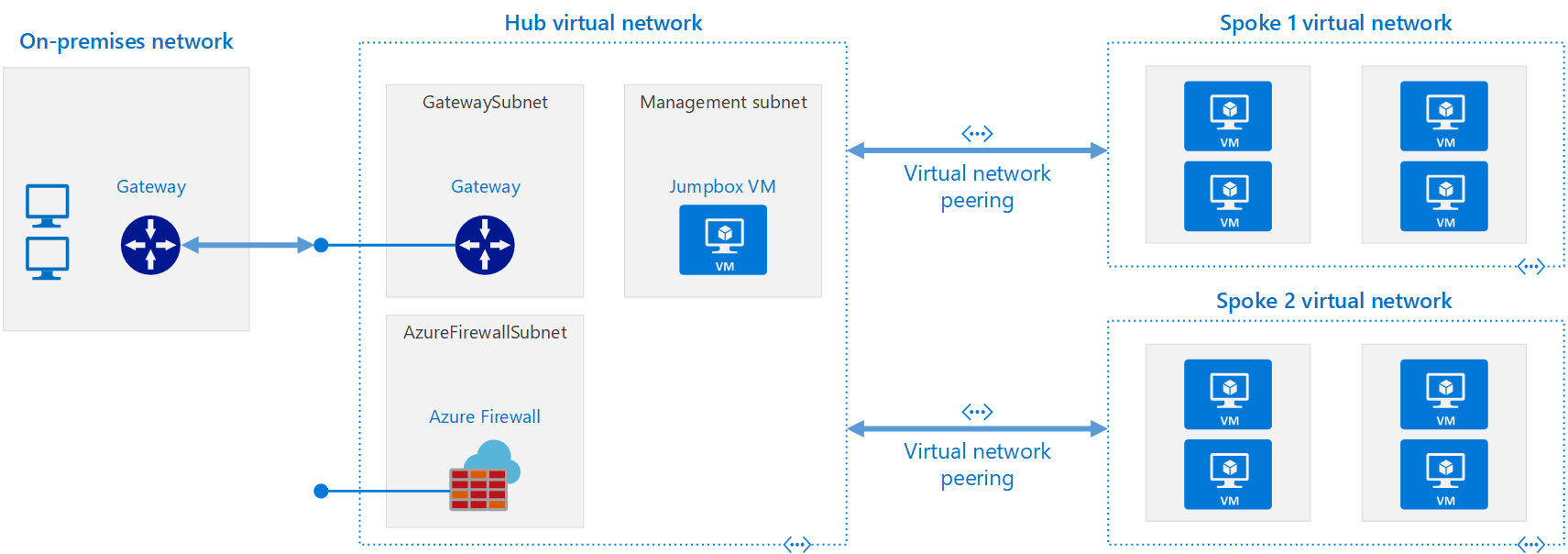
> The most common design topology within Azure is the Hub and Spoke model. The hub is a virtual network (VNet) in Azure that acts as a central point of connectivity to your on-premises network.
## Azure Native Transit
The most common design topology within Azure is the Hub and Spoke model. The hub
is a virtual network (VNet) in Azure that acts as a central point of
connectivity to your on-premises network. The spokes are VNets that peer with
the HUB and can be used to isolate workloads, departments, subscriptions, etc.
Traffic flows between the on-premises datacenter and the hub through an
ExpressRoute or VPN gateway connection. It is common in these environments for
spoke to spoke communication to be desired both within and across regions. To
facilitate spoke to spoke communication, Azure natively provides three methods
for performing this functionality. Each of these options has advantages and
disadvantages. These options can be used simultaneously for customers to apply
the right transit method for the desired outcome.
 ### Intra-Region Transitive Options:
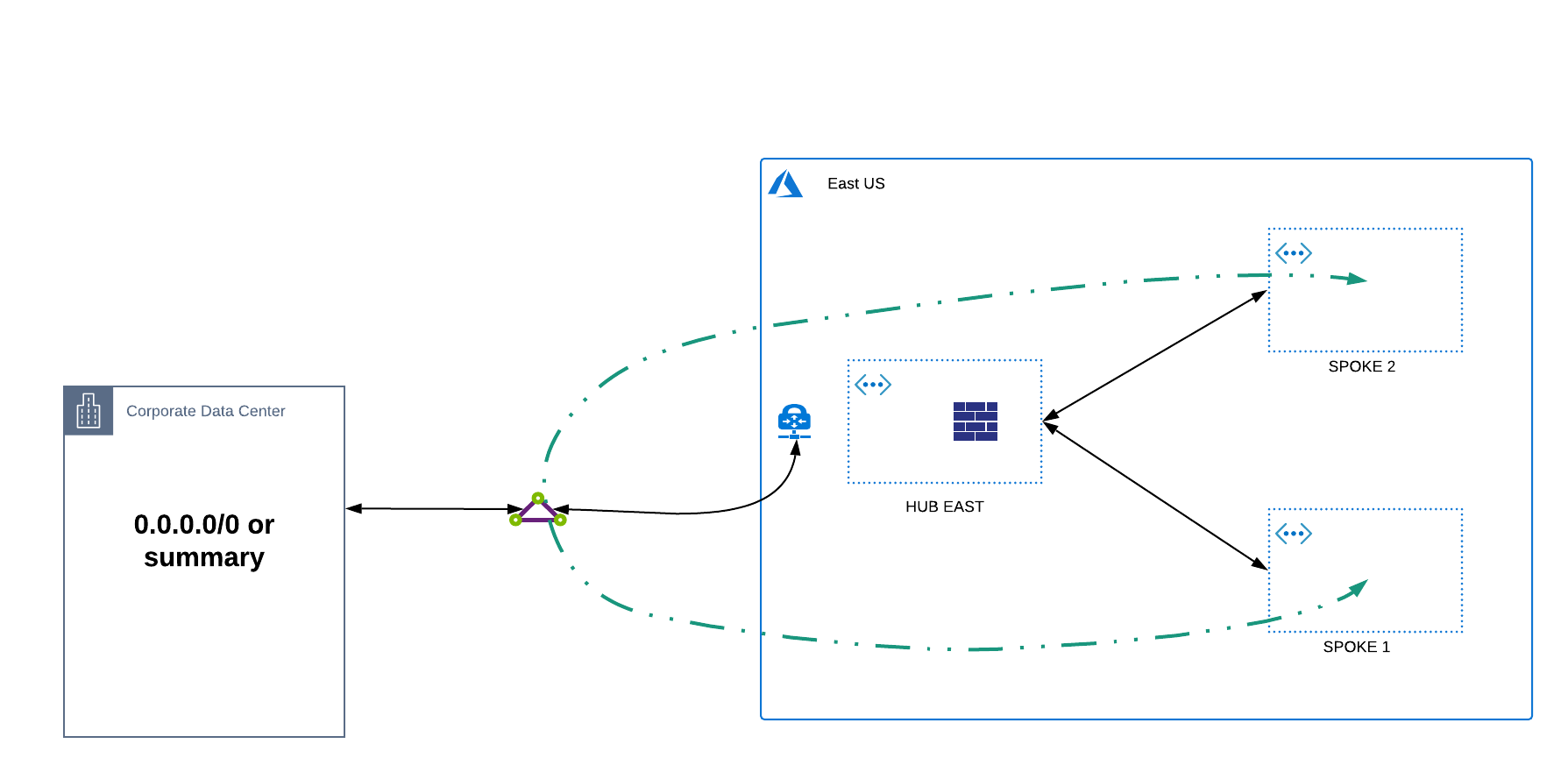
1. **Leveraging ExpressRoute** - the most common transitive method is for
customers to leverage their ExpressRoute circuits to provide spoke to spoke
communication. This method requires a default (0.0.0.0/0) or summary route to
be advertised from on-prem to allow spoke to spoke traffic to hairpin off the
Microsoft Edge Routers. The advantage to this method is that this traffic
will not incur VNET peering charges and this provides any to any spoke
connectivity. The disadvantage to this approach is that bandwidth is limited
by the ExpressRoute gateway SKU, traffic takes a longer path from spoke to
spoke, a lack of granular control as this method provides any to any
communication, and the fact that this is not a recommended approach as there
is no dedicated bandwidth allocation on the Microsoft Edge Routers for this
configuration.
### Intra-Region Transitive Options:
1. **Leveraging ExpressRoute** - the most common transitive method is for
customers to leverage their ExpressRoute circuits to provide spoke to spoke
communication. This method requires a default (0.0.0.0/0) or summary route to
be advertised from on-prem to allow spoke to spoke traffic to hairpin off the
Microsoft Edge Routers. The advantage to this method is that this traffic
will not incur VNET peering charges and this provides any to any spoke
connectivity. The disadvantage to this approach is that bandwidth is limited
by the ExpressRoute gateway SKU, traffic takes a longer path from spoke to
spoke, a lack of granular control as this method provides any to any
communication, and the fact that this is not a recommended approach as there
is no dedicated bandwidth allocation on the Microsoft Edge Routers for this
configuration.
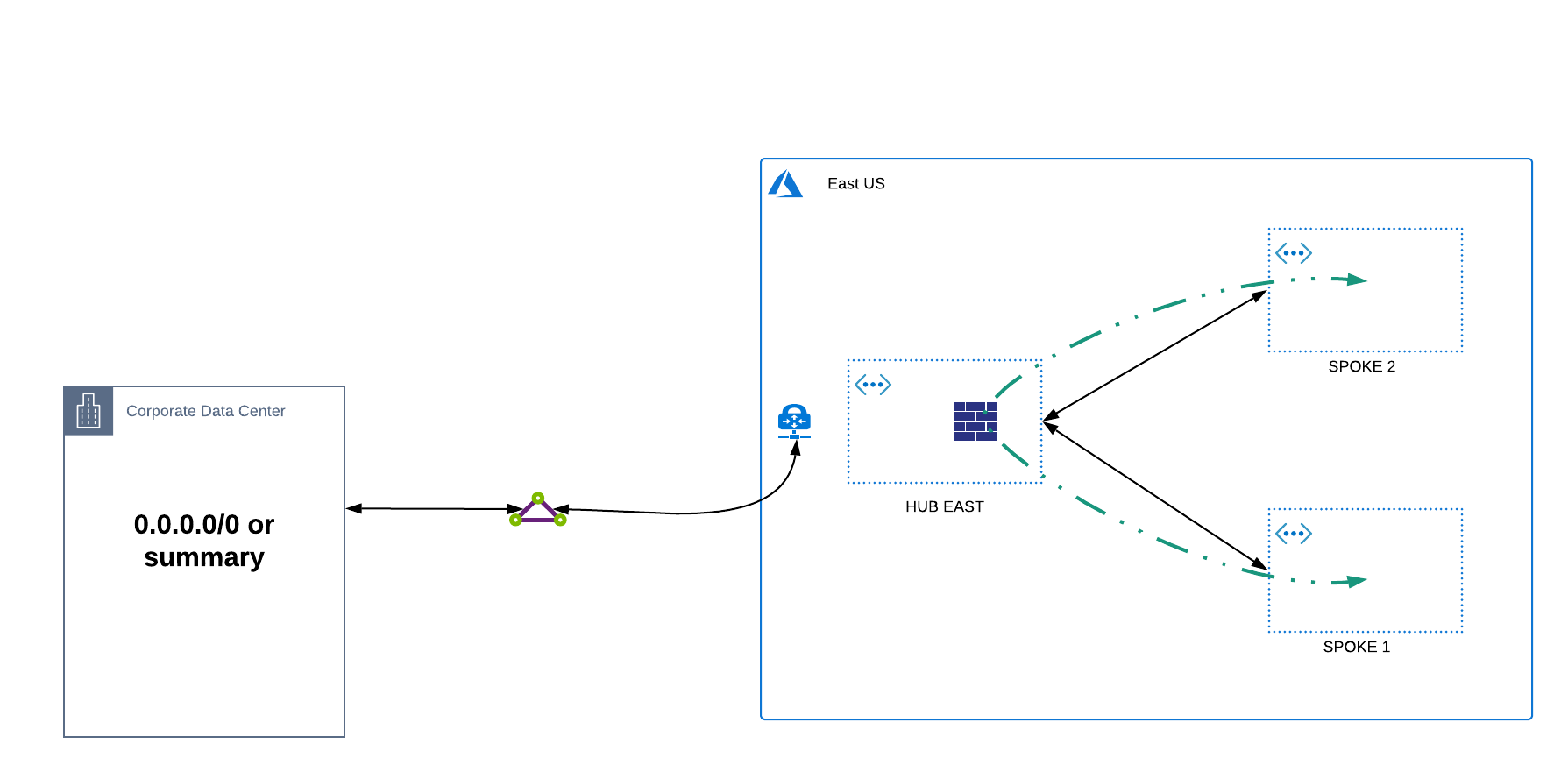
 2. **Leveraging a HUB Network Virtual Appliance (NVA)** - in this option, an NVA
is deployed in the HUB VNET and User Defined Routes (UDRs) are created in
each spoke to route traffic from spoke to spoke. The advantage to this
approach is that traffic takes a more ideal path, does not require any route
advertisements from on-premises, and potentially provides additional security
functionality depending upon the NVA being leveraged. The disadvantage to
this approach comes with the management of UDRs at scale, potential bandwidth
limits of the NVA itself, and the configuration of NVA high availability (HA)
to ensure redundancy in case of failure.
2. **Leveraging a HUB Network Virtual Appliance (NVA)** - in this option, an NVA
is deployed in the HUB VNET and User Defined Routes (UDRs) are created in
each spoke to route traffic from spoke to spoke. The advantage to this
approach is that traffic takes a more ideal path, does not require any route
advertisements from on-premises, and potentially provides additional security
functionality depending upon the NVA being leveraged. The disadvantage to
this approach comes with the management of UDRs at scale, potential bandwidth
limits of the NVA itself, and the configuration of NVA high availability (HA)
to ensure redundancy in case of failure.
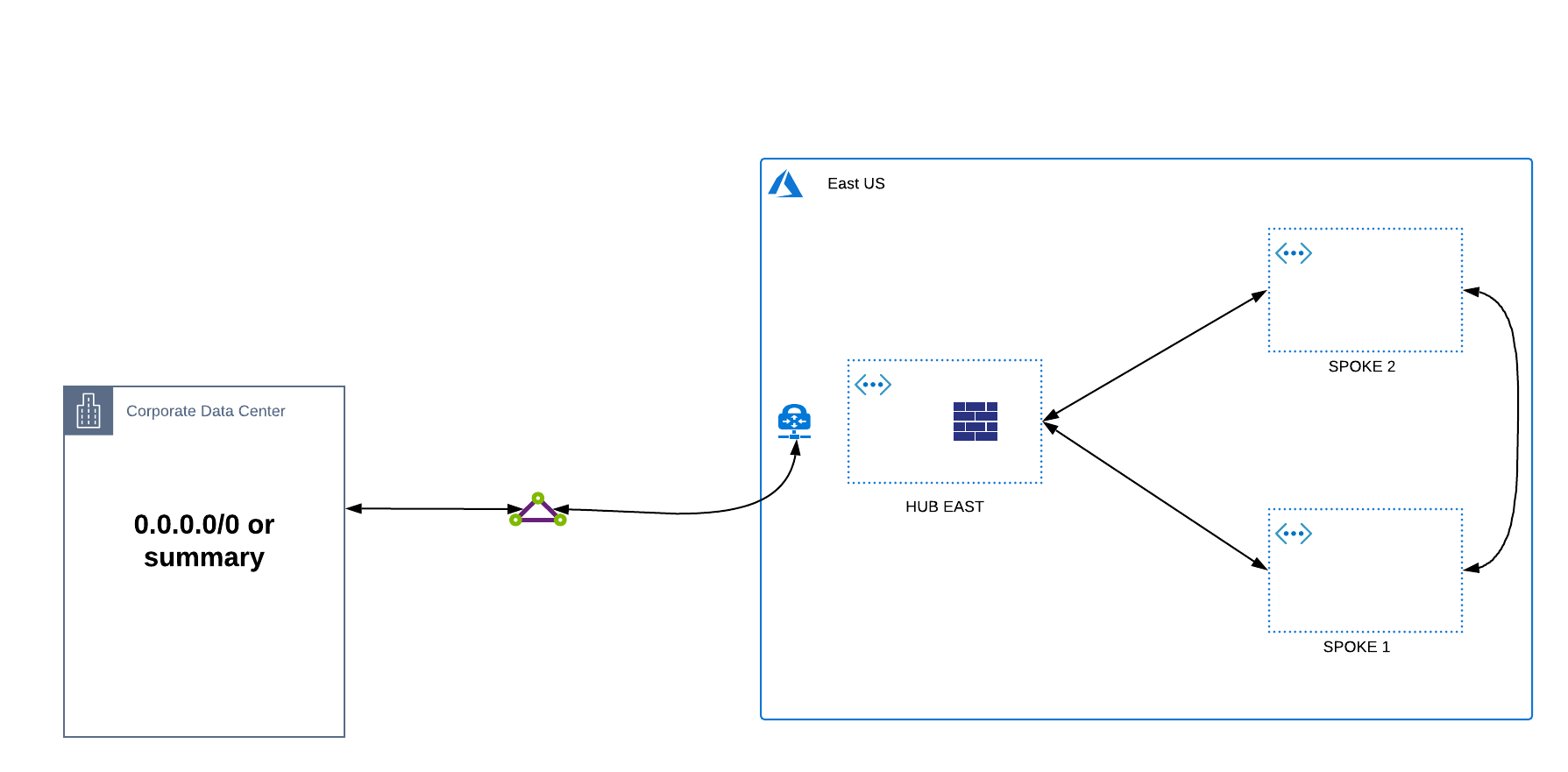
 3. **VNET Peering** - the recommended approach for spoke to spoke communication
is VNET peering as this leverages the MSFT backbone directly and always takes
the preferred path. This option provides the lowest latency possible and has
no bandwidth restrictions as opposed to the options previously discussed. The
disadvantage of this model is this connectivity is a 1 to 1 mapping. Each
spoke much be peered directly with another spoke in order to facilitate
communication which at scale becomes a web of interconnected fully meshed
VNETS. As such, customers often have challenges in managing the scale of VNET
peers.
3. **VNET Peering** - the recommended approach for spoke to spoke communication
is VNET peering as this leverages the MSFT backbone directly and always takes
the preferred path. This option provides the lowest latency possible and has
no bandwidth restrictions as opposed to the options previously discussed. The
disadvantage of this model is this connectivity is a 1 to 1 mapping. Each
spoke much be peered directly with another spoke in order to facilitate
communication which at scale becomes a web of interconnected fully meshed
VNETS. As such, customers often have challenges in managing the scale of VNET
peers.
 ### Inter-Region Transitive Options:
The options for spoke to spoke communication across regions follow the same
patterns above with a few notable nuances.
1. **Leveraging ExpressRoute** - this method is similar to what was described in
Intra-Region however, as ExpressRoute circuits are terminated across regions
the routes are propagated automatically. To facilitate cross region spoke to
spoke communication, no summary or default route is required. The same
advantages and disadvantages apply.
2. **Leveraging a HUB Network Virtual Appliance (NVA)** - this method is also
similar to what was previously described however, the number of UDRs
increases as additional routes must be defined in the HUB VNETs to facilitate
routing across regions to another HUB. Additionally, a VNET peer must be
leveraged between the HUB to facilitate this HUB to HUB transit path.
3. **VNET Peering** - the only change in VNET peering across regions is in
naming convention. Microsoft refers to this as Global VNET Peering but still
has the same advantages and disadvantages previously discussed.
Azure Virtual WAN is another native architectural approach which can also
provide transitive functionality. Aviatrix Transit can integrate with Azure
Virtual WAN and is not covered in detail here.
## Aviatrix Transit for Azure
Aviatrix Transit for Azure is an architecture to interconnect multiple VNets and
on-prem leveraging the hub and spoke deployment model while adding additional
functionality and features. This deployment is shown in the diagram below.
### Inter-Region Transitive Options:
The options for spoke to spoke communication across regions follow the same
patterns above with a few notable nuances.
1. **Leveraging ExpressRoute** - this method is similar to what was described in
Intra-Region however, as ExpressRoute circuits are terminated across regions
the routes are propagated automatically. To facilitate cross region spoke to
spoke communication, no summary or default route is required. The same
advantages and disadvantages apply.
2. **Leveraging a HUB Network Virtual Appliance (NVA)** - this method is also
similar to what was previously described however, the number of UDRs
increases as additional routes must be defined in the HUB VNETs to facilitate
routing across regions to another HUB. Additionally, a VNET peer must be
leveraged between the HUB to facilitate this HUB to HUB transit path.
3. **VNET Peering** - the only change in VNET peering across regions is in
naming convention. Microsoft refers to this as Global VNET Peering but still
has the same advantages and disadvantages previously discussed.
Azure Virtual WAN is another native architectural approach which can also
provide transitive functionality. Aviatrix Transit can integrate with Azure
Virtual WAN and is not covered in detail here.
## Aviatrix Transit for Azure
Aviatrix Transit for Azure is an architecture to interconnect multiple VNets and
on-prem leveraging the hub and spoke deployment model while adding additional
functionality and features. This deployment is shown in the diagram below.
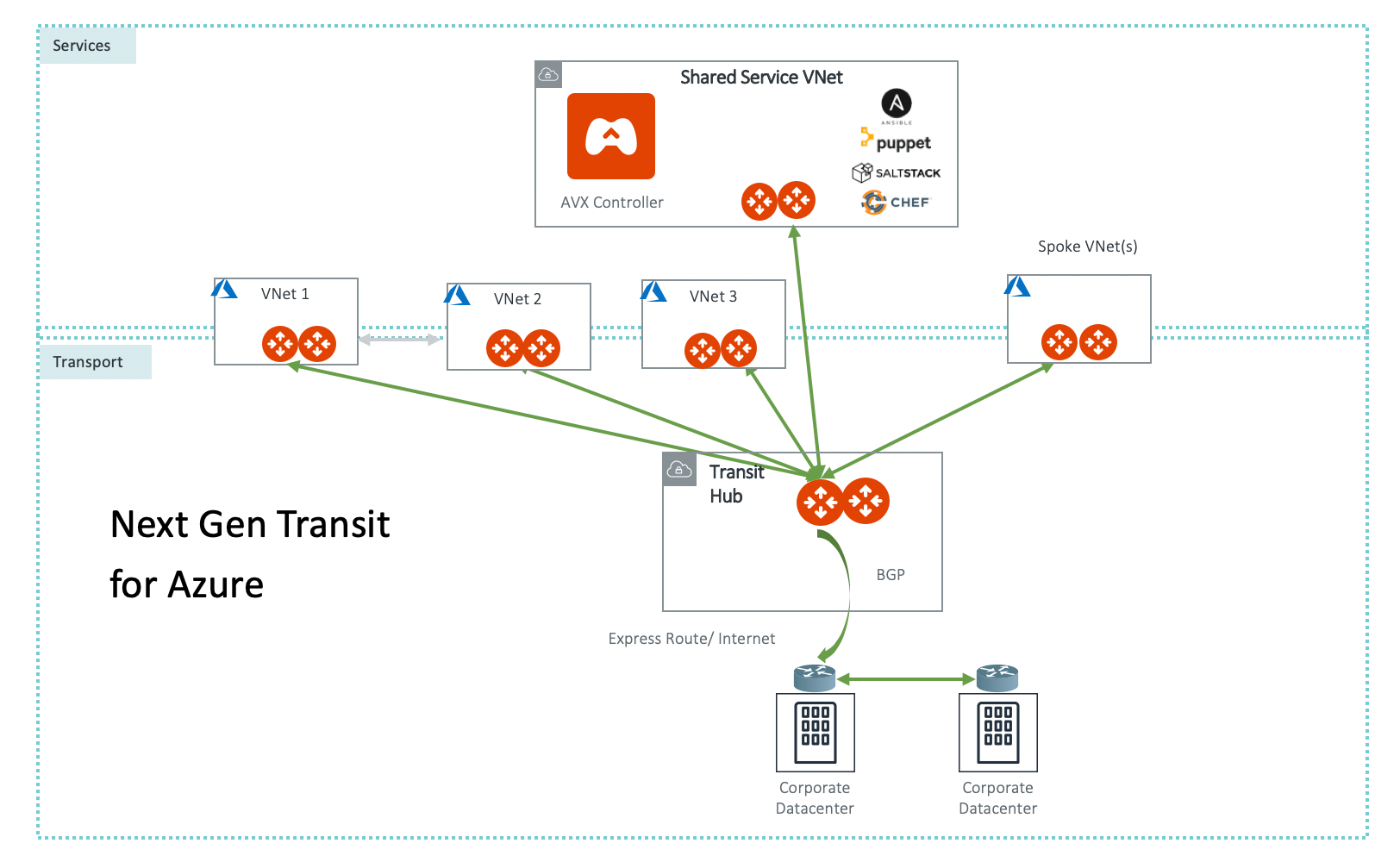 In the above diagram, the Aviatrix Controller is a VM that manages all
networking connections from VNETs to on-prem as well as between VNETs
themselves. It deploys one Aviatrix gateway (two for redundancy) in each VNet.
The Transit gateway is deployed in the transit VNet and connects to on-prem over
Express Route or Internet. The Transit Gateway is then peered to each spoke VNET
gateway to provide end to end communication. Communication can be granularly
controlled to provide any to any communication between the spokes and to/from
on-prem however, the transit gateway can also block certain traffic to keep
spokes isolated. Additionally, all Spoke UDRs are orchestrated from the
controller based on desired traffic flows.
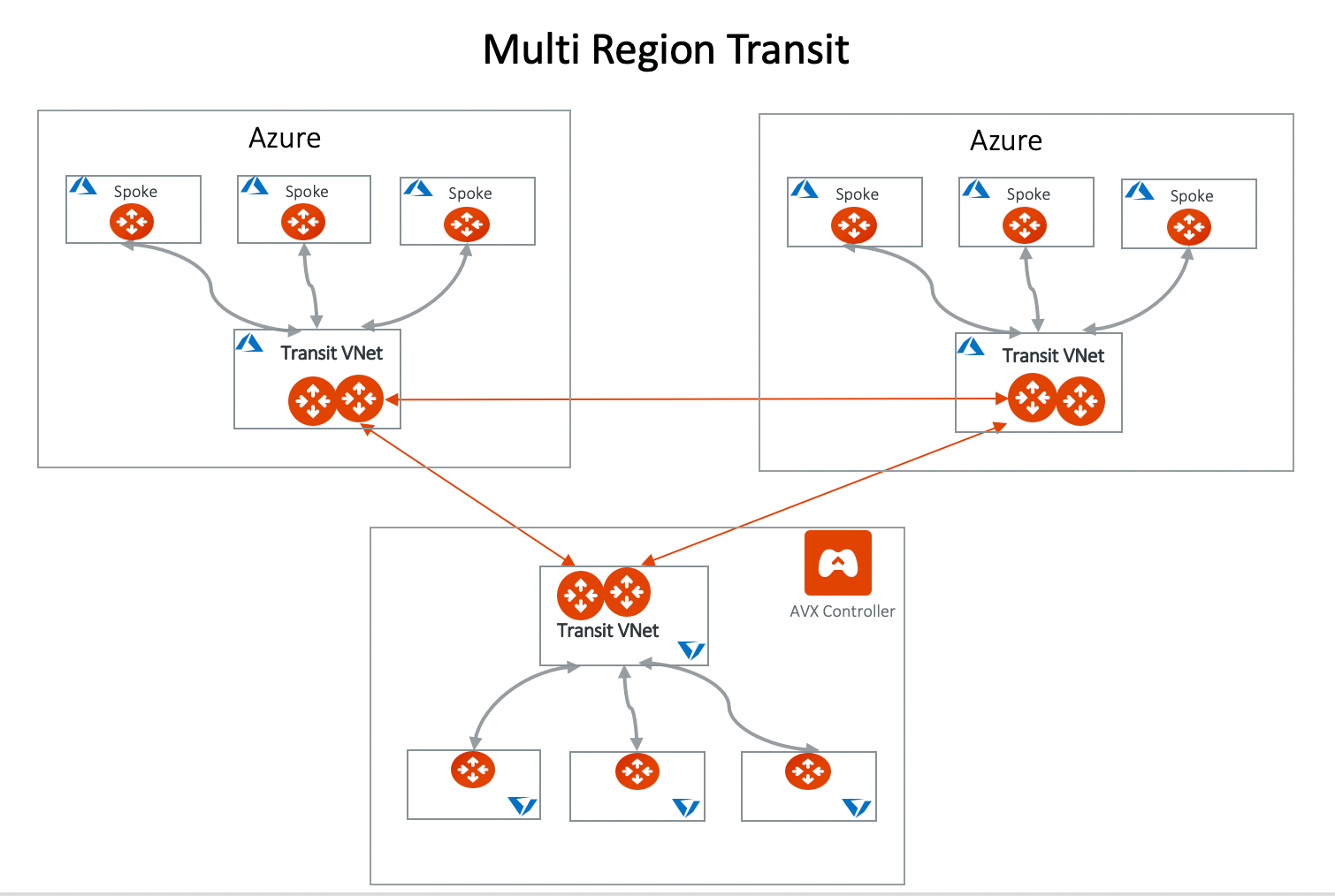
For cross region communication, multiple Transit Gateways can also be
interconnected. Spoke VNets can communicate to remote Spoke VNets through the
two connected Transit Gateways with the same granular controls mentioned
previously. Additionally, route advertisements between the two transit gateways
can be controlled to provide additional functionality like summarization, route
exclusion, etc. This topology is depicted below.
In the above diagram, the Aviatrix Controller is a VM that manages all
networking connections from VNETs to on-prem as well as between VNETs
themselves. It deploys one Aviatrix gateway (two for redundancy) in each VNet.
The Transit gateway is deployed in the transit VNet and connects to on-prem over
Express Route or Internet. The Transit Gateway is then peered to each spoke VNET
gateway to provide end to end communication. Communication can be granularly
controlled to provide any to any communication between the spokes and to/from
on-prem however, the transit gateway can also block certain traffic to keep
spokes isolated. Additionally, all Spoke UDRs are orchestrated from the
controller based on desired traffic flows.
For cross region communication, multiple Transit Gateways can also be
interconnected. Spoke VNets can communicate to remote Spoke VNets through the
two connected Transit Gateways with the same granular controls mentioned
previously. Additionally, route advertisements between the two transit gateways
can be controlled to provide additional functionality like summarization, route
exclusion, etc. This topology is depicted below.
 Another important advantage of using Aviatrix Transit is that all communications
are encrypted by default providing additional levels of security. Azure does not
provide any native encryption across the Microsoft Backbone and depends upon
third party NVAs to provide this functionality should customers require it.
The Aviatrix Controller also has the ability to orchestrate native VNET peering
for Azure VNETs should customers not wish to deploy gateways within spoke VNETs.
While customers will lose the encryption and visibility benefits across these
links, all appropriate UDRs will be orchestrated to facilitate transitive
communication as desired. It is also important to note that certain native
limitations may apply as to the number of peerings allowed as well as
restrictions to overlapping IP space when native peering is leveraged.
Another important advantage of using Aviatrix Transit is that all communications
are encrypted by default providing additional levels of security. Azure does not
provide any native encryption across the Microsoft Backbone and depends upon
third party NVAs to provide this functionality should customers require it.
The Aviatrix Controller also has the ability to orchestrate native VNET peering
for Azure VNETs should customers not wish to deploy gateways within spoke VNETs.
While customers will lose the encryption and visibility benefits across these
links, all appropriate UDRs will be orchestrated to facilitate transitive
communication as desired. It is also important to note that certain native
limitations may apply as to the number of peerings allowed as well as
restrictions to overlapping IP space when native peering is leveraged.
 ## Why do I need Aviatrix Transit for Azure?
Transit architecture is about building connectivity between cloud and on-prem in
the most agile manner possible. In the Transit architecture, there is one
connection (not including the backup) between on-premises and a Transit Hub
VNet. Everything else (the Spoke VNet to on-prem traffic) is routed through the
Transit Hub VNet.
The alternative to Transit architecture is to leverage the native options
already mentioned or is to build one connection (often referred to as "flat"
architecture), either IPSEC over Internet or Express Route, each time you spin
up a new VNet in Azure. This requires changes at the on-premises edge, which
requires a change control process that takes from days to weeks. Additionally,
this method often facilitates the default any to any connectivity which may
require additional configuration to prevent.
## The Benefits of Aviatrix Transit for Azure
* **Simplicity** The Aviatrix Controller provides an abstraction layer and
workflow to build the Transit network. You do not need to program any Azure
route tables, manage the route entries or understand the significant details
about Azure networking.
* **Multi Subscriptions Support** The Controller provides a single pane of glass
to manage the entire cloud network of multiple Azure subscriptions.
* **Logging Service Integration** Out-of-the-box integration with Splunk, Sumo
Logic, DataDog, ELK, remote syslog and Netflow.
* **Visibility** View connectivity status, network latency and traffic
statistics from a central dashboard.
* **Granular Routing Control** Route redistribution can be controlled to
selectively allow specific route propagation and/or summarization.
* **Advanced Networking Features** Support for Network Address Translation, NGFW
Insertion, Egress FQDN filtering (Legacy), etc.
* **No Route Limits** The Aviatrix solution auto summarizes the on-prem and
Spoke VNet routes so that Spoke VNet route entries do not exceed the route
limits.
* **End-to-End Encryption** All traffic in flight, between Spoke VNets and
between Spoke to on-prem, is encrypted.
## How does it work?
Aviatrix Transit Network is a Duo Mode architecture. While the Transit Gateway
runs BGP protocol, advertising Spoke VNets CIDRs to an on-prem network and
learning the on-prem network CIDRs, Spoke VNets do not run dynamic routing
protocols. Learned routes by the Transit Gateway are reported to the Controller
which in turn propagate to the Spoke VNets. By minimizing dynamic protocol
running in the network, operations and troubleshooting become simple. CloudOps
engineers without extensive networking background are able to build and manage
the network.
## How do I deploy it?
The Aviatrix Controller is available in the Azure Marketplace.
1. Follow the Azure Startup Guide
to launch the Controller.
2. Follow the onboarding steps to set up Azure API credentials so that the
Controller can launch gateways on behalf of the Azure account.
3. Select the use case Next-Gen Transit Network and follow the
workflow
to start building the transit network.
## Why do I need Aviatrix Transit for Azure?
Transit architecture is about building connectivity between cloud and on-prem in
the most agile manner possible. In the Transit architecture, there is one
connection (not including the backup) between on-premises and a Transit Hub
VNet. Everything else (the Spoke VNet to on-prem traffic) is routed through the
Transit Hub VNet.
The alternative to Transit architecture is to leverage the native options
already mentioned or is to build one connection (often referred to as "flat"
architecture), either IPSEC over Internet or Express Route, each time you spin
up a new VNet in Azure. This requires changes at the on-premises edge, which
requires a change control process that takes from days to weeks. Additionally,
this method often facilitates the default any to any connectivity which may
require additional configuration to prevent.
## The Benefits of Aviatrix Transit for Azure
* **Simplicity** The Aviatrix Controller provides an abstraction layer and
workflow to build the Transit network. You do not need to program any Azure
route tables, manage the route entries or understand the significant details
about Azure networking.
* **Multi Subscriptions Support** The Controller provides a single pane of glass
to manage the entire cloud network of multiple Azure subscriptions.
* **Logging Service Integration** Out-of-the-box integration with Splunk, Sumo
Logic, DataDog, ELK, remote syslog and Netflow.
* **Visibility** View connectivity status, network latency and traffic
statistics from a central dashboard.
* **Granular Routing Control** Route redistribution can be controlled to
selectively allow specific route propagation and/or summarization.
* **Advanced Networking Features** Support for Network Address Translation, NGFW
Insertion, Egress FQDN filtering (Legacy), etc.
* **No Route Limits** The Aviatrix solution auto summarizes the on-prem and
Spoke VNet routes so that Spoke VNet route entries do not exceed the route
limits.
* **End-to-End Encryption** All traffic in flight, between Spoke VNets and
between Spoke to on-prem, is encrypted.
## How does it work?
Aviatrix Transit Network is a Duo Mode architecture. While the Transit Gateway
runs BGP protocol, advertising Spoke VNets CIDRs to an on-prem network and
learning the on-prem network CIDRs, Spoke VNets do not run dynamic routing
protocols. Learned routes by the Transit Gateway are reported to the Controller
which in turn propagate to the Spoke VNets. By minimizing dynamic protocol
running in the network, operations and troubleshooting become simple. CloudOps
engineers without extensive networking background are able to build and manage
the network.
## How do I deploy it?
The Aviatrix Controller is available in the Azure Marketplace.
1. Follow the Azure Startup Guide
to launch the Controller.
2. Follow the onboarding steps to set up Azure API credentials so that the
Controller can launch gateways on behalf of the Azure account.
3. Select the use case Next-Gen Transit Network and follow the
workflow
to start building the transit network.