> ## Documentation Index
> Fetch the complete documentation index at: https://docs.aviatrix.com/llms.txt
> Use this file to discover all available pages before exploring further.
# Enabling GCP Global VPC Routing
> GCP Global VPC creates regional awareness between the VPC and Aviatrix gateways, letting you restrict spoke gateway traffic to transit gateways in the same region as the spoke gateway and, starting with Controller 10.1, configure a distinct egress mode for each region.
## Overview
GCP Global VPC creates regional awareness between the VPC and Aviatrix gateways,
allowing you to restrict spoke gateway traffic to transit gateways in the same
region as the spoke gateway. Without global VPC, communications between spokes
over transit in the same region are routed outside the region. Regional
awareness is achieved by appending regional network tags to virtual machines and
adding regional routes to the gateways in the routing table using tags.
If you use a **Regional VPC** (Global VPC disabled) with **Single IP SNAT** on
a spoke gateway, Controller **9.0** and later supports tagless default routes,
allowing serverless and untagged workloads egress through the gateway. See{" "}
GCP Spoke Single IP SNAT and Tagless Default Routes (Regional VPC)
.
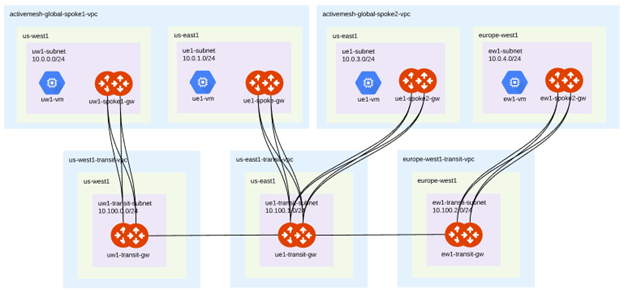
Global VPC enabled spokes can be deployed in a single region, multi-region, or
hybrid configuration to segment your workload traffic by region. A multi-region
spoke VPC is a spoke VPC that has a pair of spokes in each region where
workloads are deployed.
**Multi-Region Spoke VPC**
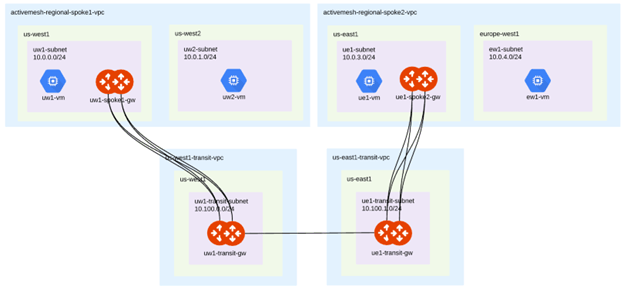
 A regional spoke VPC is a spoke VPC with a unique group of spoke gateways, and
workloads in one or more individual regions. Workloads outside the spoke gateway
region can exit the VPC through the spoke gateways using Global VPC global
routing tables. Starting with Controller **10.1**, you can also configure a
distinct egress mode independently for each region: FireNet, local egress with
SNAT/DNAT/FQDN filtering, Single IP SNAT, or customized SNAT. See
[Configuring Regional Spoke Egress Mode](#configuring-regional-spoke-egress-mode).
**Regional Spoke VPC**
A regional spoke VPC is a spoke VPC with a unique group of spoke gateways, and
workloads in one or more individual regions. Workloads outside the spoke gateway
region can exit the VPC through the spoke gateways using Global VPC global
routing tables. Starting with Controller **10.1**, you can also configure a
distinct egress mode independently for each region: FireNet, local egress with
SNAT/DNAT/FQDN filtering, Single IP SNAT, or customized SNAT. See
[Configuring Regional Spoke Egress Mode](#configuring-regional-spoke-egress-mode).
**Regional Spoke VPC**
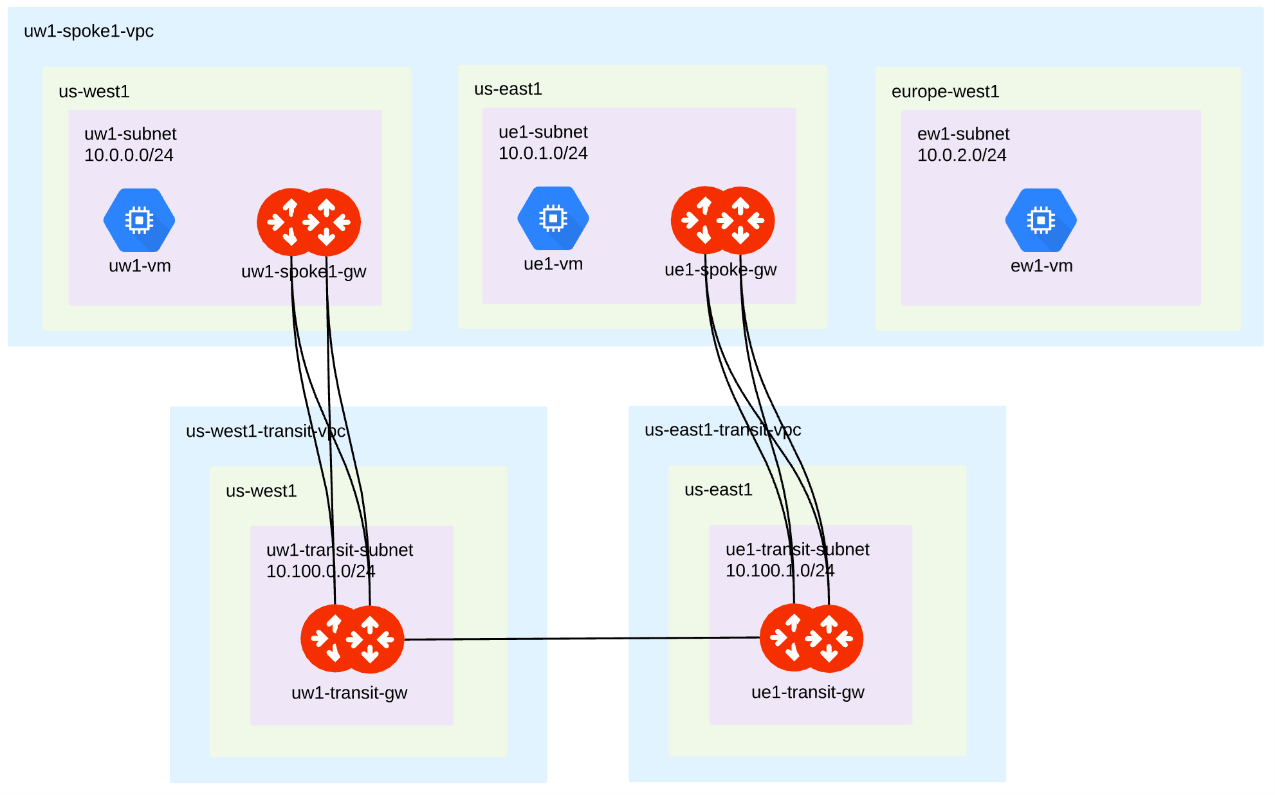
 You can deploy a hybrid configuration where the spoke VPC has more than one pair
of spoke gateways, and workloads in a region with no spoke gateways. Workloads
can communicate with other workloads in the same VPC, but they cannot
communicate outside the VPC using the Aviatrix transit gateway. In this example,
the region's gateways need to manually advertise subnets without gateways using
the
[custom spoke advertise CIDR](https://legacy.docs.aviatrix.com/documentation/latest/network/spoke-gateway-route-settings.html?expand=true#cust-spoke-advertised-cidrs)
feature so that if the subnets are advertised, the tagging is performed.
**Hybrid Spoke VPC**
You can deploy a hybrid configuration where the spoke VPC has more than one pair
of spoke gateways, and workloads in a region with no spoke gateways. Workloads
can communicate with other workloads in the same VPC, but they cannot
communicate outside the VPC using the Aviatrix transit gateway. In this example,
the region's gateways need to manually advertise subnets without gateways using
the
[custom spoke advertise CIDR](https://legacy.docs.aviatrix.com/documentation/latest/network/spoke-gateway-route-settings.html?expand=true#cust-spoke-advertised-cidrs)
feature so that if the subnets are advertised, the tagging is performed.
**Hybrid Spoke VPC**
 ## Enabling and Disabling GCP Global VPC
When global VPC is enabled, the spoke only advertises its own region to the
transit network. It also makes changes to the routing tables and virtual machine
tags to make the RFC 1918 traffic regional to the gateway.
You can enable and disable global VPC on spokes that are already part of a
Transit FireNet deployment.
To enable Global VPC tag routing:
1. Go to **Cloud Fabric > Gateways > Spoke Gateways >** and select the gateway
to be configured.
2. Select the gateway in the Edit Spoke Gateway window and click the Edit icon.
3. Use the **Global VPC** button Gateway to turn Global VPC on or off for the
selected gateway region.
4. Click **Save** to save your spoke gateway configuration changes.
## Tagging GCP Global VPC Spoke Gateways
You can add and manage tags on spokes that are already part of a Transit
FireNet deployment.
To add and manage GCP Global VPC tags:
1. Go to **Cloud Fabric** > **Gateways** > **Settings** > **GCP Global VPC
Configuration** and click the **Modify** button.
2. Select the method of tagging for your Aviatrix gateways. There are three
methods of tagging GCP spoke gateways:
* **Tag on Changes**: Aviatrix recommends this method. Any time there is a
configuration change to the gateway or connections to the gateway, Aviatrix
reevaluates the tags in your environment and verifies all gateways are
regionally aware of the changes and that the regions can communicate with
each other.
* **Auto Tag**: Aviatrix Controller monitors virtual machines launched in the
VPCs and automatically adds tags for newly launched virtual machines in the
VPC or removes tags for virtual machines removed from the VPC.
* **Manage Manually**: You do all the tagging through the GCP console and
Aviatrix becomes regionally aware of those tags.
3. Optional. Exclude virtual machines connected to the gateway from GCP Global
VPC routing by selecting them from the drop-down menu in the Modify GCP
Global VPC Configuration window. Any virtual machines excluded from the
Aviatrix tags are still accessible through the global routing tables.
4. Optional. Use the notification button in the Modify GCP Global VPC
Configuration window to start or stop notifications when instances are
discovered and tagged in your global VPC environment.
5. Click **Save** to save your Global VPC configuration changes.
## Reapplying Tags to Sync VPC Subnets
Whenever new subnets are added, the Reapply Tags operation must be performed to
sync VPC subnets to update the routing tables and add the routes to the newly
deployed regions. This operation applies tags to new or existing virtual
machines in the new region that have not been tagged.
The Reapply Tags operation can only be performed in Tag on Changes and Auto
Tag configurations.
To reapply GCP Global VPC tags: Go to **Cloud Fabric** > **Gateways** >
**Settings** > **GCP Global VPC Configuration** and click the **Reapply Tags**
button.
## Configuring Regional Spoke Egress Mode
Controller **7.2** introduced regional spoke egress for GCP Global VPC: a
region's spoke gateway could send egress traffic through Transit FireNet, but
Source NAT (SNAT), Destination NAT (DNAT), and FQDN-based egress filtering were
not supported on that path. Controller **10.1** removes that restriction. For
each region in a multi-region, regional, or hybrid spoke VPC, you can now
independently choose one of the following egress modes:
* **FireNet egress**: Traffic continues to route through Transit FireNet,
unchanged from earlier Controller versions.
* **Local egress with filtering**: The region's spoke gateway applies SNAT,
DNAT, and FQDN-based egress filtering directly, instead of routing through
FireNet.
* **Single IP SNAT**: The region's spoke gateway performs Source NAT using a
single IP address.
* **Customized SNAT**: The region's spoke gateway performs Source NAT using a
customized SNAT policy.
Regions that keep the FireNet egress mode and regions configured for local
egress coexist in the same Global VPC deployment. You do not have to migrate
every region at once, and the Controller reports each region's egress mode
independently in a mixed deployment.
Configuring a region's egress mode requires CoPilot **4.37** or later.
Go to **Security > Egress > Egress VPC/VNets**.
Locate the row for the GCP Global VPC, or expand it to select an individual
region's row.
Open the **Actions** menu for the row and select **Enable Local Egress**.
Confirm. Enabling **Local Egress** changes the region's default route to
point to its spoke gateway and enables SNAT, DNAT, and FQDN-based egress
filtering for that region.
When the regions in a Global VPC use different egress modes, the Egress
VPC/VNets table reports the parent VPC row's egress status as **Mixed**.
### How the Controller Programs Egress Mode Changes
When you select an egress mode other than FireNet for a region, the Controller
programs GCP VPC routes the same way it does for non-global (Regional VPC) SNAT.
It tags a `0.0.0.0/0` route with a region-specific network tag in the form
`avx-snat-noip-` (for example, `avx-snat-noip-europe-west1`) and points
that route at the region's spoke gateway. This is the same tag format documented
for Single IP SNAT in Global VPC mode; see{" "}
GCP Spoke Single IP SNAT and Tagless Default Routes (Regional VPC)
for the equivalent Regional VPC (Global VPC disabled) behavior.
Because this route is network-tag-based, it applies only to tagged virtual
machine instances. Serverless compute (Cloud Run, Cloud Functions, App Engine)
does not receive GCP network tags, so serverless workloads in a region
configured for local egress are not covered by this route. Only the tagless
default route described in the linked Regional VPC document avoids this
limitation, and that route is not available in Global VPC mode.
## Limitations
* **Each region needs its own spoke gateway.** You can choose a distinct egress
mode only for a region that has its own spoke gateway pair. A region with
workloads but no spoke gateway continues to depend on the gateways in a
neighboring region, per the Hybrid Spoke VPC behavior described in the
Overview.
* **Serverless workloads are not covered by tag-based egress routes.** See the
Note above.
* **Excluding CIDRs from egress redirection.** To keep east-west traffic between
spokes in the same VPC from being translated, exclude the relevant CIDR ranges
from egress redirection using the same exclude-CIDR configuration that applies
to existing SNAT and Single IP SNAT deployments.
## Enabling and Disabling GCP Global VPC
When global VPC is enabled, the spoke only advertises its own region to the
transit network. It also makes changes to the routing tables and virtual machine
tags to make the RFC 1918 traffic regional to the gateway.
You can enable and disable global VPC on spokes that are already part of a
Transit FireNet deployment.
To enable Global VPC tag routing:
1. Go to **Cloud Fabric > Gateways > Spoke Gateways >** and select the gateway
to be configured.
2. Select the gateway in the Edit Spoke Gateway window and click the Edit icon.
3. Use the **Global VPC** button Gateway to turn Global VPC on or off for the
selected gateway region.
4. Click **Save** to save your spoke gateway configuration changes.
## Tagging GCP Global VPC Spoke Gateways
You can add and manage tags on spokes that are already part of a Transit
FireNet deployment.
To add and manage GCP Global VPC tags:
1. Go to **Cloud Fabric** > **Gateways** > **Settings** > **GCP Global VPC
Configuration** and click the **Modify** button.
2. Select the method of tagging for your Aviatrix gateways. There are three
methods of tagging GCP spoke gateways:
* **Tag on Changes**: Aviatrix recommends this method. Any time there is a
configuration change to the gateway or connections to the gateway, Aviatrix
reevaluates the tags in your environment and verifies all gateways are
regionally aware of the changes and that the regions can communicate with
each other.
* **Auto Tag**: Aviatrix Controller monitors virtual machines launched in the
VPCs and automatically adds tags for newly launched virtual machines in the
VPC or removes tags for virtual machines removed from the VPC.
* **Manage Manually**: You do all the tagging through the GCP console and
Aviatrix becomes regionally aware of those tags.
3. Optional. Exclude virtual machines connected to the gateway from GCP Global
VPC routing by selecting them from the drop-down menu in the Modify GCP
Global VPC Configuration window. Any virtual machines excluded from the
Aviatrix tags are still accessible through the global routing tables.
4. Optional. Use the notification button in the Modify GCP Global VPC
Configuration window to start or stop notifications when instances are
discovered and tagged in your global VPC environment.
5. Click **Save** to save your Global VPC configuration changes.
## Reapplying Tags to Sync VPC Subnets
Whenever new subnets are added, the Reapply Tags operation must be performed to
sync VPC subnets to update the routing tables and add the routes to the newly
deployed regions. This operation applies tags to new or existing virtual
machines in the new region that have not been tagged.
The Reapply Tags operation can only be performed in Tag on Changes and Auto
Tag configurations.
To reapply GCP Global VPC tags: Go to **Cloud Fabric** > **Gateways** >
**Settings** > **GCP Global VPC Configuration** and click the **Reapply Tags**
button.
## Configuring Regional Spoke Egress Mode
Controller **7.2** introduced regional spoke egress for GCP Global VPC: a
region's spoke gateway could send egress traffic through Transit FireNet, but
Source NAT (SNAT), Destination NAT (DNAT), and FQDN-based egress filtering were
not supported on that path. Controller **10.1** removes that restriction. For
each region in a multi-region, regional, or hybrid spoke VPC, you can now
independently choose one of the following egress modes:
* **FireNet egress**: Traffic continues to route through Transit FireNet,
unchanged from earlier Controller versions.
* **Local egress with filtering**: The region's spoke gateway applies SNAT,
DNAT, and FQDN-based egress filtering directly, instead of routing through
FireNet.
* **Single IP SNAT**: The region's spoke gateway performs Source NAT using a
single IP address.
* **Customized SNAT**: The region's spoke gateway performs Source NAT using a
customized SNAT policy.
Regions that keep the FireNet egress mode and regions configured for local
egress coexist in the same Global VPC deployment. You do not have to migrate
every region at once, and the Controller reports each region's egress mode
independently in a mixed deployment.
Configuring a region's egress mode requires CoPilot **4.37** or later.
Go to **Security > Egress > Egress VPC/VNets**.
Locate the row for the GCP Global VPC, or expand it to select an individual
region's row.
Open the **Actions** menu for the row and select **Enable Local Egress**.
Confirm. Enabling **Local Egress** changes the region's default route to
point to its spoke gateway and enables SNAT, DNAT, and FQDN-based egress
filtering for that region.
When the regions in a Global VPC use different egress modes, the Egress
VPC/VNets table reports the parent VPC row's egress status as **Mixed**.
### How the Controller Programs Egress Mode Changes
When you select an egress mode other than FireNet for a region, the Controller
programs GCP VPC routes the same way it does for non-global (Regional VPC) SNAT.
It tags a `0.0.0.0/0` route with a region-specific network tag in the form
`avx-snat-noip-` (for example, `avx-snat-noip-europe-west1`) and points
that route at the region's spoke gateway. This is the same tag format documented
for Single IP SNAT in Global VPC mode; see{" "}
GCP Spoke Single IP SNAT and Tagless Default Routes (Regional VPC)
for the equivalent Regional VPC (Global VPC disabled) behavior.
Because this route is network-tag-based, it applies only to tagged virtual
machine instances. Serverless compute (Cloud Run, Cloud Functions, App Engine)
does not receive GCP network tags, so serverless workloads in a region
configured for local egress are not covered by this route. Only the tagless
default route described in the linked Regional VPC document avoids this
limitation, and that route is not available in Global VPC mode.
## Limitations
* **Each region needs its own spoke gateway.** You can choose a distinct egress
mode only for a region that has its own spoke gateway pair. A region with
workloads but no spoke gateway continues to depend on the gateways in a
neighboring region, per the Hybrid Spoke VPC behavior described in the
Overview.
* **Serverless workloads are not covered by tag-based egress routes.** See the
Note above.
* **Excluding CIDRs from egress redirection.** To keep east-west traffic between
spokes in the same VPC from being translated, exclude the relevant CIDR ranges
from egress redirection using the same exclude-CIDR configuration that applies
to existing SNAT and Single IP SNAT deployments.