> ## Documentation Index
> Fetch the complete documentation index at: https://docs.aviatrix.com/llms.txt
> Use this file to discover all available pages before exploring further.
# Extending VLAN Segmentation to the Cloud
> This document describes the Aviatrix Hybrid Cloud Edge solution to extend virtual LAN (VLAN) network segmentation into cloud.
This document describes the Aviatrix Hybrid Cloud Edge solution to extend
virtual LAN (VLAN) network segmentation into cloud.
Before reading this document, you should be familiar with the following:
* Aviatrix Multicloud Transit Network architecture
* Aviatrix Gateway High-Availability
* Virtual LAN networking concepts
* Virtual Router Redundancy Protocol (VRRP) concepts
Virtual Local Area Networks (VLANs) enables you to create network segmentation
to maintain separation between Local Area Networks. Businesses may deploy
network segmentation for additional security or to keep workloads in their
network separate.
Aviatrix Edge Spoke Gateway supports multiple VLANs and VRRP architecture. This
capability enables you to segment your on-premises network traffic for your LAN
network segments. For example, you can segment the workload in the cloud that
supports PoS (Point-of-Sale) application to the PoS application at the Edge in
that specific LAN segment only.
VLAN and VRRP support is only available on the Aviatrix Edge Platform and
Self-Managed Platform. It is not available on the Equinix Platform.
## VLAN TOPOLOGY
### Single VLAN Topology
The topology below illustrates an Edge site with a single VLAN, Virtual Router
Redundancy Protocol (VRRP), and the Edge Spoke Gateway deployed as the default
LAN router.
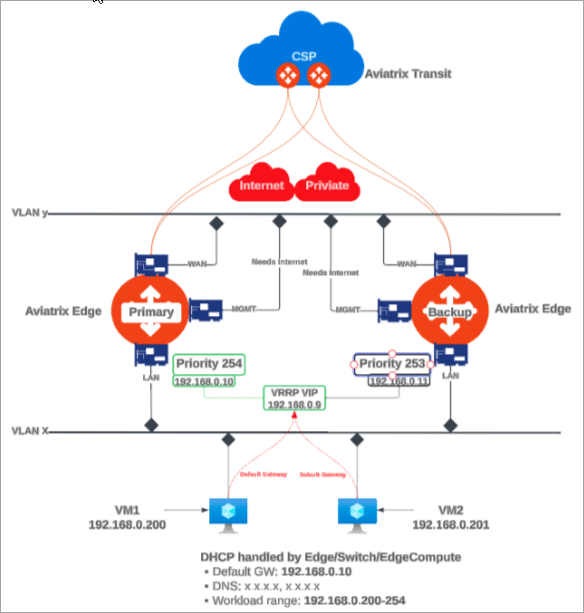 In this diagram:
* The VRRP and VLAN segment is configured on the primary Edge Spoke Gateway.
* The VLAN segment is automatically created symmetrically on the secondary Edge
Spoke Gateway.
* The VRRP Virtual IP is used by the LAN hosts as the Default Gateway IP.
- VRRP support requires that the Edge Spoke Gateway is created with Active-Active high availability peering connection to the Transit Gateway(s).
- The Edge Spoke Gateways advertise the CIDRs associated with the LAN and VLAN sub-interfaces to the Aviatrix Transit Gateway(s). You can disable CIDR propagation, if not needed. See [Disabling LAN and VLAN CIDR Propagation to the Transit Gateway](#disabling-lan-and-vlan-cidr-propagation-to-the-transit-gateway).
### Multiple VLAN Topology
The topology below illustrates an edge site with multiple VLANs, Virtual Router
Redundancy Protocol (VRRP), and Edge Spoke Gateway deployed as the default LAN
router.
In this diagram:
* The VRRP and VLAN segment is configured on the primary Edge Spoke Gateway.
* The VLAN segment is automatically created symmetrically on the secondary Edge
Spoke Gateway.
* The VRRP Virtual IP is used by the LAN hosts as the Default Gateway IP.
- VRRP support requires that the Edge Spoke Gateway is created with Active-Active high availability peering connection to the Transit Gateway(s).
- The Edge Spoke Gateways advertise the CIDRs associated with the LAN and VLAN sub-interfaces to the Aviatrix Transit Gateway(s). You can disable CIDR propagation, if not needed. See [Disabling LAN and VLAN CIDR Propagation to the Transit Gateway](#disabling-lan-and-vlan-cidr-propagation-to-the-transit-gateway).
### Multiple VLAN Topology
The topology below illustrates an edge site with multiple VLANs, Virtual Router
Redundancy Protocol (VRRP), and Edge Spoke Gateway deployed as the default LAN
router.
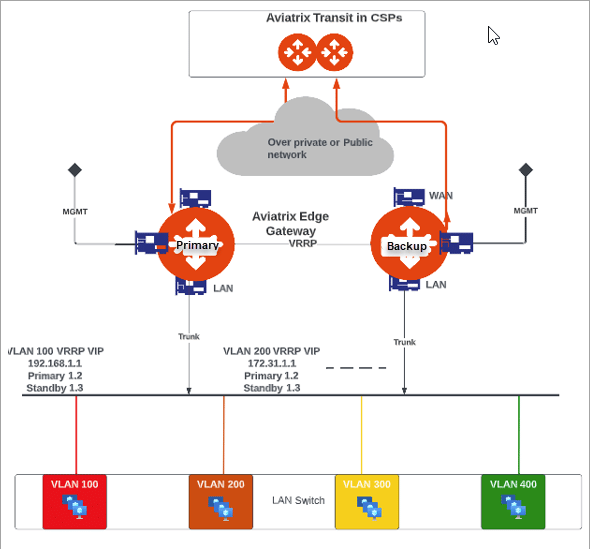 In this diagram:
* The VRRP and VLAN segments are configured on the primary Edge Spoke Gateway.
For multiple Edge Spoke Gateways deployed on an edge site, you configure the
VLAN segments on each primary Edge Spok Gateway. The VLAN segments must be
configured with the same VLAN ID and CIDR across all the Edge Spoke Gateways
on the Edge site.
* The VLAN segments are automatically created symmetrically on the secondary
Edge Spoke Gateway(s).
* The VRRP Virtual IP is used by the LAN hosts as the Default Gateway IP for the
VLAN segments.
* The Edge Spoke Gateway provides the trunk interface connectivity to the LAN
side switch.
- VRRP support requires that the Edge Spoke Gateway is created with Active-Active high availability peering connection to the Transit Gateway.
- The Edge Spoke Gateways advertise the CIDRs associated with the LAN and VLAN sub-interfaces to the Aviatrix Transit Gateway(s). You can disable CIDR propagation, if not needed. See [Disabling LAN and VLAN CIDR Propagation to the Transit Gateway](#disabling-lan-and-vlan-cidr-propagation-to-the-transit-gateway).
## Extending On-Premises VLAN Segmentation into Cloud
To extend on-premises VLAN segmentation into cloud involves these two steps.
1. [Configure VLAN Interfaces on the Edge Spoke Gateway](#configuring-vlan-interfaces-on-the-edge-spoke-gateway).
2. [Associate VLANs to Network Domains](#associating-vlans-to-aviatrix-network-domains).
## Configuring VLAN Interfaces on the Edge Spoke Gateway
You can configure VLAN interfaces on the Edge Spoke Gateway during or after the
gateway is created.
To configure VLANs for a new Edge Spoke Gateway, follow the instructions for:
* Create the Primary and Secondary Edge Spoke Gateway (Aviatrix Edge Platform)
* Creating the ZTP ISO for the Edge Gateway (Self-Managed Platform)
To configure VLANs for an existing Edge Spoke Gateway, perform the steps below.
1. In Aviatrix CoPilot, go the *Cloud Fabric > Hybrid Cloud > Edge Gateways*
tab.
2. Click *Spoke Gateways*.
3. In the table, locate the Edge Spoke Gateway and click the Edit icon on right
side of the row.
4. In Edit Edge Spoke Gateway, click *Next* to go to *Interface Configuration*
step.
5. Click *LAN* and enable VRRP, if applicable.
| **Field** | **Description** |
| ------------- | ------------------------------------------------------------------------------------------------------------------------------------------------- |
| IP Assignment | The default is **Static** for static IP assignment on this LAN interface.
In this diagram:
* The VRRP and VLAN segments are configured on the primary Edge Spoke Gateway.
For multiple Edge Spoke Gateways deployed on an edge site, you configure the
VLAN segments on each primary Edge Spok Gateway. The VLAN segments must be
configured with the same VLAN ID and CIDR across all the Edge Spoke Gateways
on the Edge site.
* The VLAN segments are automatically created symmetrically on the secondary
Edge Spoke Gateway(s).
* The VRRP Virtual IP is used by the LAN hosts as the Default Gateway IP for the
VLAN segments.
* The Edge Spoke Gateway provides the trunk interface connectivity to the LAN
side switch.
- VRRP support requires that the Edge Spoke Gateway is created with Active-Active high availability peering connection to the Transit Gateway.
- The Edge Spoke Gateways advertise the CIDRs associated with the LAN and VLAN sub-interfaces to the Aviatrix Transit Gateway(s). You can disable CIDR propagation, if not needed. See [Disabling LAN and VLAN CIDR Propagation to the Transit Gateway](#disabling-lan-and-vlan-cidr-propagation-to-the-transit-gateway).
## Extending On-Premises VLAN Segmentation into Cloud
To extend on-premises VLAN segmentation into cloud involves these two steps.
1. [Configure VLAN Interfaces on the Edge Spoke Gateway](#configuring-vlan-interfaces-on-the-edge-spoke-gateway).
2. [Associate VLANs to Network Domains](#associating-vlans-to-aviatrix-network-domains).
## Configuring VLAN Interfaces on the Edge Spoke Gateway
You can configure VLAN interfaces on the Edge Spoke Gateway during or after the
gateway is created.
To configure VLANs for a new Edge Spoke Gateway, follow the instructions for:
* Create the Primary and Secondary Edge Spoke Gateway (Aviatrix Edge Platform)
* Creating the ZTP ISO for the Edge Gateway (Self-Managed Platform)
To configure VLANs for an existing Edge Spoke Gateway, perform the steps below.
1. In Aviatrix CoPilot, go the *Cloud Fabric > Hybrid Cloud > Edge Gateways*
tab.
2. Click *Spoke Gateways*.
3. In the table, locate the Edge Spoke Gateway and click the Edit icon on right
side of the row.
4. In Edit Edge Spoke Gateway, click *Next* to go to *Interface Configuration*
step.
5. Click *LAN* and enable VRRP, if applicable.
| **Field** | **Description** |
| ------------- | ------------------------------------------------------------------------------------------------------------------------------------------------- |
| IP Assignment | The default is **Static** for static IP assignment on this LAN interface.
**DHCP** for dynamic IP address assignment is not supported. |
| VRRP | To enable Virtual Router Redundancy Protocol (VRRP) on the Edge Spoke Gateway, set this toggle to **On**. |
6. Click *+ VLAN Interface* to add one or more VLAN sub-interfaces.
| **Field** | **Description** |
| ----------------------------------- | ----------------------------------------------------------------------------------------------------------------------------------------------------------------------------------------------------- |
| Interface CIDR | Enter the native VLAN interface IP address.
This interface is where untagged packets are sent. |
| Default Gateway IP, VRRP Gateway IP | Enter the Default gateway IP address.
If VRRP is enabled, enter the VRRP Gateway IP address.
If VRRP is disabled, enter the Default gateway IP address for the native VLAN interface. |
| Interface Labels | Enter a name to identify this native VLAN interface. |
| VLAN ID | Enter the VLAN ID.
VLAN ID must be a number between 2 and 4092. |
| VLAN Interface CIDR | Enter the VLAN's interface IP address. |
| Default Gateway IP | Enter the Default gateway IP address for this VLAN interface. |
| Sub-Interface Tag | Enter a name to identify this VLAN interface. |
If high availability is enabled, the VLAN configurations are added to the
secondary Edge Spoke Gateway. If the properties are shared, the fields are
disabled on the secondary gateway and non-editable.
7. If multiple Edge Spoke Gateways are deployed on the edge site, repeat the
steps above for each primary Edge Spoke Gateway.
* VLAN segments must be configured with the same VLAN ID and CIDR across all the Edge Spoke Gateways for the edge site.
* You cannot edit the VLAN ID after it is configured. To edit the VLAN
sub-interface attributes, it is highly recommended to delete and recreate the
VLAN sub-interface configuration.
## Associating VLANs to Aviatrix Network Domains
Aviatrix Edge Spoke Gateway enables you to segment your on-premises network
traffic through network domains and connection policies. The Edge Spoke Gateway
routes on-premises and inter-VLAN traffic flow based on the network domain
connection policies.
To segment the on-premises network traffic, you associate the VLAN segment and
its workload in the CSP to the same network domain.
For example, the diagram below illustrates on-premises network traffic flow
between the yellow and orange domains that are segmented.
* VLAN 100 is associated to the same network domain as its workload in the CSP.
* VLAN 200 is associated to the same network domain as its workload in the CSP.
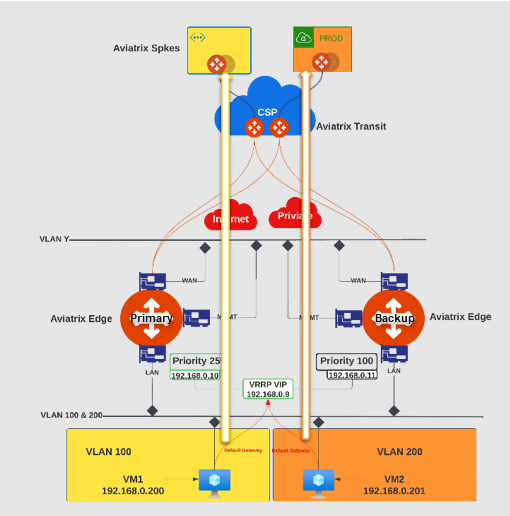 To create network segmentation between VLANs and Spoke VPCs Or VNets, you
associate the VLANs and Spoke VPCs or VNets to network domains. When network
segmentation is configured with multiple Edge Spoke Gateways using VLAN, the
same VLAN ID is associated to the network segment *across all the gateways for
the edge site*.
* The VLANs for an edge site must be created before the network domain association is configured.
* The VLANs must be configured with the same VLAN identifier (ID) and CIDR across all the Edge Spoke Gateways on the edge site before the network segmentation is configured.
If VLANs are created or added after the network domain association is created, the association must be removed and reconfigured.
1. Remove the VLAN association with the network domain.
2. Ensure the new VLAN is configured with the same VLAN ID and CIDR across all
the Edge Spoke Gateways on the edge site.
3. Re-create the VLAN association with the network domain.
To associate VLANs to Aviatrix Network Domains:
1. In Aviatrix CoPilot, go to *Networking > Network Segmentation > Network
Domains* tab.
2. To add a new network domain, click *+ Network Domain*.
Provide the following information:
| **Field** | **Description** |
| ------------------------- | -------------------------------------------------------------------------------------------------------------------------------------------------------------------------------------------------------------------------------------------------------------------------------------------------------------------------------- |
| Name | Enter a unique name for this network domain.
To create network segmentation between VLANs and Spoke VPCs Or VNets, you
associate the VLANs and Spoke VPCs or VNets to network domains. When network
segmentation is configured with multiple Edge Spoke Gateways using VLAN, the
same VLAN ID is associated to the network segment *across all the gateways for
the edge site*.
* The VLANs for an edge site must be created before the network domain association is configured.
* The VLANs must be configured with the same VLAN identifier (ID) and CIDR across all the Edge Spoke Gateways on the edge site before the network segmentation is configured.
If VLANs are created or added after the network domain association is created, the association must be removed and reconfigured.
1. Remove the VLAN association with the network domain.
2. Ensure the new VLAN is configured with the same VLAN ID and CIDR across all
the Edge Spoke Gateways on the edge site.
3. Re-create the VLAN association with the network domain.
To associate VLANs to Aviatrix Network Domains:
1. In Aviatrix CoPilot, go to *Networking > Network Segmentation > Network
Domains* tab.
2. To add a new network domain, click *+ Network Domain*.
Provide the following information:
| **Field** | **Description** |
| ------------------------- | -------------------------------------------------------------------------------------------------------------------------------------------------------------------------------------------------------------------------------------------------------------------------------------------------------------------------------- |
| Name | Enter a unique name for this network domain.
A network-domain name can only have letters, digits, a hyphen (-), and an underscore (\_). The name must start with a letter and must have 2-27 characters. For example, Dev\_Domain.
After you create and save a network domain, you cannot change its name. |
| Association | From the dropdown list, select the Spoke VPC/VNet and the VLAN that are in this network domain. |
| Connect to Network Domain | To connect this network domain to another network domain, from the dropdown list, select the other network domain.
This enables traffic flow between both network domains. |
3. Click *Save*.
## Disabling LAN and VLAN CIDR Propagation to the Transit Gateway
The Aviatrix Edge Spoke Gateway exchanges routes with the Transit Gateways. The
Edge Spoke Gateway advertises the CIDRs associated with the LAN and VLAN
interfaces to the Transit Gateway, by default. If you do not need LAN CIDR
propagation, you can disable this feature.
If there are workloads on the LAN or the VLAN CIDR, then disabling LAN and
VLAN interface CIDR propagation may cause network traffic to be dropped, since
Transit Gateway will not have learned the LAN or VLAN CIDRs.
To disable LAN and VLAN CIDR propagation:
1. In Aviatrix CoPilot, go to *Cloud Fabric > Hybrid Cloud > Edge Gateways* tab.
2. Click *Spoke Gateways*.
3. Select the Edge Spoke Gateway for which to disable LAN CIDR propagation.
4. In the Edge Spoke Gateway's *Settings* tab, expand the *Routing* section.
5. Set *LAN/VLAN Interface CIDR Propagation* toggle to *Off*.