> ## Documentation Index
> Fetch the complete documentation index at: https://docs.aviatrix.com/llms.txt
> Use this file to discover all available pages before exploring further.
# Customized SNAT and DNAT on Edge
> The Aviatrix Hybrid Cloud Edge solution supports customized SNAT and DNAT for the use case where the cloud service provider (CSP) network CIDR overlaps with the on-premises network CIDR. The customized SNAT and DNAT apply to HPE-enabled and HPE-disabled Edge Spoke gateways.
The Aviatrix Hybrid Cloud Edge solution supports customized SNAT and DNAT for
the use case where the cloud service provider (CSP) network CIDR overlaps with
the on-premises network CIDR. The customized SNAT and DNAT apply to HPE-enabled
and HPE-disabled Edge Spoke gateways.
The following NAT scenarios are supported:
* Single IP and Customized SNAT on Edge Spoke Gateway - For network traffic
initiated from the edge location towards the CSP.
* DNAT on Edge Spoke Gateway - For network traffic initiated from the edge
location towards Transit Gateway in cloud or CSP.
Customized SNAT on Edge Spoke Gateway is not supported when VLAN segmentation
is also configured in the same network domain.
This diagram shows overlapping CSP and on-premises network CIDRs.
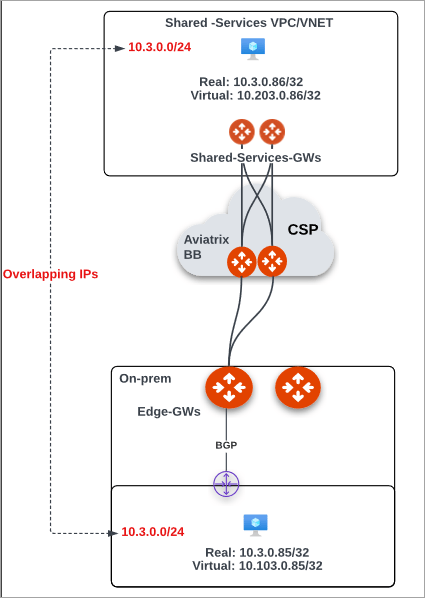 In this example, to resolve the overlapping CIDR issue, you would perform these
steps:
1. Create a mapping of the Real CIDR to Virtual CIDR for both the cloud
instances and on-premises hosts or workloads. For example:
| **Network** | **Real CIDR** | **Virtual CIDR** |
| ---------------- | ------------- | ---------------- |
| Cloud workload | 10.3.0.86/32 | 10.203.0.86/32 |
| On-prem workload | 10.3.0.85/32 | 10.103.0.85/32 |
2. Configure DNAT on Edge Spoke Gateway for traffic initiated from on-premises
to cloud.
a. In Aviatrix CoPilot, go to **Cloud Fabric > Hybrid Cloud > Edge Gateways**
tab. b. Click **Spoke Gateways** c. Select the Edge Spoke Gateway for which
you want to enable DNAT. d. In the Edge Spoke Gateway's **Settings** tab,
expand the **Network Address Translation (NAT)** section. e. Set the
**Destination NAT** toggle to **On**. f. In **Destination NAT**, from the
**Instance** dropdown menu, select the Edge Spoke Gateway. g. Click **+
Rule** and provide the following information.
| **Field** | **Description** |
| ---------- | --------------------------------------------------------------------------------------------------- |
| Instance | From the dropdown list, select the Edge Gateway instance. |
| Src CIDR | Enter 10.3.0.85/32. |
| Dst CIDR | Enter 10.203.0.86/32 (the virtual IP of the cloud instance). |
| Connection | From the dropdown list, select the connection which reflects the connection to the Transit Gateway. |
| Mark | (Optional) Enter a unique value. Value should be between 65535 - 99999. |
| DNAT IP | Enter 10.3.0.86 (cloud instance). |
3. Configure a Manual BGP Advertised CIDR List to advertise the DNAT virtual IP
from the Edge Spoke Gateway to on-premises via BGP. a. In the Edge Spoke
Gateway's **Settings** tab, expand the **Border Gateway Protocol (BGP)**
section. b. In **Manual BGP Advertised CIDR List**, enter the following
information.
| **Field** | **Description** |
| --------------------------------- | ---------------------------------------------------------------------- |
| Advertised CIDRs (Per Gateway) | Leave this blank. |
| Connection | From the dropdown menu, select the connection to the on-prem BGP peer. |
| Advertised CIDRs (Per Connection) | Enter 10.203.0.86/32 (the virtual IP of the cloud instance) |
4. Configure SNAT on the Edge Spoke Gateway for traffic initiated from cloud to
on-premises. a. In the Edge Gateway's **Settings** tab, expand the **Network
Address Translation (NAT) section**. b. Click the **Source NAT** switch to
**On**, then click **Customized SNAT**. c. From the **Instance** dropdown
menu, select the Edge Spoke Gateway. d. Click **+ Rule** and provide the
following information.
| **Field** | **Description** |
| ---------- | ------------------------------------------------------------------------------------------------------------- |
| Connection | Select the output connection where the rule will apply. |
| Mark | Enter the value that was defined in the DNAT settings.
In this example, to resolve the overlapping CIDR issue, you would perform these
steps:
1. Create a mapping of the Real CIDR to Virtual CIDR for both the cloud
instances and on-premises hosts or workloads. For example:
| **Network** | **Real CIDR** | **Virtual CIDR** |
| ---------------- | ------------- | ---------------- |
| Cloud workload | 10.3.0.86/32 | 10.203.0.86/32 |
| On-prem workload | 10.3.0.85/32 | 10.103.0.85/32 |
2. Configure DNAT on Edge Spoke Gateway for traffic initiated from on-premises
to cloud.
a. In Aviatrix CoPilot, go to **Cloud Fabric > Hybrid Cloud > Edge Gateways**
tab. b. Click **Spoke Gateways** c. Select the Edge Spoke Gateway for which
you want to enable DNAT. d. In the Edge Spoke Gateway's **Settings** tab,
expand the **Network Address Translation (NAT)** section. e. Set the
**Destination NAT** toggle to **On**. f. In **Destination NAT**, from the
**Instance** dropdown menu, select the Edge Spoke Gateway. g. Click **+
Rule** and provide the following information.
| **Field** | **Description** |
| ---------- | --------------------------------------------------------------------------------------------------- |
| Instance | From the dropdown list, select the Edge Gateway instance. |
| Src CIDR | Enter 10.3.0.85/32. |
| Dst CIDR | Enter 10.203.0.86/32 (the virtual IP of the cloud instance). |
| Connection | From the dropdown list, select the connection which reflects the connection to the Transit Gateway. |
| Mark | (Optional) Enter a unique value. Value should be between 65535 - 99999. |
| DNAT IP | Enter 10.3.0.86 (cloud instance). |
3. Configure a Manual BGP Advertised CIDR List to advertise the DNAT virtual IP
from the Edge Spoke Gateway to on-premises via BGP. a. In the Edge Spoke
Gateway's **Settings** tab, expand the **Border Gateway Protocol (BGP)**
section. b. In **Manual BGP Advertised CIDR List**, enter the following
information.
| **Field** | **Description** |
| --------------------------------- | ---------------------------------------------------------------------- |
| Advertised CIDRs (Per Gateway) | Leave this blank. |
| Connection | From the dropdown menu, select the connection to the on-prem BGP peer. |
| Advertised CIDRs (Per Connection) | Enter 10.203.0.86/32 (the virtual IP of the cloud instance) |
4. Configure SNAT on the Edge Spoke Gateway for traffic initiated from cloud to
on-premises. a. In the Edge Gateway's **Settings** tab, expand the **Network
Address Translation (NAT) section**. b. Click the **Source NAT** switch to
**On**, then click **Customized SNAT**. c. From the **Instance** dropdown
menu, select the Edge Spoke Gateway. d. Click **+ Rule** and provide the
following information.
| **Field** | **Description** |
| ---------- | ------------------------------------------------------------------------------------------------------------- |
| Connection | Select the output connection where the rule will apply. |
| Mark | Enter the value that was defined in the DNAT settings.
Specifies a TCP session where rule applies. |
| SNAT IP | Enter 10.103.0.85 (virtual IP of the on-prem host). |