> ## Documentation Index
> Fetch the complete documentation index at: https://docs.aviatrix.com/llms.txt
> Use this file to discover all available pages before exploring further.
# Local Internet Breakout at Network Edge
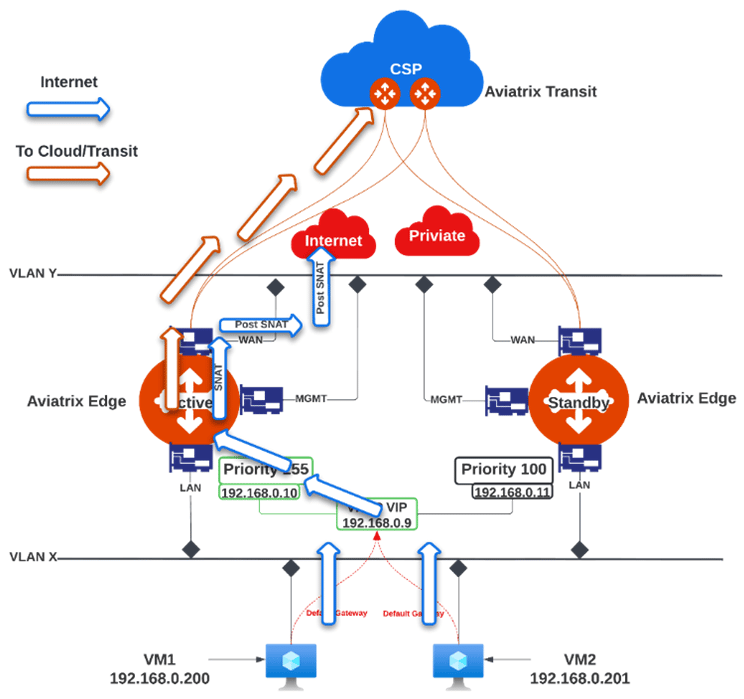
> Aviatrix Hybrid Cloud Edge solution offers Local Internet Breakout capability.
Aviatrix Hybrid Cloud Edge solution offers Local Internet Breakout capability.
Local Internet Breakout capability is supported only on the Aviatrix Edge
Platform.
This capability allows the Edge Spoke Gateway to route traffic from on-premises
and remote sites to remote destinations via overlay tunnels and route
internet-based traffic directly to the local ISP at the edge location. In SD-WAN
networks typically, by routing internet-based traffic locally, you avoid the
need to send internet traffic to your central datacenter for processing, which
reduces network latency and costs.
To support Local Internet Breakout, the Edge Spoke Gateway functions as a
stateful firewall. Using the Edge Spoke Gateway's SNAT feature, you define the
rules that the Edge Spoke Gateway uses to route traffic from the remote sites to
the Aviatrix Transit Gateway to cloud and the internet.
 To define SNAT rules for Local Internet Breakout on the Edge Spoke Gateway:
1. In Aviatrix CoPilot, go to **Cloud Fabric > Hybrid Cloud > Edge Gateways**
tab.
2. Click **Spoke Gateways**.
3. Select the Edge Spoke Gateway for which you want to enable local internet
breakout.
4. Click the Edge Spoke Gateway's **Settings** tab and expand the **Network
Address Translation (NAT)** section.
5. Set the **Source NAT** toggle to **On**.
6. Select **Single IP**, then click **Save**.
To define SNAT rules for Local Internet Breakout on the Edge Spoke Gateway:
1. In Aviatrix CoPilot, go to **Cloud Fabric > Hybrid Cloud > Edge Gateways**
tab.
2. Click **Spoke Gateways**.
3. Select the Edge Spoke Gateway for which you want to enable local internet
breakout.
4. Click the Edge Spoke Gateway's **Settings** tab and expand the **Network
Address Translation (NAT)** section.
5. Set the **Source NAT** toggle to **On**.
6. Select **Single IP**, then click **Save**.