> ## Documentation Index
> Fetch the complete documentation index at: https://docs.aviatrix.com/llms.txt
> Use this file to discover all available pages before exploring further.
# Edge Spoke Gateway High Availability
> This document provides a brief overview of Edge Spoke Gateway high availability.
This document provides a brief overview of Edge Spoke Gateway high availability.
Before reading this document, you should be familiar with the following:
* Aviatrix Multicloud Transit Network Architecture
* Aviatrix ActiveMesh
## Topology
The Edge Spoke Gateways support active-active and active-standby peering
connections for high availability.
## High Availability Modes
Aviatrix Edge Gateways are associated with an
[edge site](https://legacy.docs.aviatrix.com/documentation/latest/network/edge-gateway-settings.html#site).
### Active-Standby Edge
In an active-standby configuration, an *edge site* can consist of only two Edge
Gateways with one active peering and one standby peering. Only the primary Edge
Gateway actively forwards network traffic. The secondary Edge Gateway takes over
when the primary gateway is down.
In an active-standby deployment, you can set *Preemptive* mode to automatically
switch back to using the primary gateway when the gateway connection is back up.
By default, the network continues to use the secondary gateway even after the
primary gateway is back up.
### Active-Active Edge
In an active-active configuration, both the primary and secondary gateways have
active peerings. Network traffic is load balanced and forwarded across both
active peerings by using Equal Cost Multi Path (ECMP) routing.
In an active-active configuration, an *edge site* can consist of multiple Edge
Gateways. You can deploy multiple gateways to scale your Edge Gateways for
throughput. For more information, see Edge
Spoke Gateway Horizontal Scaling.
## About Edge Spoke Gateway to Transit Gateway High Availability
For high availability between Edge Spoke Gateway and Transit Gateway in the
cloud, you can deploy Edge Spoke Gateway in *active-active* configuration. This
feature is supported on all Edge
platforms.
## About Edge Spoke Gateway to LAN High Availability
Edge Spoke Gateways can connect to a LAN side router using BGP over LAN or to an
external device such as a server or firewall using static routes.
Edge Spoke Gateways support *active-active* and *active-standby* connections to
provide LAN side high availability. This feature is supported on all Edge
platforms.
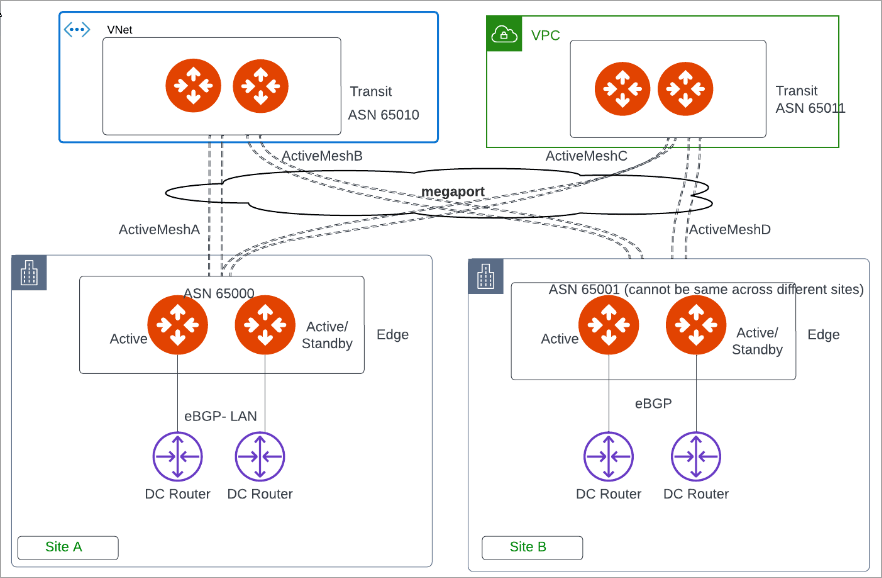
This diagram shows Edge Spoke Gateways deployed on multiple edge sites with
active and standby peering connections to different LAN routers.
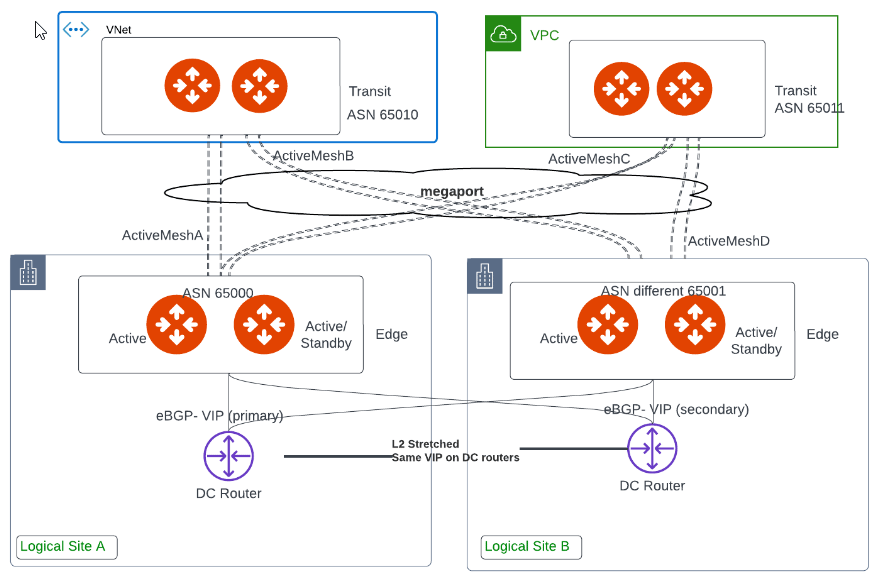
 This diagram shows Edge Spoke Gateways deployed on the same site with active and
standby peering connections to different LAN routers.
This diagram shows Edge Spoke Gateways deployed on the same site with active and
standby peering connections to different LAN routers.
 ## About Edge Spoke Gateway to VRRP High Availability
Edge Spoke Gateways support Virtual Router Redundancy Protocol (VRRP) protocol
to provide high availability for Virtual Local Area Network (VLAN) connectivity.
You can deploy Edge Spoke Gateways in on-premises locations with the VRRP
protocol enabled. This feature is supported on the *Aviatrix Edge Platform* and
*Self Managed* platforms.
If you deploy an Edge Spoke Gateway with VRRP enabled, then all Edge Spoke
Gateways in the same *edge site* must be created in active-active high
availability mode.
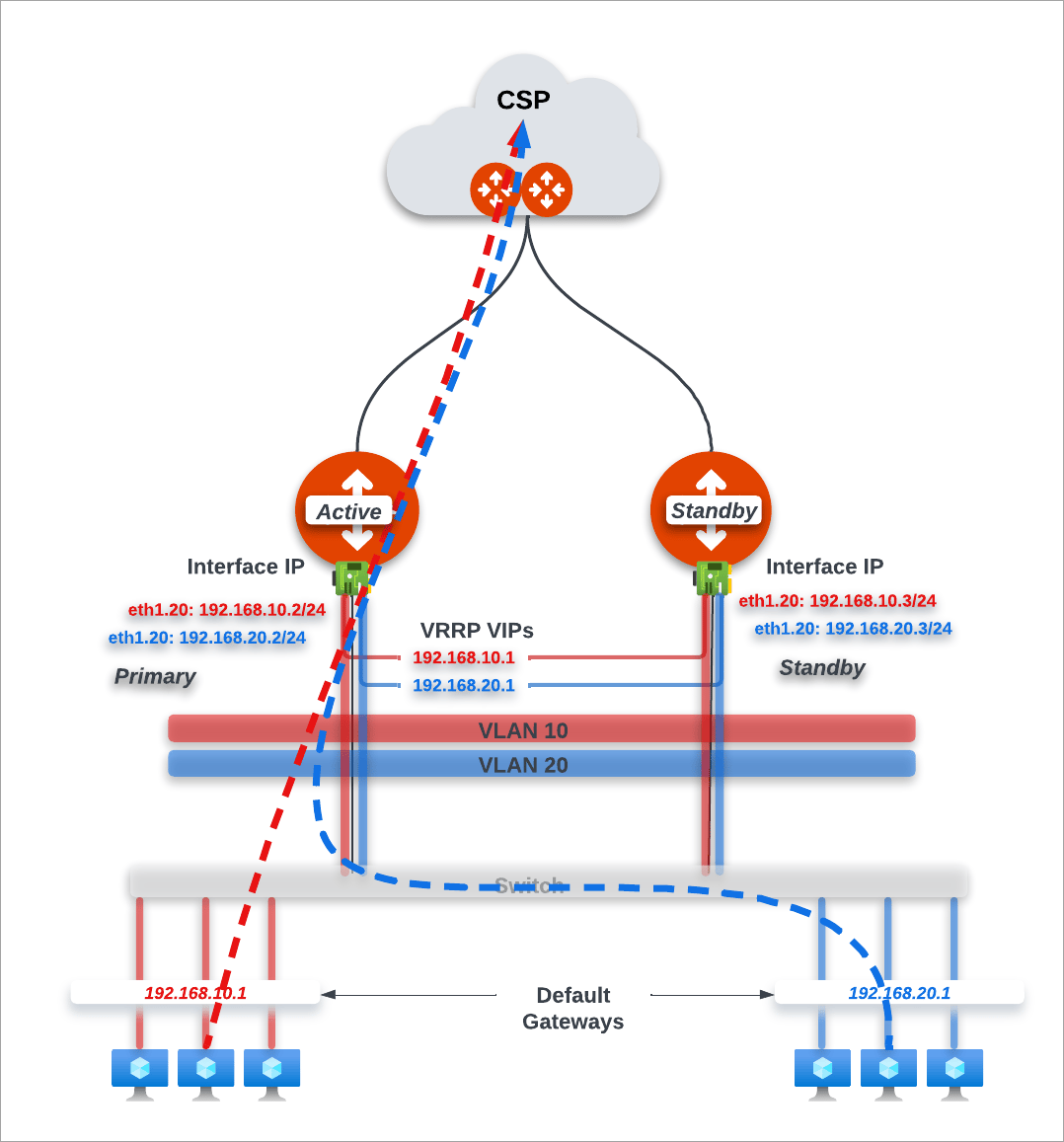
The diagram below illustrates a VRRP configuration with Edge Spoke Gateways as the default LAN router. LAN traffic flows to the VRRP active gateway to the cloud. When the VRRP active gateway is down, traffic flows to the VRRP standby gateway to cloud.
## About Edge Spoke Gateway to VRRP High Availability
Edge Spoke Gateways support Virtual Router Redundancy Protocol (VRRP) protocol
to provide high availability for Virtual Local Area Network (VLAN) connectivity.
You can deploy Edge Spoke Gateways in on-premises locations with the VRRP
protocol enabled. This feature is supported on the *Aviatrix Edge Platform* and
*Self Managed* platforms.
If you deploy an Edge Spoke Gateway with VRRP enabled, then all Edge Spoke
Gateways in the same *edge site* must be created in active-active high
availability mode.
The diagram below illustrates a VRRP configuration with Edge Spoke Gateways as the default LAN router. LAN traffic flows to the VRRP active gateway to the cloud. When the VRRP active gateway is down, traffic flows to the VRRP standby gateway to cloud.
 To learn more about VLAN and VRRP support, see About
Extending VLAN Segmentation to the Cloud.
## About Creating Highly Available Edge Gateways
The steps to deploy highly available Edge Spoke Gateways is different depending
on the Edge platform.
### Aviatrix Edge Platform
To deploy high availability Edge Spoke Gateways in the Aviatrix Edge Platform,
you must first onboard the devices where you want to deploy the gateways (see Installing Edge OS and
Onboarding Dell Hardware). When you create an Edge Spoke Gateway for an
*edge site*, you have the option to enable High Availability (HA) mode as
active-active mode or active-standby mode. The primary and secondary HA gateways
are then created in the primary and secondary devices that you configure.
* If your LAN network uses VRRP configuration, then High Availability mode must be set to active-active mode.
* High Availability mode cannot be changed after the primary and secondary (HA) Edge Spoke Gateways are created. To change the High Availability mode, you must first delete the HA Edge Gateway.
* If your LAN network uses VRRP configuration, then High Availability mode must be set to active-active mode.
* High Availability mode cannot be changed after the primary and secondary (HA) Edge Spoke Gateways are created. To change the High Availability mode, you must first delete the HA Edge Gateway.
For the deployment workflow, see Deploy an Edge Spoke Gateway on Aviatrix Edge Platform.
### Network Service Provider and Self Managed Platforms
To deploy high availability Edge Spoke Gateways in a Network Service Provider
(NSP) platform (Equinix or Megaport) or Self Managed platform, the high-level
steps are as follows:
1. Create the primary Edge Spoke Gateway, which generates a ZTP *cloud-init*
file. in VM.
High Availability mode is always off when creating the primary gateway.
2. Deploy the cloud-init file in the Edge VM on the NSP platform.
3. After the primary Edge Spoke Gateway is up, edit the primary Edge Spoke
Gateway configuration and set the HA mode to active-active mode or
active-standby mode. This generates a cloud-init file for the HA Edge Spoke
Gateway.
* (Self Managed platform only) If your LAN network uses VRRP configuration,
then High Availability mode must be set to active-active mode. \* High
Availability mode cannot be changed after the primary and secondary (HA)
Edge Spoke Gateways are created. To change the High Availability mode, you
must first delete the HA Edge Spoke Gateway.
4. Deploy the cloud-init file for the HA Edge Spoke Gateway in another Edge VM
on the NSP platform.
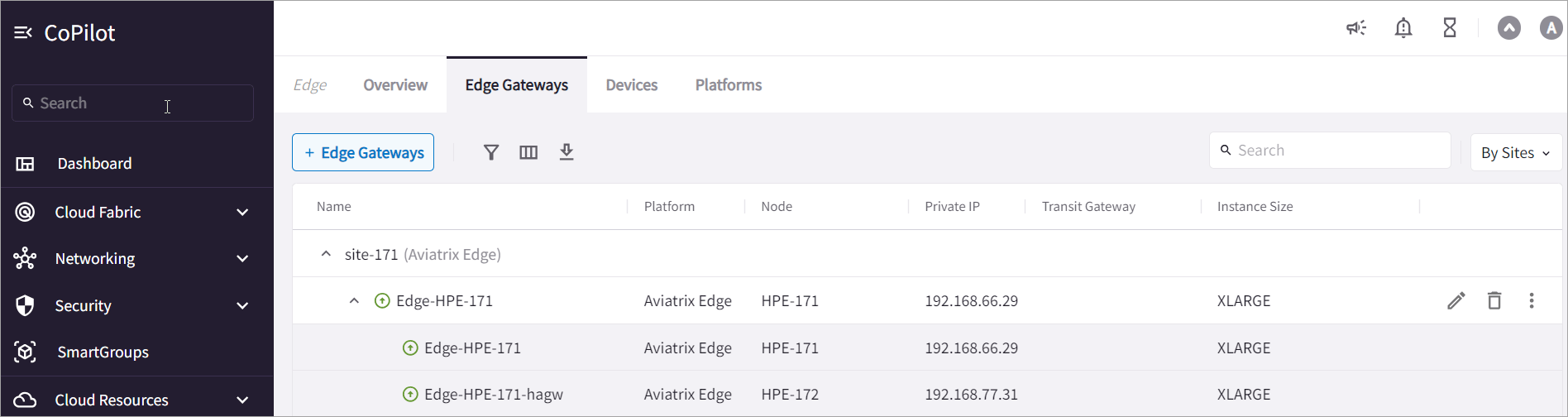
The figure below shows an *active-standby Edge deployment with two gateways*
(one primary and one HA Edge Gateway) for the same edge site. The HA gateway
name is auto-generated in the format ``.
To learn more about VLAN and VRRP support, see About
Extending VLAN Segmentation to the Cloud.
## About Creating Highly Available Edge Gateways
The steps to deploy highly available Edge Spoke Gateways is different depending
on the Edge platform.
### Aviatrix Edge Platform
To deploy high availability Edge Spoke Gateways in the Aviatrix Edge Platform,
you must first onboard the devices where you want to deploy the gateways (see Installing Edge OS and
Onboarding Dell Hardware). When you create an Edge Spoke Gateway for an
*edge site*, you have the option to enable High Availability (HA) mode as
active-active mode or active-standby mode. The primary and secondary HA gateways
are then created in the primary and secondary devices that you configure.
* If your LAN network uses VRRP configuration, then High Availability mode must be set to active-active mode.
* High Availability mode cannot be changed after the primary and secondary (HA) Edge Spoke Gateways are created. To change the High Availability mode, you must first delete the HA Edge Gateway.
* If your LAN network uses VRRP configuration, then High Availability mode must be set to active-active mode.
* High Availability mode cannot be changed after the primary and secondary (HA) Edge Spoke Gateways are created. To change the High Availability mode, you must first delete the HA Edge Gateway.
For the deployment workflow, see Deploy an Edge Spoke Gateway on Aviatrix Edge Platform.
### Network Service Provider and Self Managed Platforms
To deploy high availability Edge Spoke Gateways in a Network Service Provider
(NSP) platform (Equinix or Megaport) or Self Managed platform, the high-level
steps are as follows:
1. Create the primary Edge Spoke Gateway, which generates a ZTP *cloud-init*
file. in VM.
High Availability mode is always off when creating the primary gateway.
2. Deploy the cloud-init file in the Edge VM on the NSP platform.
3. After the primary Edge Spoke Gateway is up, edit the primary Edge Spoke
Gateway configuration and set the HA mode to active-active mode or
active-standby mode. This generates a cloud-init file for the HA Edge Spoke
Gateway.
* (Self Managed platform only) If your LAN network uses VRRP configuration,
then High Availability mode must be set to active-active mode. \* High
Availability mode cannot be changed after the primary and secondary (HA)
Edge Spoke Gateways are created. To change the High Availability mode, you
must first delete the HA Edge Spoke Gateway.
4. Deploy the cloud-init file for the HA Edge Spoke Gateway in another Edge VM
on the NSP platform.
The figure below shows an *active-standby Edge deployment with two gateways*
(one primary and one HA Edge Gateway) for the same edge site. The HA gateway
name is auto-generated in the format ``.