> ## Documentation Index
> Fetch the complete documentation index at: https://docs.aviatrix.com/llms.txt
> Use this file to discover all available pages before exploring further.
# BGP Communities
> This document outlines BGP communities in Aviatrix and describes how to configure BGP communities for implementing routing policies that direct traffic between on-premises or remote offices and the Aviatrix fabric.
This document outlines BGP communities in Aviatrix and describes how to
configure BGP communities for implementing routing policies that direct traffic
between on-premises or remote offices and the Aviatrix fabric.
## Supported Gateways
BGP communities are available on all Aviatrix gateways that support BGP
connectivity.
## What is a BGP Community?
A BGP community refers to a tag assigned to BGP routes that exhibit common
characteristics. These tags are exchanged among BGP peers during route
advertisement. BGP communities serve as an effective tool for network
administrators, empowering them to implement routing policies efficiently
without altering the actual route attributes.
BGP communities provide these benefits:
* Scalable solution for managing routing policies across large networks
* Provides granular route control while maintaining configuration simplicity
* Enables consistent policy application throughout multi-homed BGP environments
### Primary Use Cases
The primary applications of BGP communities include influencing routing
decisions such as route filtering and traffic engineering.
**Route Filtering**
Route filtering enables control over route advertisement and acceptance between
BGP peers:
* Network administrators may choose which routes to advertise based on specific
BGP community tags.
* BGP peers can filter inbound routes by evaluating the associated BGP community
tags.
* Route filtering minimizes route table updates by explicitly defining which
routes should be propagated.
**Traffic Engineering**
Traffic engineering leverages BGP community tags to guide traffic flow
throughout the network:
* Network administrators can identify specific routes and apply specific
policies using BGP community tags.
* BGP community tags support implementation of policies such as AS-Path Prepend.
* Traffic engineering creates predictable traffic flows by consistently applying
definfed policies to tagged routes.
### Use Case Example
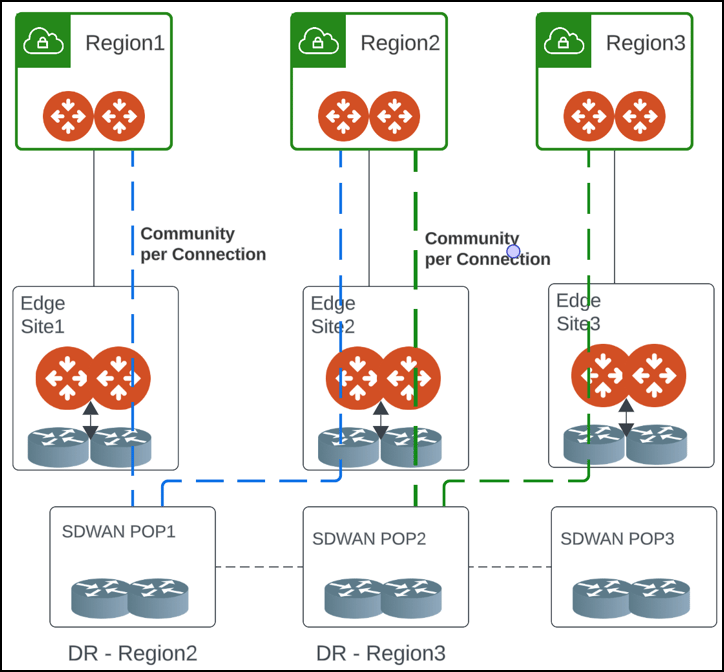
Consider a multi-region cloud deployment illustrated in the following network
diagram. In this scenario, the SDWAN devices receive BGP community tags and use
these tags to influence routing decisions. For example, if the connection
between SDWAN POP1 and Edge Site1 fails, traffic is redirected from SDWAN POP1
to Edge Site2, leveraging the BGP community received from Edge Site2 along with
the preference configured on the SDWAN POP1 customer router. Similarly, should
the link between SDWAN POP2 and Edge Site2 fail, traffic will reroute from SDWAN
POP2 to Edge Site3 based on the BGP community received from Edge Site3 and the
preference set on the SDWAN POP2 customer router.
 ## Types of BGP Communities
Aviatrix provides support for Standard BGP Communities (RFC 1997), including
both well-known and user-defined community implementations. Support for Extended
BGP Communities (RFC 4360) and Large BGP Communities (RFC 8092) is not
available.
### No-Advertise BGP Community
No-Advertise BGP community is one of the well-known BGP communities. When
applied to a route from an external BGP peer, prevents the Aviatrix gateway from
advertising the route to any other BGP peer, whether internal or external.
Common use cases include:
**Limited Route Distribution**
* Restricting route propagation to specific segments of the network
* Preventing specific routes from being advertised beyond a desginated point
**Network Segmentation**
* Establishing routing boundaries within an autonomous system
* Isolating portions of the network for security or design purposes
**Preventing Transit Traffic**
* Limiting access to destinations to direct connections only
* Avoiding unwanted transit traffic through network segments
### No-Export BGP Community
No-Export BGP community is one of the well-known BGP communities. When applied
to a route from an external BGP peer, prevents the Aviatrix gateway from
advertising the route to any external BGP peers; it will only advertise the
route to other Aviatrix gateway peers.
Common use cases include:
**AS Boundary Control**
* Preventing the advertisement of internal routes to external networks
* Implementing local routes that are not intended for global propagation
**Backup Path Management**
* Creating backup routes that are not re-advertised to the Internet
* Controlling route propagation in multi-homed environments
**Route Filtering at Scale**
* Simplifying route filtering policies across multiple border routers
* Ensuring consistent external routing policies
**Security Considerations**
* Limiting the visibility of specific network segments
* Preventing inadvertent route leaks to external networks
### Numeric BGP Community
Numeric BGP community is a user defined community implementation. Numeric BGP
community tags are numeric values specified as two 16-bit numbers
(0-65535):(0-65535). Numeric BGP tags created by network administrators to
categorize and influence BGP routes according to specific organizational needs.
Common use cases include:
**Geographic Route Tagging**
* Enabling location-based routing policies
**Customer Classification**
* Identifying routes by customer type or service level
**Route Preference Control**
* Marking routes for specific local-preference settings
* Implementing complex traffic engineering without AS-Path manipulation
**Advanced Route Filtering**
* Creating granular route acceptance policies
* Establishing selective route redistribution boundaries
### Auto-Derived BGP Communities
Auto-derived BGP communities are automatically generated according to cloud type
and cloud region and are attached to routes on the VPC or VNet. These
communities provide additional information about the origin of a route, which
can be used for routing policies.
For example, auto-derived communities can indicate the geographic regions from
which workloads originate (such as North America or Europe), allowing
identification of route source locations for policy application.
Benefits of Auto-Derived Communities:
* **Policy Implementation Efficiency**: Policies can be defined using these
tags, contributing to scalable and efficient implementation.
* **Traffic Engineering Capabilities**: Derived communities enable control over
traffic flow based on attributes such as geographic location or network type.
* **Route Visibility**: These communities facilitate visibility into route
characteristics, which assists with network management and troubleshooting.
## BGP Communities Configuration
Aviatrix has three levels of BGP communities configuration: global, gateway, and
connection.
### Global BGP Communities Setting
Global BGP Communities is a universal setting. This setting is Off, by default.
When Global BGP Communities is enabled, Aviatrix gateways accept and send
communities from and to external BGP peers and its attachments, unless the
[override BGP communities is set at the gateway-level](#gateway-level-bgp-communities-setting).
#### Auto-Derivation BGP Communties Setting
When Auto-Derivation is enabled, Aviatrix generates BGP community tags using the
specified Community Prefix.
## Types of BGP Communities
Aviatrix provides support for Standard BGP Communities (RFC 1997), including
both well-known and user-defined community implementations. Support for Extended
BGP Communities (RFC 4360) and Large BGP Communities (RFC 8092) is not
available.
### No-Advertise BGP Community
No-Advertise BGP community is one of the well-known BGP communities. When
applied to a route from an external BGP peer, prevents the Aviatrix gateway from
advertising the route to any other BGP peer, whether internal or external.
Common use cases include:
**Limited Route Distribution**
* Restricting route propagation to specific segments of the network
* Preventing specific routes from being advertised beyond a desginated point
**Network Segmentation**
* Establishing routing boundaries within an autonomous system
* Isolating portions of the network for security or design purposes
**Preventing Transit Traffic**
* Limiting access to destinations to direct connections only
* Avoiding unwanted transit traffic through network segments
### No-Export BGP Community
No-Export BGP community is one of the well-known BGP communities. When applied
to a route from an external BGP peer, prevents the Aviatrix gateway from
advertising the route to any external BGP peers; it will only advertise the
route to other Aviatrix gateway peers.
Common use cases include:
**AS Boundary Control**
* Preventing the advertisement of internal routes to external networks
* Implementing local routes that are not intended for global propagation
**Backup Path Management**
* Creating backup routes that are not re-advertised to the Internet
* Controlling route propagation in multi-homed environments
**Route Filtering at Scale**
* Simplifying route filtering policies across multiple border routers
* Ensuring consistent external routing policies
**Security Considerations**
* Limiting the visibility of specific network segments
* Preventing inadvertent route leaks to external networks
### Numeric BGP Community
Numeric BGP community is a user defined community implementation. Numeric BGP
community tags are numeric values specified as two 16-bit numbers
(0-65535):(0-65535). Numeric BGP tags created by network administrators to
categorize and influence BGP routes according to specific organizational needs.
Common use cases include:
**Geographic Route Tagging**
* Enabling location-based routing policies
**Customer Classification**
* Identifying routes by customer type or service level
**Route Preference Control**
* Marking routes for specific local-preference settings
* Implementing complex traffic engineering without AS-Path manipulation
**Advanced Route Filtering**
* Creating granular route acceptance policies
* Establishing selective route redistribution boundaries
### Auto-Derived BGP Communities
Auto-derived BGP communities are automatically generated according to cloud type
and cloud region and are attached to routes on the VPC or VNet. These
communities provide additional information about the origin of a route, which
can be used for routing policies.
For example, auto-derived communities can indicate the geographic regions from
which workloads originate (such as North America or Europe), allowing
identification of route source locations for policy application.
Benefits of Auto-Derived Communities:
* **Policy Implementation Efficiency**: Policies can be defined using these
tags, contributing to scalable and efficient implementation.
* **Traffic Engineering Capabilities**: Derived communities enable control over
traffic flow based on attributes such as geographic location or network type.
* **Route Visibility**: These communities facilitate visibility into route
characteristics, which assists with network management and troubleshooting.
## BGP Communities Configuration
Aviatrix has three levels of BGP communities configuration: global, gateway, and
connection.
### Global BGP Communities Setting
Global BGP Communities is a universal setting. This setting is Off, by default.
When Global BGP Communities is enabled, Aviatrix gateways accept and send
communities from and to external BGP peers and its attachments, unless the
[override BGP communities is set at the gateway-level](#gateway-level-bgp-communities-setting).
#### Auto-Derivation BGP Communties Setting
When Auto-Derivation is enabled, Aviatrix generates BGP community tags using the
specified Community Prefix.
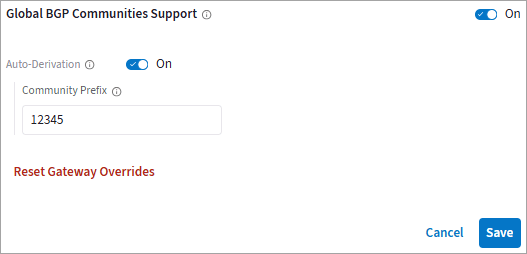 The Community Prefix is a 16-bit number representing the first part of the BGP
Community tag format (0-65535):(0-65535); the second 16-bit segment is
auto-generated based on cloud type and region.
For instance, if the Community Prefix is 12345, the system may generate
communities such as 12345:1027, 12345:1028, 12345:4100, and 12345:1047.
Auto-Derivation requires Global BGP Communities Support to be enabled.
### Gateway-Level BGP Communities Setting
By default, a gateway will handle BGP communities according to the
[global BGP communities](#global-bgp-communities-setting) setting. Sometimes,
you might want individual gateways to behave differently from the global
setting, such as when testing before turning the feature on. In that case, you
can
[override the global setting on individual gateways](#enable-bgp-communities-on-a-specific-gateway).
Using a gateway's BGP communities settings, you can choose whether the gateway
follows the global BGP setting or ignores it.
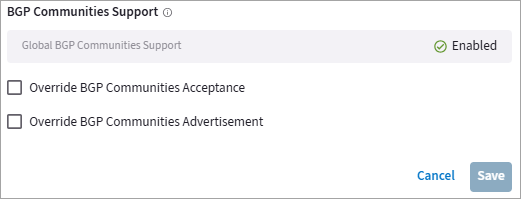
In this example, when both the gateway's override settings are unchecked, the
gateway will follow the global BGP setting.
The Community Prefix is a 16-bit number representing the first part of the BGP
Community tag format (0-65535):(0-65535); the second 16-bit segment is
auto-generated based on cloud type and region.
For instance, if the Community Prefix is 12345, the system may generate
communities such as 12345:1027, 12345:1028, 12345:4100, and 12345:1047.
Auto-Derivation requires Global BGP Communities Support to be enabled.
### Gateway-Level BGP Communities Setting
By default, a gateway will handle BGP communities according to the
[global BGP communities](#global-bgp-communities-setting) setting. Sometimes,
you might want individual gateways to behave differently from the global
setting, such as when testing before turning the feature on. In that case, you
can
[override the global setting on individual gateways](#enable-bgp-communities-on-a-specific-gateway).
Using a gateway's BGP communities settings, you can choose whether the gateway
follows the global BGP setting or ignores it.
In this example, when both the gateway's override settings are unchecked, the
gateway will follow the global BGP setting.
 In this example, when the gateway's **Override BGP Communities Advertisement**
is checked, the gateway will ignore the global BGP communities setting and not
advertise BGP communities to its BGP peers.
In this example, when the gateway's **Override BGP Communities Advertisement**
is checked, the gateway will ignore the global BGP communities setting and not
advertise BGP communities to its BGP peers.
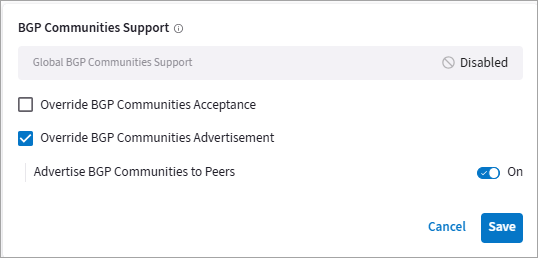
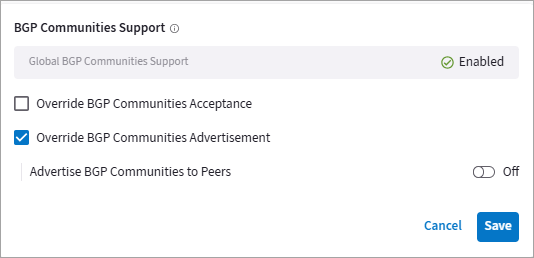 In this example, when the gateway's **Override BGP Communities Advertisement**
is checked and turned On, the gateway will ignore the global BGP communities
setting and advertise BGP communities to its BGP peers.
In this example, when the gateway's **Override BGP Communities Advertisement**
is checked and turned On, the gateway will ignore the global BGP communities
setting and advertise BGP communities to its BGP peers.
 ### Connection-Level BGP Communities Setting
Connection-level BGP communities allows you to
[set BGP communities for a specific external BGP peer](#enable-bgp-communities-for-a-connection).
With connection-level BGP communities, you can choose to:
* **Block BGP communities**. The gateway will not advertise BGP communities to
the external BGP peer.
* **Advertise BGP communities additively**. The gateway will advertise all BGP
communities that were received from peers. If any additional communities are
specified, they will be added to all advertisements over this connection.
* **Advertise BGP communities as a replacement**. The gateway will advertise
only the additional BGP communities specified for the BGP connection and
ignore the BGP communities tagged on a route to the external BGP peer.
You can
[enable connection-level BGP communities](#enable-bgp-communities-for-a-connection)
when you create a BGP over IPsec, BGP over GRE, or BGP over LAN external
connection in Aviatrix.
Connection-level BGP communities are *only* advertised when the gateway
advertise to BGP communities to peers setting is enabled either from the global
BGP communities setting or overridden at the gateway-level.
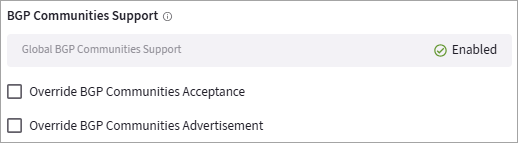
In this example, when Global BGP Communities setting is enabled with gateway
override options unchecked, then connection-level BGP communities are
advertised.
### Connection-Level BGP Communities Setting
Connection-level BGP communities allows you to
[set BGP communities for a specific external BGP peer](#enable-bgp-communities-for-a-connection).
With connection-level BGP communities, you can choose to:
* **Block BGP communities**. The gateway will not advertise BGP communities to
the external BGP peer.
* **Advertise BGP communities additively**. The gateway will advertise all BGP
communities that were received from peers. If any additional communities are
specified, they will be added to all advertisements over this connection.
* **Advertise BGP communities as a replacement**. The gateway will advertise
only the additional BGP communities specified for the BGP connection and
ignore the BGP communities tagged on a route to the external BGP peer.
You can
[enable connection-level BGP communities](#enable-bgp-communities-for-a-connection)
when you create a BGP over IPsec, BGP over GRE, or BGP over LAN external
connection in Aviatrix.
Connection-level BGP communities are *only* advertised when the gateway
advertise to BGP communities to peers setting is enabled either from the global
BGP communities setting or overridden at the gateway-level.
In this example, when Global BGP Communities setting is enabled with gateway
override options unchecked, then connection-level BGP communities are
advertised.
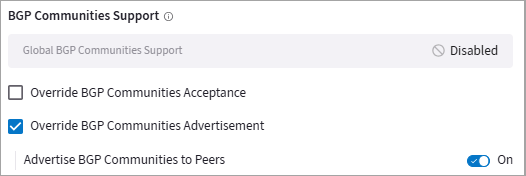
 In this example, when Global BGP communities is disabled and gateway Advertise
BGP Communities to Peers override is checked and On, then connection-level BGP
communities are advertised.
In this example, when Global BGP communities is disabled and gateway Advertise
BGP Communities to Peers override is checked and On, then connection-level BGP
communities are advertised.
 ## Enable BGP Communities Globally
To enable global BGP communities:
1. In Aviatrix CoPilot, go to **Cloud Fabric > Gateways > Settings** tab.
2. Click **Global BGP Communities Support** toggle to **On**.
3. Click **Save** to save your changes.
You can
[override this setting for a specific gateway](#enable-bgp-communities-on-a-specific-gateway)
and choose not to accept or advertise communities to BGP peers.
## Enable Auto-Derivation of BGP Communities
To enable auto-derivation of BGP communities:
1. In Aviatrix CoPilot, go to **Cloud Fabric > Gateways > Settings** tab.
2. In Global BGP Communities Support card, set the **Global BGP Communities
Support** toggle to **On**.
3. Set the **Auto-Derivation** toggle to **On**.
4. In **Community Prefix**, enter the first 16-bit prefix (required to
auto-generate tag) of the BGP Community tag format (0-65535):(0-65535).
5. Click **Save** to apply the changes.
## Enable BGP Communities on a Specific Gateway
If you prefer to override the global setting for an individual gateway, follow
these steps:
1. In Aviatrix, go to the gateway's Settings page.
* For Transit or Spoke gateway, go to **Cloud Fabric > Gateways**, then
select the gateway's tab.
* For Edge Gateway, go to **Cloud Fabric > Hybrid Cloud > Edge Gateways**
tab.
2. In the table, locate and select the gateway.
3. In the gateway's page, click the **Settings** tab.
4. Expand the **Border Gateway Protocol (BGP)** section.
5. On the **BGP Communities Support** card:
* To choose whether the gateway accepts BGP communities from its BGP peers.
1. Check **Override BGP Communities Acceptance**.
2. Click **Accept BGP Communities from Peers** toggle to **On** or **Off**.
* To choose whether the gateway advertises BGP communities to its BGP peers.
1. Check **Override BGP Communities Advertisement**.
2. Click **Advertise BGP Communities from Peers** toggle to **On** or
**Off**.
6. Click **Save** to save your changes.
## Enable BGP Communities for a Connection
Connection-level BGP communities are advertised only when the gateway
advertise to BGP communities to peers setting is enabled either from the
global BGP communities setting or at the gateway-level (see [Connection-Level
BGP Communities Setting](#connection-level-bgp-communities-setting)).
To configure BGP Communities for *a new BGP connection*, see
Setting Up External Device Connection
.
To configure BGP communities for an existing BGP connection:
1. In Aviatrix CoPilot, go to **Networking > Connectivity > External Connections
(S2C)** tab.
2. From the list of BGP connections, select the connection for which you want to
configure BGP communities.
For quick access, you can use the Filter or Search option from the toolbar to
find by name or matching condition.
3. In the connection's **Settings** tab, expand the **Border Gateway Protocol**
section.
4. Locate **Advertise BGP Communities to Peer** card.
5. From the **Advertised BGP Communities** dropdown, select one of the
following:
* **Same as Gateway**: This is the default setting for the connection. The
gateway advertises the BGP communities that were received or tagged on the
route.
* **Block Advertisement**: The gateway will not to advertise BGP Communities
received from any BGP peer or attachment.
* **Add Additional Communities**: The gateway will advertise the additional
BGP communities specified to the external BGP peer in addition to the BGP
communities that were received or tagged on the route. You can choose to
enter a numeric BGP community tag or select from the dropdown menu.
Aviatrix supports:
* **Numeric** - You can specify numeric BGP community tags specified as two
16-bit numbers (0-65535):(0-65535).
* **No-Advertise** - When a No-Advertise BGP community is attached to a
route from an external BGP peer, the Aviatrix gateway will not advertise
the route to any gateway attachments or external BGP peers.
Aviatrix gateways only support eBGP to external BGP peers.
* **No-Export** - When a No-Export BGP community is attached to a route
from an external BGP peer, the Aviatrix gateway will not advertise the
route to any external BGP peers and advertise only to gateway
attachments.
## Enable BGP Communities Globally
To enable global BGP communities:
1. In Aviatrix CoPilot, go to **Cloud Fabric > Gateways > Settings** tab.
2. Click **Global BGP Communities Support** toggle to **On**.
3. Click **Save** to save your changes.
You can
[override this setting for a specific gateway](#enable-bgp-communities-on-a-specific-gateway)
and choose not to accept or advertise communities to BGP peers.
## Enable Auto-Derivation of BGP Communities
To enable auto-derivation of BGP communities:
1. In Aviatrix CoPilot, go to **Cloud Fabric > Gateways > Settings** tab.
2. In Global BGP Communities Support card, set the **Global BGP Communities
Support** toggle to **On**.
3. Set the **Auto-Derivation** toggle to **On**.
4. In **Community Prefix**, enter the first 16-bit prefix (required to
auto-generate tag) of the BGP Community tag format (0-65535):(0-65535).
5. Click **Save** to apply the changes.
## Enable BGP Communities on a Specific Gateway
If you prefer to override the global setting for an individual gateway, follow
these steps:
1. In Aviatrix, go to the gateway's Settings page.
* For Transit or Spoke gateway, go to **Cloud Fabric > Gateways**, then
select the gateway's tab.
* For Edge Gateway, go to **Cloud Fabric > Hybrid Cloud > Edge Gateways**
tab.
2. In the table, locate and select the gateway.
3. In the gateway's page, click the **Settings** tab.
4. Expand the **Border Gateway Protocol (BGP)** section.
5. On the **BGP Communities Support** card:
* To choose whether the gateway accepts BGP communities from its BGP peers.
1. Check **Override BGP Communities Acceptance**.
2. Click **Accept BGP Communities from Peers** toggle to **On** or **Off**.
* To choose whether the gateway advertises BGP communities to its BGP peers.
1. Check **Override BGP Communities Advertisement**.
2. Click **Advertise BGP Communities from Peers** toggle to **On** or
**Off**.
6. Click **Save** to save your changes.
## Enable BGP Communities for a Connection
Connection-level BGP communities are advertised only when the gateway
advertise to BGP communities to peers setting is enabled either from the
global BGP communities setting or at the gateway-level (see [Connection-Level
BGP Communities Setting](#connection-level-bgp-communities-setting)).
To configure BGP Communities for *a new BGP connection*, see
Setting Up External Device Connection
.
To configure BGP communities for an existing BGP connection:
1. In Aviatrix CoPilot, go to **Networking > Connectivity > External Connections
(S2C)** tab.
2. From the list of BGP connections, select the connection for which you want to
configure BGP communities.
For quick access, you can use the Filter or Search option from the toolbar to
find by name or matching condition.
3. In the connection's **Settings** tab, expand the **Border Gateway Protocol**
section.
4. Locate **Advertise BGP Communities to Peer** card.
5. From the **Advertised BGP Communities** dropdown, select one of the
following:
* **Same as Gateway**: This is the default setting for the connection. The
gateway advertises the BGP communities that were received or tagged on the
route.
* **Block Advertisement**: The gateway will not to advertise BGP Communities
received from any BGP peer or attachment.
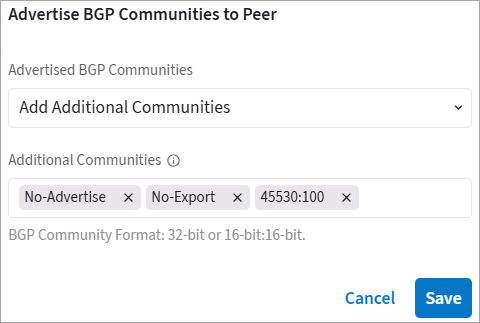
* **Add Additional Communities**: The gateway will advertise the additional
BGP communities specified to the external BGP peer in addition to the BGP
communities that were received or tagged on the route. You can choose to
enter a numeric BGP community tag or select from the dropdown menu.
Aviatrix supports:
* **Numeric** - You can specify numeric BGP community tags specified as two
16-bit numbers (0-65535):(0-65535).
* **No-Advertise** - When a No-Advertise BGP community is attached to a
route from an external BGP peer, the Aviatrix gateway will not advertise
the route to any gateway attachments or external BGP peers.
Aviatrix gateways only support eBGP to external BGP peers.
* **No-Export** - When a No-Export BGP community is attached to a route
from an external BGP peer, the Aviatrix gateway will not advertise the
route to any external BGP peers and advertise only to gateway
attachments.
 * **Specific Communities**: The gateway will advertise to the external BGP
peer only these BGP communities specified and ignore the BGP communities
that are already tagged on the route.
* **Specific Communities**: The gateway will advertise to the external BGP
peer only these BGP communities specified and ignore the BGP communities
that are already tagged on the route.
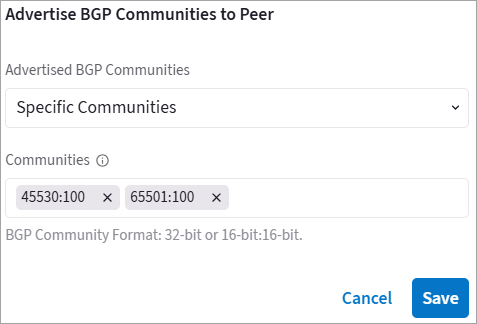 6. Click **Save**.
## Reset BGP Community Overrides
You can reset *all* gateways to inherit the global BGP community setting. This
will remove (uncheck) all
[gateway-level BGP communities overrides](#gateway-level-bgp-communities-setting),
ensuring all gateways follow the global setting. Resetting the override will
cause all gateways to stop or start handling communities, according to the
global setting. This is especially useful if you need to make sure that
communities are disabled across your entire fabric.
Resetting gateway-level BGP communities overrides does not reset the
connection-level BGP communities. However, if gateway advertise BGP
communities is not enabled either from global BGP communities setting or at
the gateway-level, then connection-level BGP communties are not advertised.
1. In Aviatrix CoPilot, go to **Cloud Fabric > Gateways > Settings** tab.
2. Locate **Global BGP Communities Support** card.
3. Click **Reset Gateway Overrides**.
This will remove (uncheck) all gateway-level BGP communities overrides,
ensuring all gateways follow the global setting.
4. Click **Reset** to confirm.
## Viewing BGP Communities Status for a BGP Connection
When you configure BGP communities for Aviatrix gateway, you can view the BGP
communities' status and the list of BGP communities received (communities tagged
on the route) and additional BGP communities configured for the BGP connection.
To view BGP Communities status:
1. In Aviatrix CoPilot, go to **Networking > Connectivity > External Connections
(S2C)** tab.
2. From the list of BGP connections, select the connection for which you want to
view BGP communities status.
For quick access, you can use the Filter or Search option from the toolbar to
find by name or matching condition.
3. Click the **Details** tab.
4. In the **BGP** table:
* Locate **Advertise BGP Communities to Peer** to view the status. Status is:
* **Enabled** when **Advertise BGP Communities to Peer** is turned On.
* **Disabled** when **Advertise BGP Communities to Peer** is turned Off or
blocked.
* Locate **Received Communities** to view the list of BGP communities
received (tagged on the route).
* Locate **Advertise Communities** to view the list of additional BGP
communities configured for the BGP connection.
6. Click **Save**.
## Reset BGP Community Overrides
You can reset *all* gateways to inherit the global BGP community setting. This
will remove (uncheck) all
[gateway-level BGP communities overrides](#gateway-level-bgp-communities-setting),
ensuring all gateways follow the global setting. Resetting the override will
cause all gateways to stop or start handling communities, according to the
global setting. This is especially useful if you need to make sure that
communities are disabled across your entire fabric.
Resetting gateway-level BGP communities overrides does not reset the
connection-level BGP communities. However, if gateway advertise BGP
communities is not enabled either from global BGP communities setting or at
the gateway-level, then connection-level BGP communties are not advertised.
1. In Aviatrix CoPilot, go to **Cloud Fabric > Gateways > Settings** tab.
2. Locate **Global BGP Communities Support** card.
3. Click **Reset Gateway Overrides**.
This will remove (uncheck) all gateway-level BGP communities overrides,
ensuring all gateways follow the global setting.
4. Click **Reset** to confirm.
## Viewing BGP Communities Status for a BGP Connection
When you configure BGP communities for Aviatrix gateway, you can view the BGP
communities' status and the list of BGP communities received (communities tagged
on the route) and additional BGP communities configured for the BGP connection.
To view BGP Communities status:
1. In Aviatrix CoPilot, go to **Networking > Connectivity > External Connections
(S2C)** tab.
2. From the list of BGP connections, select the connection for which you want to
view BGP communities status.
For quick access, you can use the Filter or Search option from the toolbar to
find by name or matching condition.
3. Click the **Details** tab.
4. In the **BGP** table:
* Locate **Advertise BGP Communities to Peer** to view the status. Status is:
* **Enabled** when **Advertise BGP Communities to Peer** is turned On.
* **Disabled** when **Advertise BGP Communities to Peer** is turned Off or
blocked.
* Locate **Received Communities** to view the list of BGP communities
received (tagged on the route).
* Locate **Advertise Communities** to view the list of additional BGP
communities configured for the BGP connection.