> ## Documentation Index
> Fetch the complete documentation index at: https://docs.aviatrix.com/llms.txt
> Use this file to discover all available pages before exploring further.
# Configure Distributed Cloud Firewall
> Configure Distributed Cloud Firewall rules and default rules
This section describes the Distributed Cloud Firewall functional area of
Aviatrix PaaS.
## DCF Constraints
* A SmartGroup or WebGroup traffic flow can match more than one rule. If this
occurs, when the conditions of the first rule are met, the rule actions are
applied if the rule is enforced. If the rule is not enforced, the hit count is
incremented. DCF rules then continue to be executed in order of priority if
they are enforced. If no rules are matched, the default DCF rules are
executed.
Distributed Cloud Firewall, greenfield rule
## Default Distributed Cloud Firewall Rules
There are two default Distributed Cloud Firewall (DCF) Rules:
* Greenfield Rule: prevents traffic from being dropped before you start
configuring the rest of your rules. By default (if you selected the
recommended *Permit* action for the rule), the rule has the following
attributes:
* Source/Destination SmartGroups: Anywhere (0.0.0.0/0)
* Protocol: Any
* Action: Permit
* Logging: On
After you create additional rules you can move the Greenfield Rule where needed
in your rule priority list. You can edit or delete the rule later, if desired.
* DefaultDenyAll Rule: blocks traffic to any CIDR covered in Distributed Cloud
Firewall rules. You cannot edit or delete this rule.
## Create Groups for Distributed Cloud Firewall
## SmartGroups
A Distributed Cloud Firewall (DCF) SmartGroup contains one or more filters to
identify cloud resources. A filter specifies resource matching criteria.
Matching criteria could be a cloud tag; a resource attribute (such as account
name or region); or a list of IP prefixes. All conditions within a Resource Type
must be satisfied to be matched; if you add more than one Resource Type, OR
logic is applied between the multiple Resource Types.
A tag or resource attribute-based filter must be associated with a resource type
(VPC/VNet, subnet, or VM).
SmartGroups can be created manually or as part of monitoring or protecting a
VPC/VNet.
[Creating SmartGroups](/docs/cloud/resource-groups/smartgroup/smartgroups-create)
## WebGroups
A DCF WebGroup contains one or more domain names that assist in filtering and
providing security to Internet-bound traffic.
WebGroups can be created manually or as part of monitoring or protecting a
VPC/VNet.
[Creating WebGroups](/docs/cloud/resource-groups/webgroups/webgroups-create)
You can only [delete a
group](/docs/cloud/resource-groups/general/groups-delete) if you first remove
it from its associated DCF rules.
Firewall rules
## Create Distributed Cloud Firewall Egress Rules
You can manually create Distributed Cloud Firewall (DCF) egress rules on the
Security > Distributed Cloud Firewall > Rules tab to define the access control
to apply on the traffic going to the Internet.
DCF rules are also created automatically when you:
* Monitor a VPC/VNet: VPC/VNet is added to the Monitored-VPCs rule.
* Protect a VPC/VNet: VPC/VNet is added to the Protected-VPCs rule; additional
rules are created based on the trusted domains that are selected. These
methods create the SmartGroup and the WebGroup at the same time as the DCF
rule.
DCF rules are automatically enforced (pushed to Aviatrix gateways) as soon as
they are created and committed, unless they are just being watched.
To create a new Egress rule:
1. In Aviatrix PaaS, navigate to *Security > Distributed Cloud Firewall*.
2. Click *+ Rule*. The Create Egress Rule dialog displays.
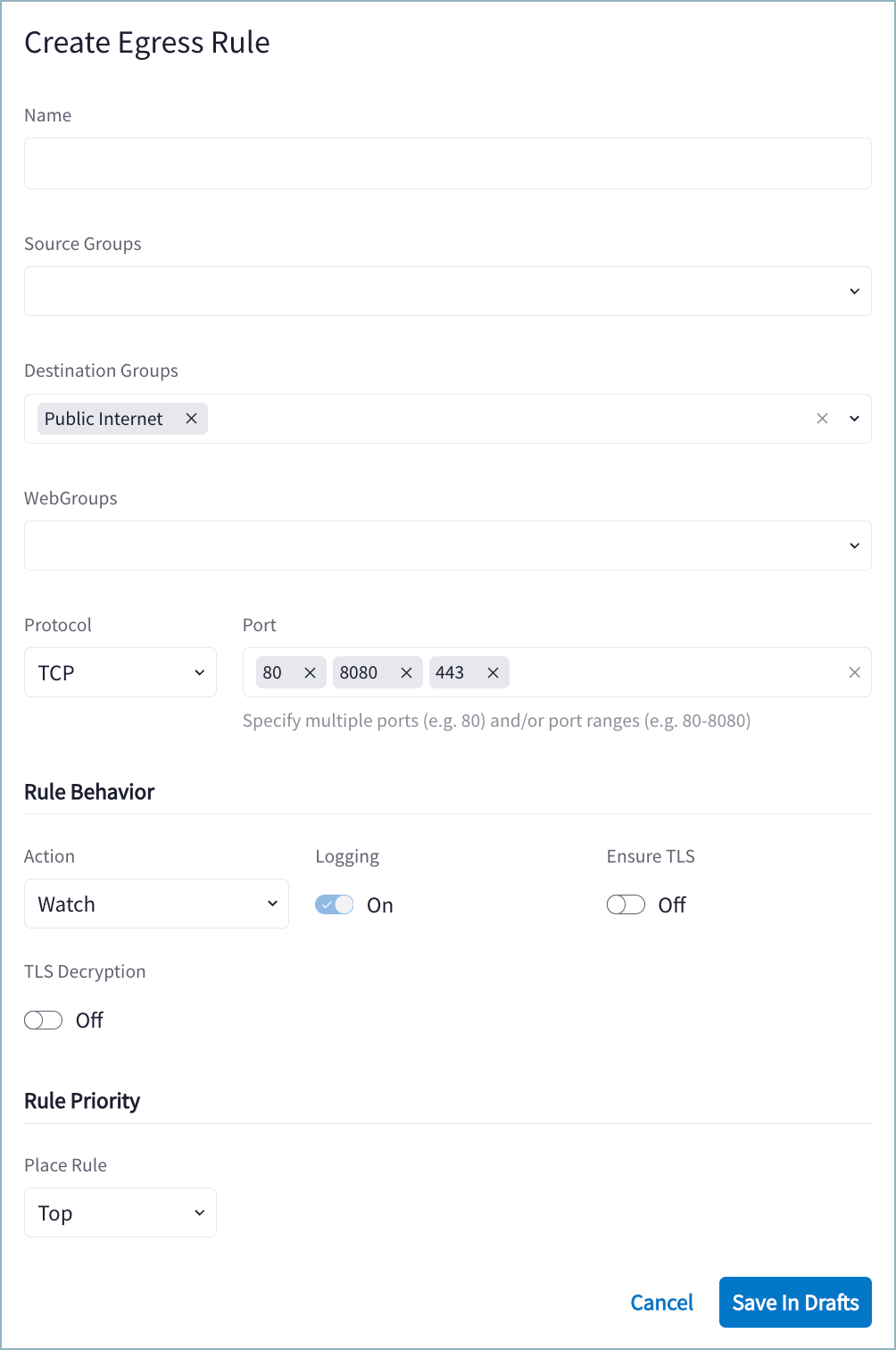 3. Use the Distributed Cloud Firewall Field Reference to create your rule.
4. Click *Save in Drafts*.
5. Click *Commit*.
If you want to protect a VPC/VNet in a similar way to how a VPC/VNet is
protected in the Egress workflow, the DCF rule for the VPC/VNet must deny all
traffic from that VPC/VNet (Protocol = Any and no values in the Port field).
rule
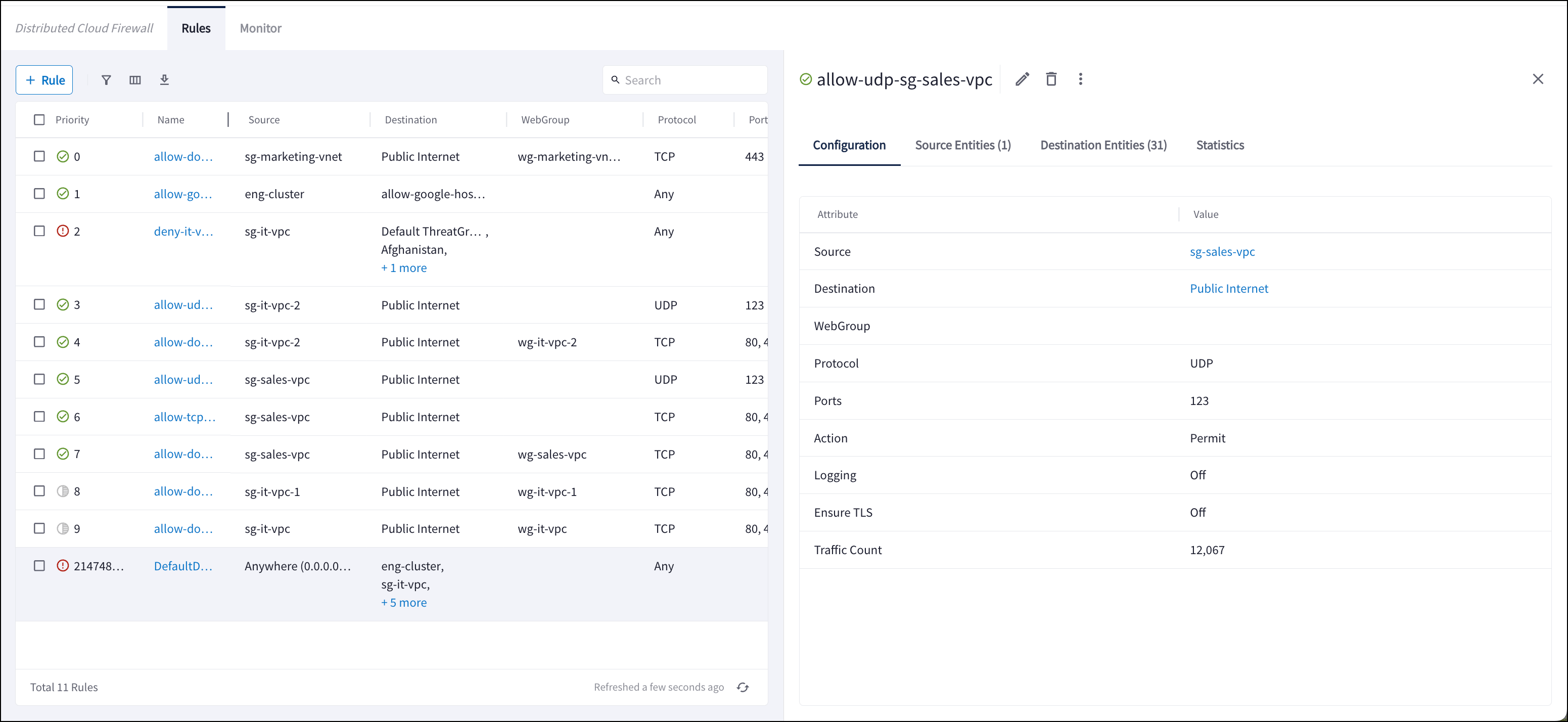
## View Distributed Cloud Firewall Rule Details
You can open a previously created rule to view the details related to the
execution of that particular rule. You can view:
* Source Entities: origin(s) of the traffic for this rule (SmartGroup)
* Destination Entities: where the traffic terminates for this rule (SmartGroup,
ExternalGroup, Threat Feed, Country)
* Statistics: traffic statistics from the last hour, day, week, or custom time
period. The resulting graph indicates if the traffic is Observed, Enforced &
Allowed, or Enforced & Denied.
3. Use the Distributed Cloud Firewall Field Reference to create your rule.
4. Click *Save in Drafts*.
5. Click *Commit*.
If you want to protect a VPC/VNet in a similar way to how a VPC/VNet is
protected in the Egress workflow, the DCF rule for the VPC/VNet must deny all
traffic from that VPC/VNet (Protocol = Any and no values in the Port field).
rule
## View Distributed Cloud Firewall Rule Details
You can open a previously created rule to view the details related to the
execution of that particular rule. You can view:
* Source Entities: origin(s) of the traffic for this rule (SmartGroup)
* Destination Entities: where the traffic terminates for this rule (SmartGroup,
ExternalGroup, Threat Feed, Country)
* Statistics: traffic statistics from the last hour, day, week, or custom time
period. The resulting graph indicates if the traffic is Observed, Enforced &
Allowed, or Enforced & Denied.
 ## Related Topics
* [Edit a Distributed Cloud Firewall Rule](/docs/cloud/security/dcf/dcf-rule-edit)
* [Delete a Distributed Cloud Firewall Rule](/docs/cloud/security/dcf/dcf-rule-delete)
* [Distributed Cloud Firewall Actions](/docs/cloud/security/dcf/dcf-actions)
* Editing or Deleting the Greenfield Rule
This documentation is built and hosted on [Mintlify](https://mintlify.com), a developer documentation platform.
## Related Topics
* [Edit a Distributed Cloud Firewall Rule](/docs/cloud/security/dcf/dcf-rule-edit)
* [Delete a Distributed Cloud Firewall Rule](/docs/cloud/security/dcf/dcf-rule-delete)
* [Distributed Cloud Firewall Actions](/docs/cloud/security/dcf/dcf-actions)
* Editing or Deleting the Greenfield Rule
This documentation is built and hosted on [Mintlify](https://mintlify.com), a developer documentation platform.