> ## Documentation Index
> Fetch the complete documentation index at: https://docs.aviatrix.com/llms.txt
> Use this file to discover all available pages before exploring further.
# Architecture
> How AgentGuard derives AI-workload visibility from existing Aviatrix Cloud telemetry, how it correlates DCF logs and VPC flow logs into a stable workload identity, and how it hands discovered workloads to Distributed Cloud Firewall for enforcement.
This page describes how AgentGuard is built and how it fits with the rest of the
Aviatrix Cloud Native Security Fabric. For a summary of what AgentGuard does and
when to use it, see
[AgentGuard Overview](/docs/cloud/security/agentguard/agentguard-overview).
## Architecture at a Glance
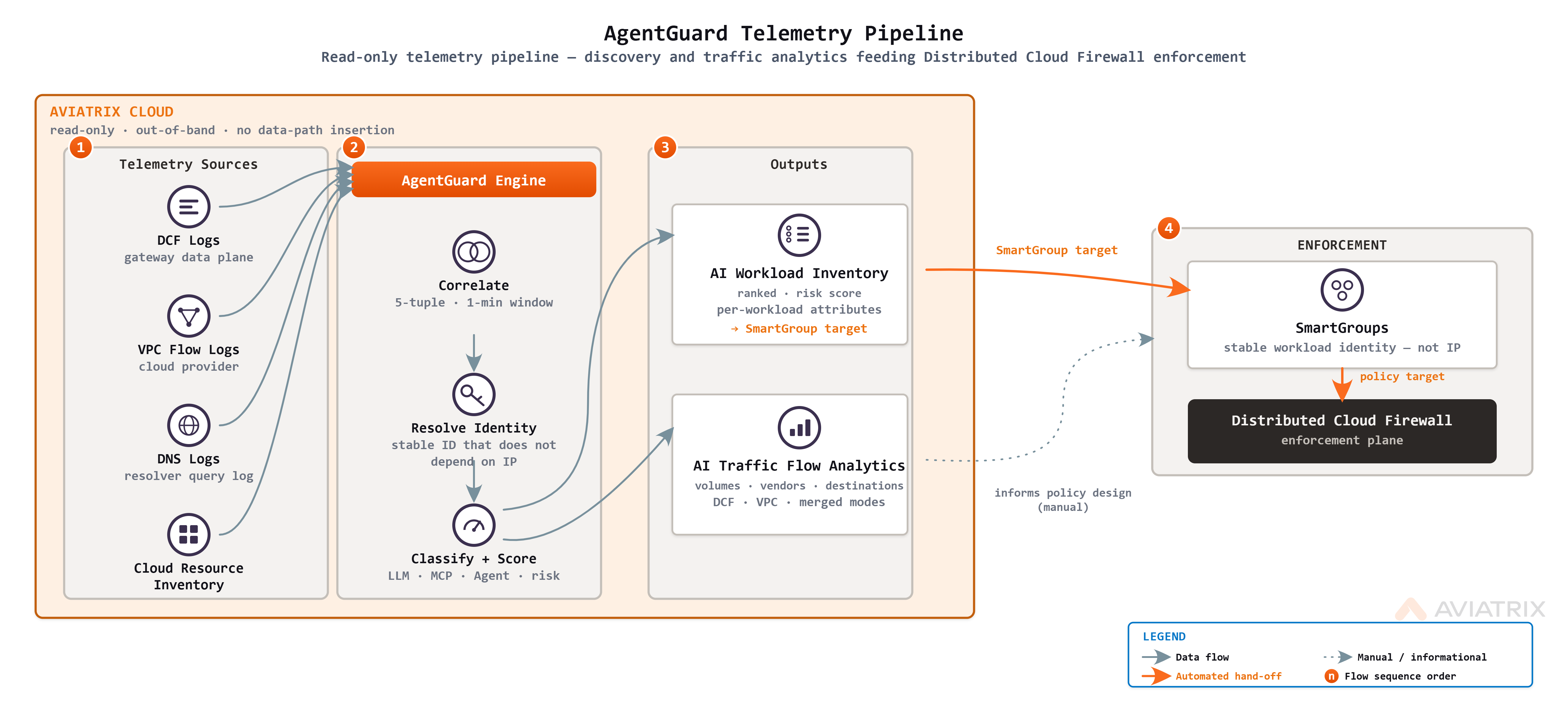 AgentGuard reads log sources that Aviatrix Cloud already produces —
Distributed Cloud Firewall logs, VPC flow logs, and DNS logs — and correlates
them with cloud resource inventory. The result is a ranked inventory of AI
workloads and a set of source-to-destination traffic flows. When you are
ready to enforce, Distributed Cloud Firewall acts on those same workloads.
This approach is deliberate. Discovery methods that depend on an SDK, an agent
framework, or an in-line proxy detect only the workloads that adopted the
instrumentation, and the highest-risk workloads are often those that did not.
Because AgentGuard reads existing telemetry, it surfaces both sanctioned and
shadow AI workloads without code changes, in-guest agents, or in-line
collectors.
## Telemetry Sources
AgentGuard correlates **Distributed Cloud Firewall logs**, **VPC flow logs**, and **DNS
logs** with cloud resource inventory to build its workload and traffic views.
VPC flow logs are the AWS record of the network connections in a VPC. AgentGuard
reads them read-only from the S3 bucket they are delivered to; it does not sit
in the data path.
VPC flow logs provide breadth. They give AgentGuard visibility into traffic that
Distributed Cloud Firewall is not in path for, so AI workloads are discovered
even where no gateway is deployed. AgentGuard attributes each flow to an AI
vendor from the destination FQDN and the cloud resource identity, then uses this
traffic signal — together with network topology — to calculate the blast-radius
risk level for each workload.
VPC flow logs do not carry application-layer detail. They attribute traffic to
AI vendors by FQDN but do not classify it by AI protocol family; that
classification requires Distributed Cloud Firewall to be in path.
For how these sources are combined and selected per query, see
[Source Modes](/docs/cloud/security/agentguard/agentguard-traffic-analytics#source-modes)
in AI Traffic Flow Analytics.
## Workload Identity
AgentGuard keys each workload to a stable identity hash derived from VPC,
workload, application, namespace, and cluster identifiers. Because the key is
not an IP address, a workload retains its identity as it reschedules and its
address changes.
Correlate AgentGuard data with other systems on the workload identity hash,
not on IP address. IP addresses change as workloads reschedule; the identity
hash does not.
## Two Levels of Visibility
AgentGuard provides two independent levels of visibility. The level is
determined by the telemetry that AgentGuard receives for a given VPC.
* **Without a gateway** — AgentGuard reads VPC flow logs and cloud resource
inventory to inventory every AI workload, classify each one by AI vendor, and
assign a risk level. This level requires no changes to your
network.
* **With a gateway (DCF)** — When a gateway is in path and Distributed Cloud
Firewall inspects the traffic, AgentGuard adds full-detail AI traffic and full
AI-protocol classification, and Distributed Cloud Firewall enforces allow,
block, and inspect rules.
Getting-started guidance for each level is provided in
[Get Basic Visibility Without a Gateway](/docs/cloud/security/agentguard/getting-started/agentguard-without-gateway)
and
[Get Deep Visibility and Enforcement With a Gateway](/docs/cloud/security/agentguard/getting-started/agentguard-with-gateway).
## How AgentGuard Works With the Security Fabric
AgentGuard produces the AI inventory and analytics; the rest of the Cloud Native
Security Fabric acts on them. AgentGuard remains read-only so that discovery can
run across the entire estate, while enforcement is handled by components
designed for it. The following sections reuse the canonical descriptions of
those components.
### Distributed Cloud Firewall
Dynamic Trust Enforcement (DTE) with Distributed Cloud Firewall (DCF) provides advanced security capabilities for your cloud infrastructure. This feature enables organizations to implement zero-trust security policies across their multi-cloud environments.
## Key Features
* **Real-time threat detection** - Continuously monitors network traffic for malicious activity
* **FQDN filtering** - Controls access to specific domains and URLs
* **ThreatIQ integration** - Leverages threat intelligence for enhanced security
* **Distributed enforcement** - Applies security policies consistently across all cloud locations
* **Zero-trust architecture** - Verifies every connection before allowing access
## Benefits
Dynamic Trust Enforcement with DCF helps organizations:
* Reduce attack surface by controlling outbound traffic
* Prevent data exfiltration through malicious domains
* Maintain compliance with security regulations
* Simplify security management across multi-cloud deployments
* Improve visibility into network traffic patterns
This security framework is essential for enterprises looking to implement comprehensive cloud security strategies while maintaining operational efficiency.
AgentGuard does not enforce policy. It hands off discovered workloads to
Distributed Cloud Firewall for enforcement — see
[Hand-Off to Enforcement](/docs/cloud/security/agentguard/agentguard-workload-discovery#hand-off-to-enforcement).
### Egress Security
[Egress security](/docs/cloud/security/egress-nat/about-egress-security) routes
a VPC's outbound traffic through an Aviatrix gateway so that the traffic is
inspected and controlled before it leaves your cloud network. For AI workloads,
egress places the gateway in the path of the calls that agents make to external
model providers and tool servers.
Enabling egress for a VPC deploys and configures the gateway automatically.
After egress is enabled and a Distributed Cloud Firewall rule enables AI
Inspection, AgentGuard reports the observed AI traffic in full detail rather
than inferring it from logs.
### SmartGroups and WebGroups
[SmartGroups](/docs/cloud/resource-groups/smartgroup/smartgroups-about) and
[WebGroups](/docs/cloud/resource-groups/webgroups/webgroups-about) define the
workloads and destinations that a Distributed Cloud Firewall policy applies to.
* A **SmartGroup** is a logical, self-updating grouping of workloads, matched by
cloud tags, Kubernetes labels, or properties. The AI workloads that AgentGuard
discovers are addressable as SmartGroup members, and new matching workloads
join automatically as they are deployed.
* A **WebGroup** is a list of destination domains or URLs, such as the domains
of a specific AI provider. Aviatrix provides built-in `avx-ai-*` WebGroups for
common AI providers, and you can create your own for internal or restricted
destinations.
Reference these groups as the source and destination of Distributed Cloud
Firewall rules to keep policy readable and stable as workloads and addresses
change.
## Limitations
* AgentGuard is an Early Access capability; its scope and behavior may change.
* AgentGuard is read-only. It discovers and analyzes but does not enforce;
enforcement is handled by Distributed Cloud Firewall, as described in
[Distributed Cloud Firewall](#distributed-cloud-firewall).
## Related Topics
* [AgentGuard Overview](/docs/cloud/security/agentguard/agentguard-overview)
* [AI Workload Discovery](/docs/cloud/security/agentguard/agentguard-workload-discovery)
* [AI Traffic Flow Analytics](/docs/cloud/security/agentguard/agentguard-traffic-analytics)
* [Set Up AgentGuard](/docs/cloud/security/agentguard/getting-started/agentguard-setup)
This documentation is built and hosted on [Mintlify](https://mintlify.com), a developer documentation platform.
AgentGuard reads log sources that Aviatrix Cloud already produces —
Distributed Cloud Firewall logs, VPC flow logs, and DNS logs — and correlates
them with cloud resource inventory. The result is a ranked inventory of AI
workloads and a set of source-to-destination traffic flows. When you are
ready to enforce, Distributed Cloud Firewall acts on those same workloads.
This approach is deliberate. Discovery methods that depend on an SDK, an agent
framework, or an in-line proxy detect only the workloads that adopted the
instrumentation, and the highest-risk workloads are often those that did not.
Because AgentGuard reads existing telemetry, it surfaces both sanctioned and
shadow AI workloads without code changes, in-guest agents, or in-line
collectors.
## Telemetry Sources
AgentGuard correlates **Distributed Cloud Firewall logs**, **VPC flow logs**, and **DNS
logs** with cloud resource inventory to build its workload and traffic views.
VPC flow logs are the AWS record of the network connections in a VPC. AgentGuard
reads them read-only from the S3 bucket they are delivered to; it does not sit
in the data path.
VPC flow logs provide breadth. They give AgentGuard visibility into traffic that
Distributed Cloud Firewall is not in path for, so AI workloads are discovered
even where no gateway is deployed. AgentGuard attributes each flow to an AI
vendor from the destination FQDN and the cloud resource identity, then uses this
traffic signal — together with network topology — to calculate the blast-radius
risk level for each workload.
VPC flow logs do not carry application-layer detail. They attribute traffic to
AI vendors by FQDN but do not classify it by AI protocol family; that
classification requires Distributed Cloud Firewall to be in path.
For how these sources are combined and selected per query, see
[Source Modes](/docs/cloud/security/agentguard/agentguard-traffic-analytics#source-modes)
in AI Traffic Flow Analytics.
## Workload Identity
AgentGuard keys each workload to a stable identity hash derived from VPC,
workload, application, namespace, and cluster identifiers. Because the key is
not an IP address, a workload retains its identity as it reschedules and its
address changes.
Correlate AgentGuard data with other systems on the workload identity hash,
not on IP address. IP addresses change as workloads reschedule; the identity
hash does not.
## Two Levels of Visibility
AgentGuard provides two independent levels of visibility. The level is
determined by the telemetry that AgentGuard receives for a given VPC.
* **Without a gateway** — AgentGuard reads VPC flow logs and cloud resource
inventory to inventory every AI workload, classify each one by AI vendor, and
assign a risk level. This level requires no changes to your
network.
* **With a gateway (DCF)** — When a gateway is in path and Distributed Cloud
Firewall inspects the traffic, AgentGuard adds full-detail AI traffic and full
AI-protocol classification, and Distributed Cloud Firewall enforces allow,
block, and inspect rules.
Getting-started guidance for each level is provided in
[Get Basic Visibility Without a Gateway](/docs/cloud/security/agentguard/getting-started/agentguard-without-gateway)
and
[Get Deep Visibility and Enforcement With a Gateway](/docs/cloud/security/agentguard/getting-started/agentguard-with-gateway).
## How AgentGuard Works With the Security Fabric
AgentGuard produces the AI inventory and analytics; the rest of the Cloud Native
Security Fabric acts on them. AgentGuard remains read-only so that discovery can
run across the entire estate, while enforcement is handled by components
designed for it. The following sections reuse the canonical descriptions of
those components.
### Distributed Cloud Firewall
Dynamic Trust Enforcement (DTE) with Distributed Cloud Firewall (DCF) provides advanced security capabilities for your cloud infrastructure. This feature enables organizations to implement zero-trust security policies across their multi-cloud environments.
## Key Features
* **Real-time threat detection** - Continuously monitors network traffic for malicious activity
* **FQDN filtering** - Controls access to specific domains and URLs
* **ThreatIQ integration** - Leverages threat intelligence for enhanced security
* **Distributed enforcement** - Applies security policies consistently across all cloud locations
* **Zero-trust architecture** - Verifies every connection before allowing access
## Benefits
Dynamic Trust Enforcement with DCF helps organizations:
* Reduce attack surface by controlling outbound traffic
* Prevent data exfiltration through malicious domains
* Maintain compliance with security regulations
* Simplify security management across multi-cloud deployments
* Improve visibility into network traffic patterns
This security framework is essential for enterprises looking to implement comprehensive cloud security strategies while maintaining operational efficiency.
AgentGuard does not enforce policy. It hands off discovered workloads to
Distributed Cloud Firewall for enforcement — see
[Hand-Off to Enforcement](/docs/cloud/security/agentguard/agentguard-workload-discovery#hand-off-to-enforcement).
### Egress Security
[Egress security](/docs/cloud/security/egress-nat/about-egress-security) routes
a VPC's outbound traffic through an Aviatrix gateway so that the traffic is
inspected and controlled before it leaves your cloud network. For AI workloads,
egress places the gateway in the path of the calls that agents make to external
model providers and tool servers.
Enabling egress for a VPC deploys and configures the gateway automatically.
After egress is enabled and a Distributed Cloud Firewall rule enables AI
Inspection, AgentGuard reports the observed AI traffic in full detail rather
than inferring it from logs.
### SmartGroups and WebGroups
[SmartGroups](/docs/cloud/resource-groups/smartgroup/smartgroups-about) and
[WebGroups](/docs/cloud/resource-groups/webgroups/webgroups-about) define the
workloads and destinations that a Distributed Cloud Firewall policy applies to.
* A **SmartGroup** is a logical, self-updating grouping of workloads, matched by
cloud tags, Kubernetes labels, or properties. The AI workloads that AgentGuard
discovers are addressable as SmartGroup members, and new matching workloads
join automatically as they are deployed.
* A **WebGroup** is a list of destination domains or URLs, such as the domains
of a specific AI provider. Aviatrix provides built-in `avx-ai-*` WebGroups for
common AI providers, and you can create your own for internal or restricted
destinations.
Reference these groups as the source and destination of Distributed Cloud
Firewall rules to keep policy readable and stable as workloads and addresses
change.
## Limitations
* AgentGuard is an Early Access capability; its scope and behavior may change.
* AgentGuard is read-only. It discovers and analyzes but does not enforce;
enforcement is handled by Distributed Cloud Firewall, as described in
[Distributed Cloud Firewall](#distributed-cloud-firewall).
## Related Topics
* [AgentGuard Overview](/docs/cloud/security/agentguard/agentguard-overview)
* [AI Workload Discovery](/docs/cloud/security/agentguard/agentguard-workload-discovery)
* [AI Traffic Flow Analytics](/docs/cloud/security/agentguard/agentguard-traffic-analytics)
* [Set Up AgentGuard](/docs/cloud/security/agentguard/getting-started/agentguard-setup)
This documentation is built and hosted on [Mintlify](https://mintlify.com), a developer documentation platform.